Azure Service Bus Connector Guide
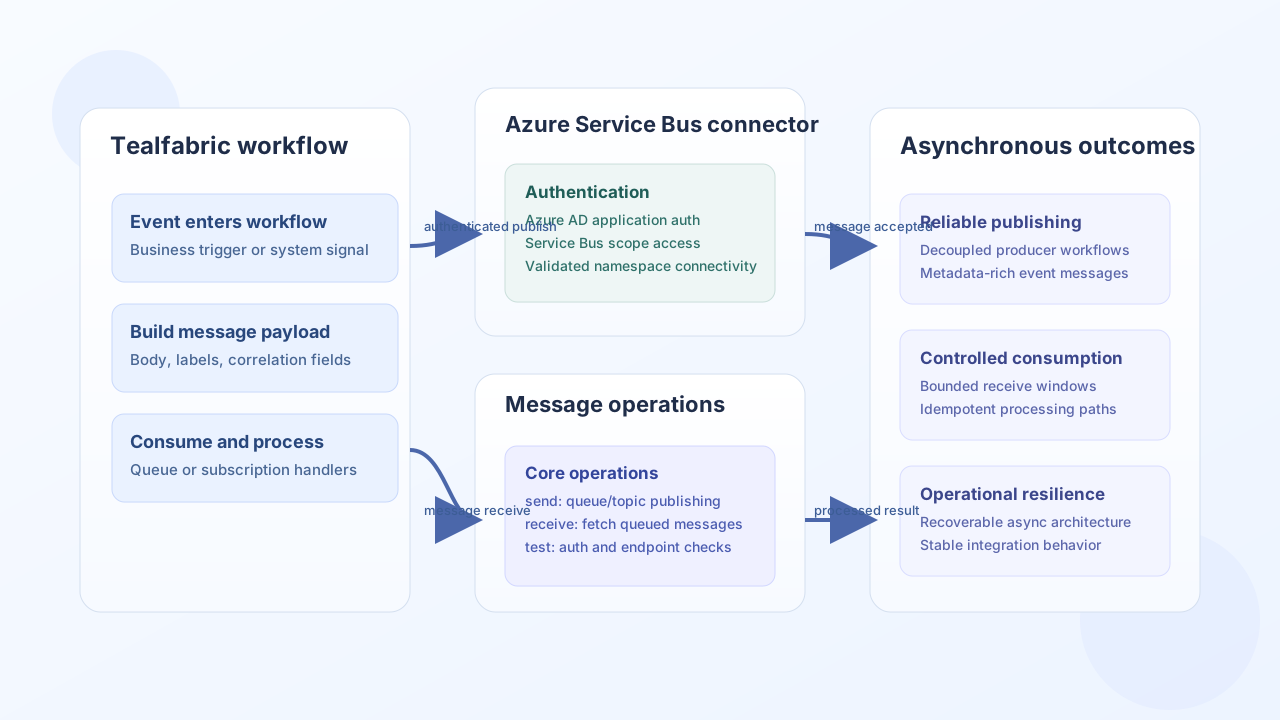
The Azure Service Bus connector helps Tealfabric workflows publish and consume messages for asynchronous processing. It is a strong fit for event-driven automation where producers and consumers should remain decoupled across queues or topic subscriptions.
Document information
| Field | Value |
|---|---|
| Canonical URL | /docs/04_connecting-systems/connectors/a/azure-service-bus |
| Version (published date) | 2026-05-08 |
| Tags | connectors, reference, azure-service-bus |
| Connector ID | azure-service-bus-1.0.0 |
Configuration and authentication
Set up the connector with an Azure AD application that has permission to access your Service Bus namespace. Keep credentials scoped per environment, and validate connectivity with test before enabling production traffic so publishing and receiving behavior stays predictable.
client_id(required): Azure AD application (client) ID.client_secret(required): Azure AD application secret.redirect_uri(required): Redirect URI registered in Azure AD (validated ontest; not used by client-credentials token flow).queue_name(required): Default queue or topic entity name.namespace(optional): Service Bus namespace (defaults todefault-namespace; endpoint ishttps://{namespace}.servicebus.windows.net).scope(optional): Typicallyhttps://servicebus.azure.net/.default.timeout_seconds(optional): Request timeout in seconds (default30).
test enforces full configuration validation (client_id, client_secret, redirect_uri, queue_name). Other operations rely on runtime token acquisition and Service Bus API responses when configuration is incomplete.
Publish messages with send
Use send to place workflow events on the configured queue or topic. Message bodies can be provided as message, body, or content; objects and arrays are JSON-stringified. Keep message size within your Service Bus tier limits.
const baseUrl = "https://api.example.com/api/v1";
const tenantId = "<TENANT_ID>";
const apiKey = "<API_KEY>";

async function publishUserSignupEvent(integrationId: string) {
  const response = await fetch(`${baseUrl}/integrations/${encodeURIComponent(integrationId)}/execute`, {
    method: "POST",
    headers: {
      "X-API-Key": apiKey,
      "X-Tenant-ID": tenantId,
      "Content-Type": "application/json",
    },
    body: JSON.stringify({
      operation: "send",
      message: {
        userId: "<ENTITY_ID>",
        action: "signup",
        occurredAt: "2026-05-08T14:07:00Z",
      },
    }),
  });
  if (!response.ok) throw new Error(`Request failed: ${response.status}`);
  const payload = await response.json();
  return payload.data;
}
curl -X POST "https://api.example.com/api/v1/integrations/<ENTITY_ID>/execute" \
-H "X-API-Key: <API_KEY>" \
-H "X-Tenant-ID: <TENANT_ID>" \
-H "Content-Type: application/json" \
-d '{
"operation": "send",
"message": "{\"userId\":\"<ENTITY_ID>\",\"action\":\"signup\",\"occurredAt\":\"2026-05-08T14:07:00Z\"}"
}'
{
  "success": true,
  "data": {
    "message_count": 1,
    "message_id": "<ENTITY_ID>"
  }
}
Receive messages with receive
Use receive to consume one message via receive-and-delete (DELETE .../messages/head). The REST API returns at most one message per call, so max_messages and limit are capped to 1. For topic subscriptions, pass subscription_name in callData; the path becomes {queue_name}/subscriptions/{subscription_name}/messages/head.
const baseUrl = "https://api.example.com/api/v1";
const tenantId = "<TENANT_ID>";
const apiKey = "<API_KEY>";

async function receivePendingEvents(integrationId: string) {
  const response = await fetch(`${baseUrl}/integrations/${encodeURIComponent(integrationId)}/execute`, {
    method: "POST",
    headers: {
      "X-API-Key": apiKey,
      "X-Tenant-ID": tenantId,
      "Content-Type": "application/json",
    },
    body: JSON.stringify({
      operation: "receive",
      max_messages: 1,
    }),
  });
  if (!response.ok) throw new Error(`Request failed: ${response.status}`);
  const payload = await response.json();
  return payload.data;
}
curl -X POST "https://api.example.com/api/v1/integrations/<ENTITY_ID>/execute" \
-H "X-API-Key: <API_KEY>" \
-H "X-Tenant-ID: <TENANT_ID>" \
-H "Content-Type: application/json" \
-d '{
"operation": "receive",
"max_messages": 1
}'
{
  "success": true,
  "data": {
    "message_count": 1,
    "messages": [
      {
        "body": "{\"userId\":\"<ENTITY_ID>\",\"action\":\"signup\"}",
        "properties": {
          "MessageId": "<ENTITY_ID>",
          "DeliveryCount": 1
        },
        "custom_properties": {}
      }
    ]
  }
}
Test connectivity with test
Use test to validate integration configuration and peek at the configured queue without deleting messages (GET .../messages/head?peekonly=true).
curl -X POST "https://api.example.com/api/v1/integrations/<ENTITY_ID>/execute" \
  -H "X-API-Key: <API_KEY>" \
  -H "X-Tenant-ID: <TENANT_ID>" \
  -H "Content-Type: application/json" \
  -d '{ "operation": "test" }'
{
  "success": true,
  "data": {
    "message": "Azure Service Bus connection test successful",
    "details": {
      "namespace": "<NAMESPACE>",
      "queue_name": "<QUEUE_NAME>",
      "endpoint": "https://<NAMESPACE>.servicebus.windows.net"
    }
  }
}
Reliability guidance
Messaging failures usually come from token or permission drift, missing queue/topic entities, and oversized payloads. Use bounded message sizes, verify namespace-level access regularly, and monitor dead-letter behavior for consumer errors. These practices keep asynchronous automation stable and recoverable.