Axway Managed File Transfer Connector Guide
The Axway MFT connector lets Tealfabric workflows initiate file transfers and track transfer lifecycle status through Axway Managed File Transfer APIs. It is useful for secure B2B exchange, scheduled partner deliveries, and post-transfer automation.
Document information
| Field | Value |
|---|---|
| Canonical URL | /docs/04_connecting-systems/connectors/a/axway-mft |
| Version (published date) | 2026-05-08 |
| Tags | connectors, reference, axway-mft |
| Connector ID | axway-mft-1.0.0 |
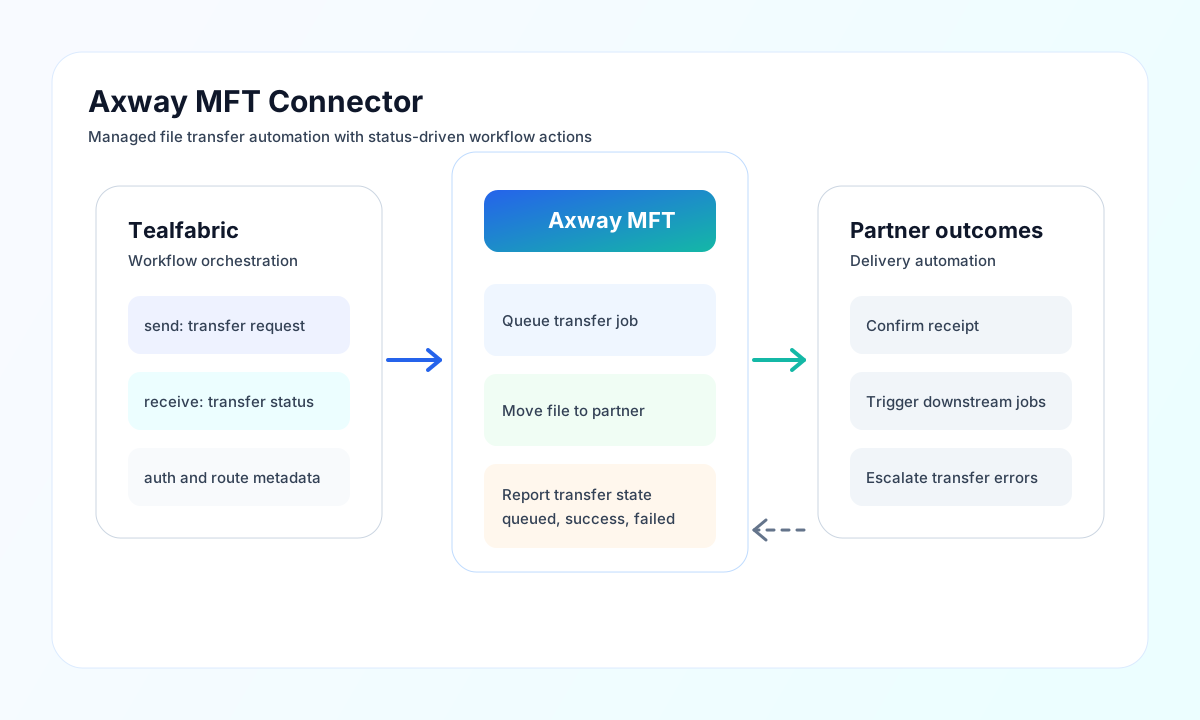
Configure endpoint and credentials
Set base_url to your Axway MFT API endpoint (for example https://mft.example.com) and provide username and password with permissions to submit and read transfer jobs. Use a service account dedicated to automation so permissions and auditing stay clear.
Set timeout_seconds to reflect expected transfer response times and API latency (default 60). Run test after setup to validate connectivity before scheduling production workflows.
Start file movement with send
Use send to call Axway MFT API paths with a JSON body. send requires endpoint (path relative to base_url) and defaults to HTTP POST when method is omitted. Provide the JSON body in data; when data is omitted, the connector serializes the remaining callData fields (excluding integration config) as the body, matching legacy connector behavior.
const baseUrl = "https://api.example.com/api/v1";
const tenantId = "<TENANT_ID>";
const apiKey = "<API_KEY>";

async function startTransfer(integrationId: string) {
  const response = await fetch(`${baseUrl}/integrations/${encodeURIComponent(integrationId)}/execute`, {
    method: "POST",
    headers: {
      "X-API-Key": apiKey,
      "X-Tenant-ID": tenantId,
      "Content-Type": "application/json",
    },
    body: JSON.stringify({
      operation: "send",
      endpoint: "api/v1/transfers",
      method: "POST",
      data: {
        transfer_name: "daily-invoice-export",
        source_path: "/outbound/invoices_2026-05-08.csv",
        destination_partner: "partner-b2b-eu",
        destination_path: "/inbox/invoices/"
      }
    }),
  });
  if (!response.ok) throw new Error(`Request failed: ${response.status}`);
  return response.json();
}
curl -X POST "https://api.example.com/api/v1/integrations/<ENTITY_ID>/execute" \
-H "X-API-Key: <API_KEY>" \
-H "X-Tenant-ID: <TENANT_ID>" \
-H "Content-Type: application/json" \
-d '{
"operation": "send",
"endpoint": "api/v1/transfers",
"method": "POST",
"data": {
"transfer_name": "daily-invoice-export",
"source_path": "/outbound/invoices_2026-05-08.csv",
"destination_partner": "partner-b2b-eu",
"destination_path": "/inbox/invoices/"
}
}'
{
  "success": true,
  "data": {
    "message": "Axway MFT operation completed successfully",
    "result": {
      "transfer_id": "TR-20260508-001",
      "status": "queued"
    }
  }
}
Track transfer status with receive
Use receive to GET an Axway MFT API path with optional query parameters. The connector returns items from response.items when present; otherwise it wraps the full response in a one-element array. record_count is the length of items.
const baseUrl = "https://api.example.com/api/v1";
const tenantId = "<TENANT_ID>";
const apiKey = "<API_KEY>";

async function getTransferStatus(integrationId: string) {
  const response = await fetch(`${baseUrl}/integrations/${encodeURIComponent(integrationId)}/execute`, {
    method: "POST",
    headers: {
      "X-API-Key": apiKey,
      "X-Tenant-ID": tenantId,
      "Content-Type": "application/json",
    },
    body: JSON.stringify({
      operation: "receive",
      endpoint: "api/v1/transfers",
      query: {
        status: "completed",
        limit: 25
      }
    }),
  });
  if (!response.ok) throw new Error(`Request failed: ${response.status}`);
  return response.json();
}
curl -X POST "https://api.example.com/api/v1/integrations/<ENTITY_ID>/execute" \
-H "X-API-Key: <API_KEY>" \
-H "X-Tenant-ID: <TENANT_ID>" \
-H "Content-Type: application/json" \
-d '{
"operation": "receive",
"endpoint": "api/v1/transfers",
"query": {
"status": "completed",
"limit": 25
}
}'
{
  "success": true,
  "data": {
    "message": "Axway MFT data retrieved successfully",
    "record_count": 1,
    "items": [
      {
        "transfer_id": "TR-20260508-001",
        "status": "completed"
      }
    ]
  }
}
Call arbitrary API methods with execute
Use execute for arbitrary HTTP methods against Axway MFT API paths. The JSON body comes from body, then data, then defaults to an empty array (legacy PHP [] semantics). POST/PUT/PATCH bodies are sent only when non-empty per PHP empty() rules.
Test connectivity with test
Use test to validate base_url, username, and password. Only test enforces required configuration validation (matching legacy connector behavior). The connector probes GET api/v1/status and returns data.details.base_url.
{
  "success": true,
  "data": {
    "message": "Axway MFT connection test successful",
    "details": {
      "base_url": "https://mft.example.com"
    }
  }
}
When configuration is invalid, test returns success: false with error message Configuration validation failed.
Reliability and security guidance
Common issues include expired credentials, incorrect paths, partner endpoint errors, and rate limiting during burst operations. Validate credentials and route configuration first, then verify source and destination path mappings.
For production reliability, apply retries with backoff for transient failures, archive transfer IDs for audit trails, and separate partner-specific workflows to reduce blast radius during incidents. This keeps managed file exchange predictable and supportable.