Connectors architecture
Document information
- Canonical URL:
/docs/04_connecting-systems/05_connectors-architecture - Version:
2026-05-08 - Tags:
connectors,architecture,integrations
This page explains how Tealfabric connectors are structured so you can design integrations that are secure, predictable, and easy to operate. You will learn where connectors fit in the platform, when to pair them with webhooks, and how to decide between synchronous and asynchronous execution.
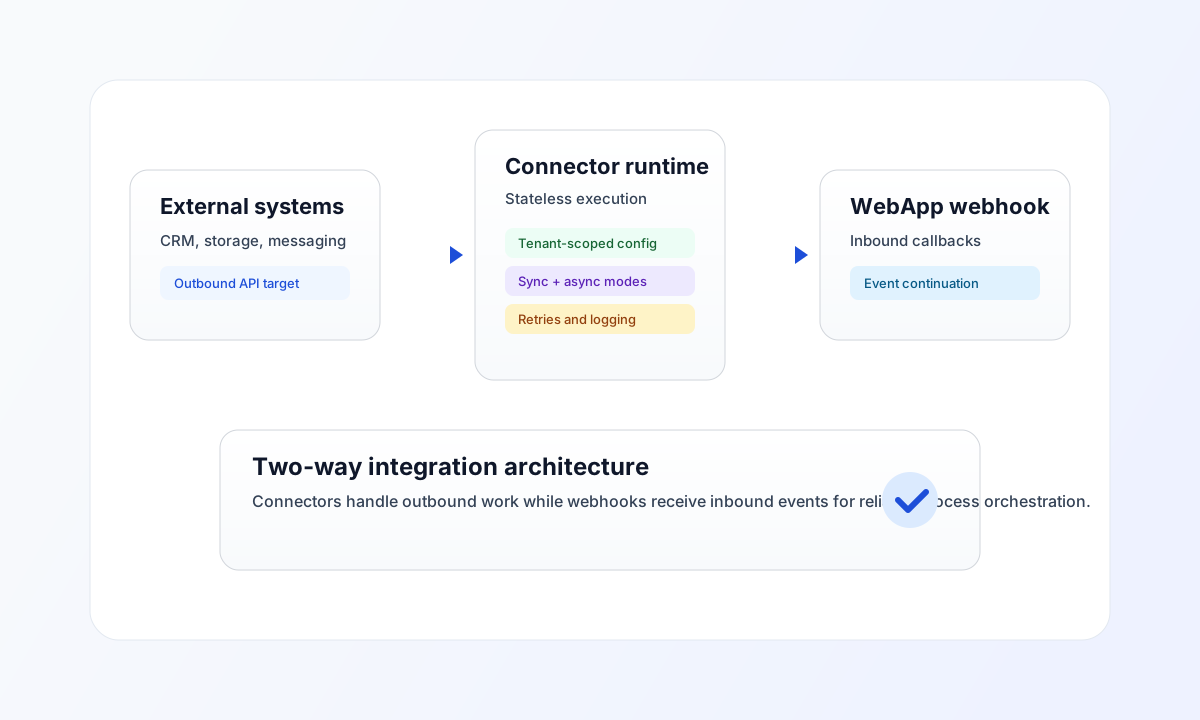
How connector architecture works
Connectors handle outbound communication from Tealfabric to external systems. They are designed to be stateless at runtime, which means each execution uses the current tenant configuration and does not rely on leftover in-memory state from previous runs. This model helps maintain tenant isolation and makes connector behavior more consistent across environments.
The platform runtime handles orchestration concerns such as execution tracking, retries, queueing for long-running jobs, and operational logging. In practice, this separation allows your connector logic to focus on request and response behavior while the platform manages reliability controls.
Outbound connectors and inbound webhooks
Use connectors when Tealfabric needs to call an external API, query a remote service, or push data to another platform. Use WebApp webhook endpoints when an external system needs to call into Tealfabric with status updates, callbacks, or event notifications.
A complete integration often combines both directions. For example, your process can create a resource through a connector, then receive the completion event through a webhook endpoint, and finally continue the workflow based on the callback payload. This pattern improves resilience and keeps integration responsibilities clear.
Execution modes: synchronous and asynchronous
Synchronous execution is best for short operations where the caller needs an immediate result, such as quick lookups or validations. Asynchronous execution is better for long-running operations such as bulk synchronization, large file transfers, or slow external APIs.
When you use async mode, the initial call usually returns an execution reference and status while processing continues in the background. This prevents request timeouts and gives you a clean way to track progress and handle completion events.
Example connector call pattern
From ProcessFlow step code, call connectors through tf.connector.execute(integrationId, operation, payload). The platform applies tenant scoping, credential handling, and execution tracking. See Integration Connector Usage for full patterns. External systems integrate through the Integrations API (curl below).
const integrationId = "<INTEGRATION_ID>";
const operation = "sync";
const payload = { method: "GET", endpoint: "/v1/resource" };

const response = await tf.connector.execute(integrationId, operation, payload);

if (!response?.success) {
  throw new Error(response?.error ?? "connector execution failed");
}
API request example
Use this request to trigger a connector execution with tenant-scoped authentication.
curl -X POST "https://api.example.com/api/v1/integrations/connectors/<ENTITY_ID>/execute" \
  -H "X-API-Key: <API_KEY>" \
  -H "X-Tenant-ID: <TENANT_ID>" \
  -H "Content-Type: application/json" \
  -d '{
    "operation": "sync",
    "data": {
      "batch_id": "b_20260508",
      "source": "crm"
    },
    "async": true
  }'
{
  "success": true,
  "data": {
    "execution_id": "exec_01JTV2R8M2A4",
    "status": "queued"
  }
}
Build for reliability and security
Keep connector permissions as narrow as possible and store credentials using secure configuration practices. Prefer idempotent operations for retries, and design payloads so repeated execution does not create duplicate side effects in external systems.
When troubleshooting, start with authentication headers, tenant context, and external API response codes before changing connector logic. A clear execution contract plus webhook-based callbacks gives you the most stable architecture for production integrations.
Continue with Connector catalog for service-specific setup and WebApp async process trigger for inbound callback patterns.