Integration Connector Usage
Document information
| Field | Value |
|---|---|
| Canonical URL | /docs/03_writing-step-code/10_integration-connectors |
| Version (published date) | 2026-09-30 |
| Tags | code-snippets, connectors, reference |
Summary
This guide shows how to execute integration connectors safely in ProcessFlow snippets using tf.connector.execute(...). It covers request shaping, retry behavior, sequential batch processing, and predictable result handling for downstream steps. Use these patterns to make external system calls more reliable and easier to troubleshoot.
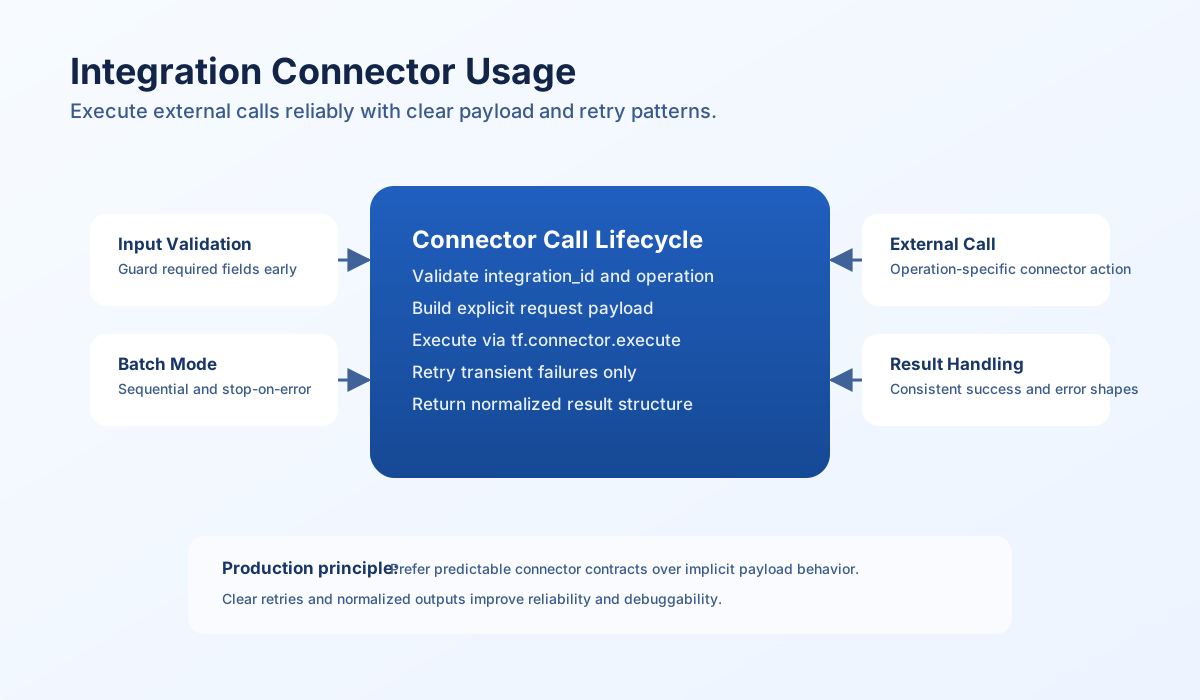
Connector execution model
Connector calls in ProcessFlow should follow one stable pattern: validate input, build an explicit payload, execute, and normalize the response. This keeps behavior consistent even when integrations return different response structures. A clear execution contract also helps you build reusable process steps.
Use integration_id and operation as first-class inputs rather than inferring operation type from loosely structured payload keys. Explicit operation routing makes failures easier to trace and prevents accidental calls to unintended connector actions. In most workflows, clarity is more valuable than compactness.
Recommended baseline pattern
Start with a minimal execution wrapper that validates required fields and returns a predictable shape. This is usually enough for straightforward connector calls and gives you a foundation for retries or batch behavior later.
const integrationId = process_input?.result?.integration_id ?? "";
const payload = process_input?.result?.data ?? {};
const operation = String(payload.operation ?? "default");

if (!integrationId) {
  return { success: false, error: "integration_id is required" };
}

const response = await tf.connector.execute(integrationId, operation, payload);

if (!response?.success) {
  return {
    success: false,
    error: response?.error ?? "connector execution failed",
    data: {
      error_code: response?.error_code ?? null,
      status_code: response?.status_code ?? null,
    },
  };
}

return {
  success: true,
  data: response?.result ?? response?.data ?? null,
};
Prepare request payloads consistently
When connector operations proxy external APIs, keep request payloads explicit with keys such as method, endpoint, query, and body. This reduces ambiguity and keeps connector logs easier to read across teams. A normalized payload contract is especially useful when different applications call the same connector.
type ConnectorRequest = {
  operation: "send";
  method: "GET" | "POST" | "PUT" | "PATCH" | "DELETE";
  endpoint: string;
  query?: Record<string, string | number | boolean>;
  body?: Record<string, unknown>;
};

function buildRequest(endpoint: string, method: ConnectorRequest["method"], body: Record<string, unknown> = {}): ConnectorRequest {
  return { operation: "send", endpoint, method, body };
}
Add retries only for transient failures
Retries are useful for temporary failures such as timeouts or rate limits, but they can worsen non-retryable errors. Gate retries by error code and keep attempt history in the response for observability. Exponential backoff is a practical default in ProcessFlow async logic.
const integrationId = process_input?.result?.integration_id ?? "";
const payload = process_input?.result?.data ?? {};
const maxRetries = Number(process_input?.result?.max_retries ?? 3);
const baseDelayMs = Number(process_input?.result?.retry_delay_ms ?? 1000);
const retryable = new Set(["TIMEOUT", "RATE_LIMITED", "SERVICE_UNAVAILABLE", "CONNECTION_ERROR"]);

if (!integrationId) {
  return { success: false, error: "integration_id is required" };
}

const attempts: Array<{ attempt: number; success: boolean; error: string | null; error_code: string | null }> = [];
let lastError = "unknown error";

for (let attempt = 1; attempt <= maxRetries; attempt += 1) {
  const result = await tf.connector.execute(integrationId, payload.operation ?? "default", payload);
  const errorCode = String(result?.error_code ?? "");
  attempts.push({
    attempt,
    success: Boolean(result?.success),
    error: result?.error ?? null,
    error_code: errorCode || null,
  });

  if (result?.success) {
    return { success: true, data: { attempts, result: result?.result ?? result?.data ?? null } };
  }

  lastError = result?.error ?? lastError;
  if (!retryable.has(errorCode) || attempt === maxRetries) break;

  const delay = baseDelayMs * Math.pow(2, attempt - 1);
  await tf.sleep(delay);
}

return { success: false, error: `max retries exceeded: ${lastError}`, data: { attempts } };
Run sequential batches safely
Batch connector execution is useful for fan-out tasks like pushing records to external systems. Sequential execution gives deterministic ordering and simpler error reasoning, especially when target systems enforce strict rate limits or state dependencies. Use stop_on_error for safety-sensitive operations and continue mode for best-effort pipelines.
const executions = process_input?.result?.executions ?? [];
const stopOnError = process_input?.result?.stop_on_error ?? true;

if (!Array.isArray(executions) || executions.length === 0) {
  return { success: false, error: "executions array is required" };
}

const results = [];
let failed = 0;

for (const item of executions) {
  const integrationId = item?.integration_id ?? "";
  const payload = item?.data ?? {};
  const res = await tf.connector.execute(integrationId, payload.operation ?? "default", payload);

  const entry = {
    integration_id: Promise<number>egrationId,
    success: Boolean(res?.success),
    result: res?.result ?? res?.data ?? null,
    error: res?.error ?? null,
  };
  results.push(entry);

  if (!entry.success) {
    failed += 1;
    if (stopOnError) break;
  }
}

return {
  success: failed === 0,
  data: {
    total_executions: executions.length,
    completed: results.length,
    failed,
    results,
  },
};
Final checklist for connector steps
Use this checklist before shipping connector-driven process logic:
-
integration_idandoperationare validated before execution. - Payload fields are explicit and operation-specific.
- Success is checked before reading response data.
- Retry logic is restricted to transient error categories.
- Batch execution mode (
stop_on_error) matches business risk. - Logs contain diagnostics without sensitive payload leakage.