Process Step Code Validation Flow
Document information
| Field | Value |
|---|---|
| Canonical URL | /docs/03_writing-step-code/05_code-validation-flow |
| Version (published date) | 2026-05-08 |
| Tags | processflow, validation, code-snippets |
Summary
This guide explains what happens when you save ProcessFlow step code and how validation controls activation. It shows the API flow for saving code, polling validation status, and handling valid or invalid outcomes in automation and UI logic. Use this recipe to build editor experiences and process tooling that never activate unvalidated snippets.
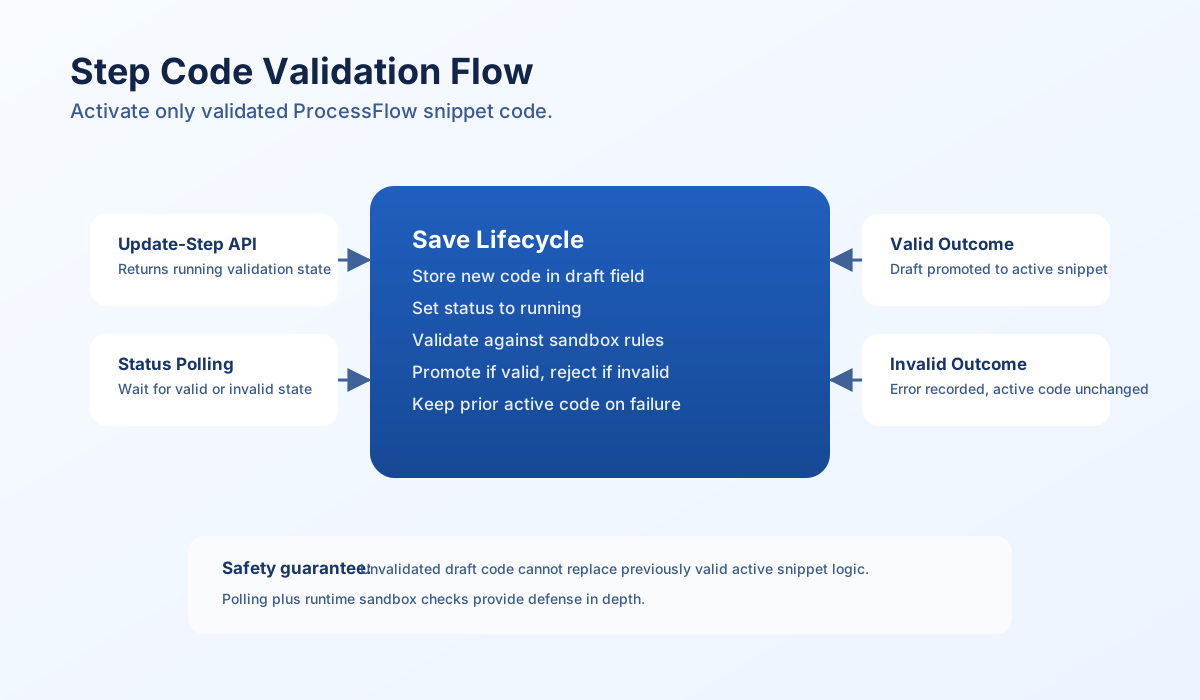
How validation protects active code
When step code is saved, the new content is first treated as draft and validated before activation. During this period, validation status is running, and the previously valid active snippet remains in use. This prevents partially saved or unsafe code from affecting running processes.
If validation passes, the active code_snippet is updated and status becomes valid. If validation fails, the draft is kept for inspection but the active snippet does not change, and status becomes invalid with an error message. This gives you safe rollback-by-default behavior without manual intervention.
Validation state fields
Validation metadata is stored with the process step so both UI and automation can reason about state changes. These fields are useful for status indicators, audit traces, and retry logic.
| Field | Purpose |
|---|---|
code_snippet_draft | Most recently submitted draft snippet awaiting or failing validation |
code_validation_status | Current validation state: running, valid, or invalid |
code_validation_error | Validation failure detail when state is invalid |
code_validation_updated_at | Last validation update timestamp |
code_validation_version | Incrementing version for save-attempt tracking |
Save and poll API flow
The save endpoint starts validation, and the status endpoint reports progress until completion. Clients should treat running as non-terminal and continue polling until valid or invalid. This flow supports responsive editing without sacrificing safety.
curl -X PUT "https://dev.tealfabric.io/api/v1/processes?action=update-step" \
  -H "X-API-Key: <API_KEY>" \
  -H "X-Tenant-ID: <TENANT_ID>" \
  -H "Content-Type: application/json" \
  -d '{
    "step_id": "<ENTITY_ID>",
    "code_snippet": "return { success: true };"
  }'
{
  "success": true,
  "data": {
    "validation": {
      "status": "running",
      "version": 12,
      "error": null
    }
  }
}
curl -X GET "https://dev.tealfabric.io/api/v1/processes?action=step-validation-status&step_id=<ENTITY_ID>" \
  -H "X-API-Key: <API_KEY>" \
  -H "X-Tenant-ID: <TENANT_ID>"
{
  "success": true,
  "data": {
    "code_validation_status": "valid",
    "code_validation_error": null,
    "code_validation_updated_at": "2026-05-08T10:20:15Z",
    "code_validation_version": 12
  }
}
Polling implementation patterns
Clients should poll at short intervals and stop only on terminal states. Add timeout handling so the UI can fail gracefully if validation stalls and users can retry without ambiguity.
async function waitForValidation(stepId: string, apiKey: string, tenantId: string): Promise<{status: string; error: string | null}> {
  const timeoutMs = 30000;
  const intervalMs = 1000;
  const started = Date.now();

  while (Date.now() - started < timeoutMs) {
    const response = await fetch(
      `https://dev.tealfabric.io/api/v1/processes?action=step-validation-status&step_id=${encodeURIComponent(stepId)}`,
      {
        headers: {
          "X-API-Key": apiKey,
          "X-Tenant-ID": tenantId,
        },
      },
    );
    if (!response.ok) throw new Error(`Status request failed: ${response.status}`);
    const payload = await response.json();
    const status = payload?.data?.code_validation_status ?? "unknown";
    const error = payload?.data?.code_validation_error ?? null;

    if (status === "valid" || status === "invalid") {
      return { status, error };
    }
    await new Promise((resolve) => setTimeout(resolve, intervalMs));
  }

  throw new Error("Validation polling timed out");
}
Runtime safety still applies
Save-time validation reduces activation risk, but it does not replace runtime enforcement. Execution-time sandbox controls remain active and should be treated as a second safety boundary. Keeping both layers enabled provides defense in depth for snippet security.
Final checklist
- Save endpoint response is checked for initial
runningstate. - Polling continues until
validorinvalid. - UI handles timeout and retries safely.
- Invalid responses surface
code_validation_errorclearly. - Active code update is assumed only after
valid.