Email MIME Parsing in ProcessFlow
Document information
| Field | Value |
|---|---|
| Canonical URL | /docs/03_writing-step-code/20_email-mime-parsing |
| Version (published date) | 2026-05-08 |
| Tags | code-snippets, email, parsing |
Summary
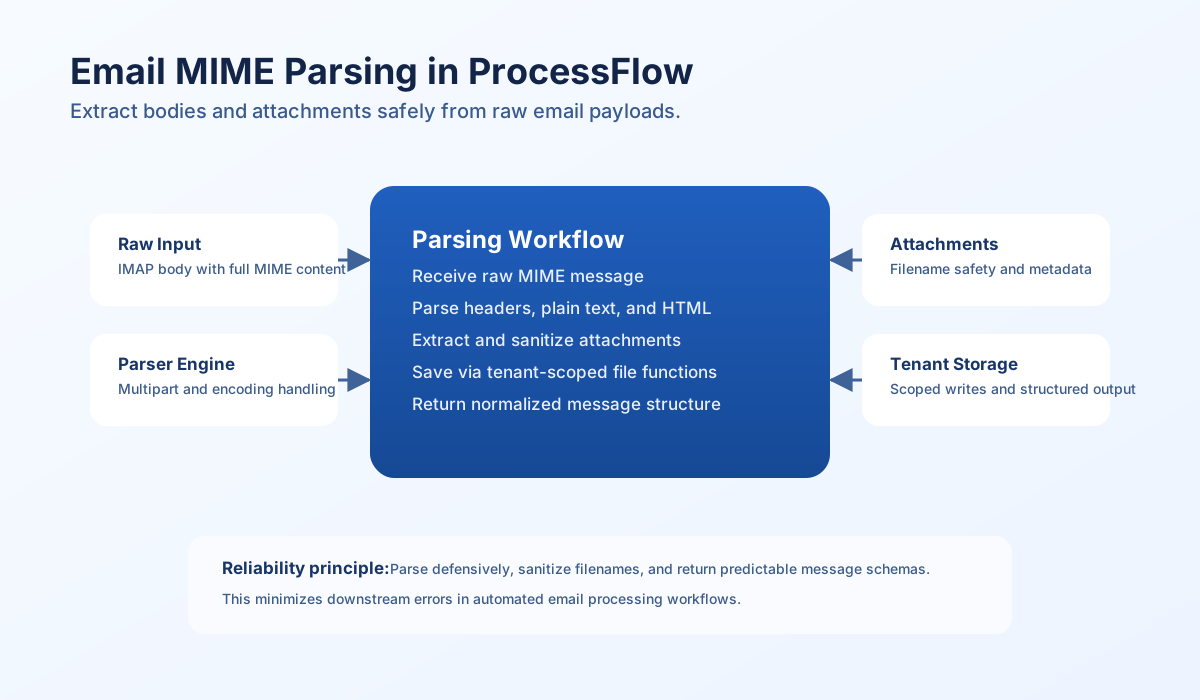
This guide explains how to work with parsed email payloads in ProcessFlow and safely extract message content and attachments. IMAP integrations typically return structured fields such as body_text, body_html, and attachments, so your step code can focus on normalization and tenant-scoped storage instead of low-level MIME parsing.
Understand the parsing model
MIME emails can contain nested text parts, HTML bodies, inline images, and regular attachments in a single payload. Parsing manually in step code is error-prone because encodings, boundaries, and header formats vary widely across providers.
In practice, let the IMAP integration parse raw MIME and return structured email objects to your process. In TypeScript steps, validate that shape, sanitize attachment filenames, and return normalized data so downstream steps can route consistently.
Input shape
Expect an email_data object with an emails array from your IMAP integration step. Each item should include headers and parsed body fields. When the connector includes attachments, each attachment should expose filename, content type, content, and size.
If a part exceeded MAIL_BODY_INLINE_MAX_BYTES (default 51200 UTF-8 bytes), the inline string is omitted and the row has body_path / body_text_path / body_html_path / attachments[].data_path (and matching *_bytes / *_spooled). Read those tenant-relative paths instead of assuming body or body_text is always present.
type EmailAttachment = {
  filename?: string;
  content_type?: string;
  content?: string;
  size?: number;
};

type ImapEmail = {
  message_number?: number;
  subject?: string;
  from?: string;
  to?: string;
  date?: string;
  body_text?: string;
  body_html?: string;
  attachments?: EmailAttachment[];
};

const emailData = (process_input.result?.email_data ?? {}) as { emails?: ImapEmail[] };
const emails = emailData.emails ?? [];

if (emails.length === 0) {
  return { success: false, error: "no emails found in input" };
}
Core parsing and attachment extraction
The core flow is to read one parsed email object, map headers and body variants, then iterate attachment parts. Always sanitize filenames before writing to tenant storage and include size and content type metadata in results. This keeps attachment handling safer and easier to audit.
function sanitizeFilename(name: string): string {
  const base = name.split(/[/\\]/).pop() ?? "attachment";
  const cleaned = base.replace(/[^a-zA-Z0-9._-]/g, "_");
  return cleaned || "attachment";
}

const emails = ((process_input.result?.email_data as { emails?: ImapEmail[] } | undefined)?.emails ?? []) as ImapEmail[];
const email = emails[0];

if (!email) {
  return { success: false, error: "email input is required" };
}

try {
  const attachments = (email.attachments ?? [])
    .map((part) => {
      const content = part.content ?? "";
      if (content === "") {
        return null;
      }
      return {
        filename: sanitizeFilename(part.filename ?? "attachment"),
        content_type: part.content_type ?? "application/octet-stream",
        content,
        size: part.size ?? content.length,
      };
    })
    .filter((part): part is NonNullable<typeof part> => part !== null);

  return {
    success: true,
    data: {
      subject: email.subject ?? null,
      from: email.from ?? null,
      to: email.to ?? null,
      date: email.date ?? null,
      body_plain: email.body_text ?? "",
      body_html: email.body_html ?? "",
      attachments,
      attachment_count: attachments.length,
    },
  };
} catch (error) {
  const message = error instanceof Error ? error.message : "email processing failed";
  return { success: false, error: message };
}
Save attachments with tenant-scoped file functions
When saving extracted attachments in ProcessFlow, use the tenant-scoped files service (files.write) so file access stays inside execution boundaries. Treat all filenames as untrusted input and guard against collisions.
function sanitizeFilename(name: string): string {
  const base = name.split(/[/\\]/).pop() ?? "attachment";
  const cleaned = base.replace(/[^a-zA-Z0-9._-]/g, "_");
  return cleaned || "attachment";
}

function withSuffix(filename: string, counter: number): string {
  const dot = filename.lastIndexOf(".");
  if (dot === -1) {
    return `${filename}_${counter}`;
  }
  return `${filename.slice(0, dot)}_${counter}${filename.slice(dot)}`;
}

if (!files) {
  return { success: false, error: "files capability is not enabled" };
}

const dir = `emails/${new Date().toISOString().slice(0, 10)}/attachments`;
const incoming = (process_input.result?.attachments ?? []) as EmailAttachment[];
const saved: Array<{ path: string; bytes_written: number }> = [];

for (let index = 0; index < incoming.length; index += 1) {
  const att = incoming[index];
  let safeName = sanitizeFilename(att.filename ?? `attachment_${index}`);
  let path = `${dir}/${safeName}`;
  let counter = 1;

  while (saved.some((item) => item.path === path)) {
    safeName = withSuffix(sanitizeFilename(att.filename ?? `attachment_${index}`), counter);
    path = `${dir}/${safeName}`;
    counter += 1;
  }

  const bytes = await files.write(path, att.content ?? "");
  saved.push({ path, bytes_written: bytes });
}

return { success: true, data: { saved, saved_count: saved.length } };
Normalize output across languages
If other systems consume parsed email data, normalize to one stable shape before transport. These examples show the same intent in TypeScript and JavaScript: map parsed message data into a consistent DTO with predictable keys.
type ParsedEmail = {
  subject: string | null;
  from: string | null;
  to: string | null;
  date: string | null;
  bodyPlain: string;
  bodyHtml: string;
  attachments: Array<{ filename: string; contentType: string; size: number }>;
};

function normalizeParsedEmail(input: ParsedEmail) {
  return {
    subject: input.subject,
    from: input.from,
    to: input.to,
    date: input.date,
    body_plain: input.bodyPlain,
    body_html: input.bodyHtml,
    attachment_count: input.attachments.length,
    attachments: input.attachments,
  };
}
Operational checklist
Use this checklist before deploying MIME parsing steps:
- IMAP integration output includes parsed
body_text,body_html, and attachment metadata. - Step code validates required email fields before processing.
- Parse and runtime errors return structured failure payloads.
- Attachment filenames are sanitized before storage.
- The
filesservice is used for attachment writes when file capability is enabled. - Output schema is normalized for downstream process steps.