Tenant Database Queries
Document information
| Field | Value |
|---|---|
| Canonical URL | /docs/03_writing-step-code/85_tenant-database-queries |
| Version (published date) | 2026-05-08 |
| Tags | code-snippets, database, sql |
Summary
This guide explains how to query tenant data safely in ProcessFlow step code using the tenant-scoped database service. It covers common read and write patterns, pagination, aggregations, and upsert workflows with security-first defaults. Use it as the practical reference when your process logic needs SQL-backed operations.
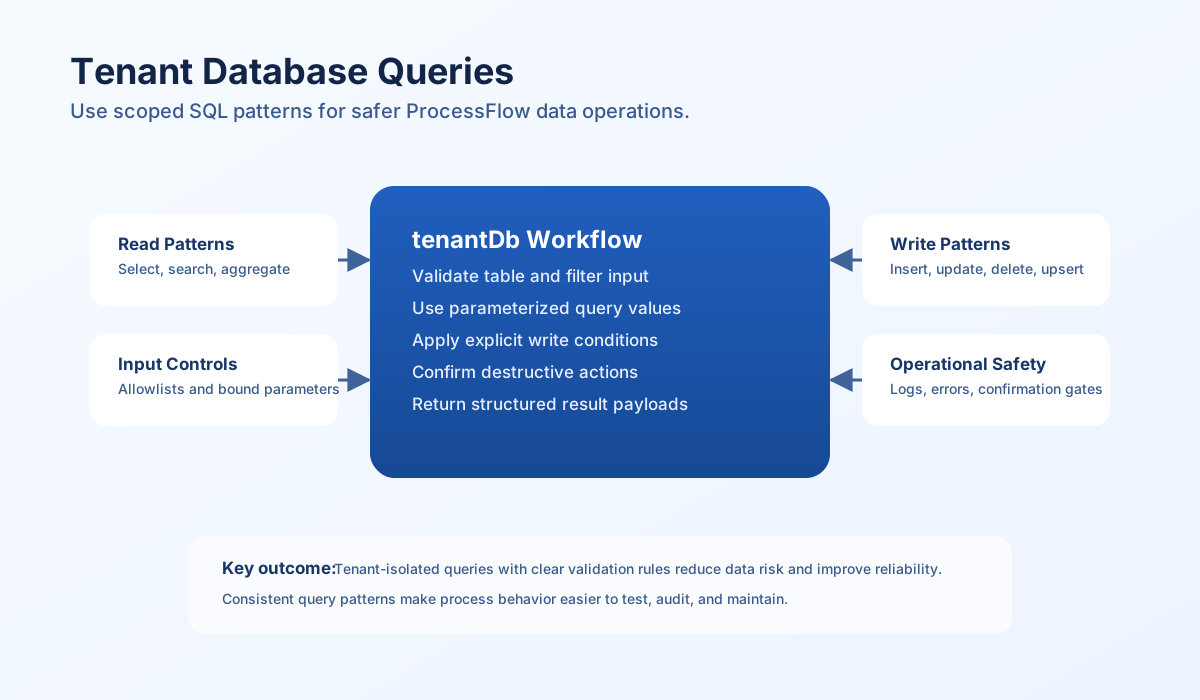
Use the tenant-scoped service first
Use tenantDb as your default database interface in ProcessFlow. It is designed for tenant isolation and is the safest path for routine application queries in snippets. While db may exist as a lower-level connection, it should only be used in carefully reviewed scenarios because it bypasses higher-level convenience protections.
The tenant database service supports common operations such as select, insert, update, delete, count, and parameterized query. This gives you enough flexibility for most business workflows without dropping into risky raw SQL assembly. In production, predictable method usage is usually more important than micro-optimizing query syntax.
| Variable | Type | Recommended usage |
|---|---|---|
tenantDb | TenantDatabaseService | Primary interface for tenant-safe query operations |
db | database connection | Advanced usage only with strict review |
tenant_id | string | Current tenant context value |
Build safe query inputs
Dynamic query inputs should always be validated before execution, especially table names, column filters, and order fields. User-provided or upstream values can cause broken queries or injection risk if used directly in SQL strings. Parameter binding and table whitelisting are the two highest-value controls.
Treat bulk actions, deletes, and custom query paths as high-risk operations that require additional guardrails. Confirm destructive actions explicitly and return clear metadata so downstream steps can decide whether to continue. Consistent safety checks reduce incidents and make workflows easier to audit.
Common read patterns
Most read workflows can be expressed as either a structured select() call or a parameterized custom query(). Use select() for routine filtering and pagination, and use query() when you need joins, specialized conditions, or aggregation clauses not covered by convenience options.
type QueryOptions = {
  limit?: number;
  offset?: number;
  orderBy?: string;
};

function buildPagedOptions(page: number, perPage: number, orderBy = "created_at"): QueryOptions {
  const safePage = Math.max(1, page);
  const safePerPage = Math.min(100, Math.max(1, perPage));
  return {
    limit: safePerPage,
    offset: (safePage - 1) * safePerPage,
    orderBy,
  };
}
Write, update, and delete patterns
Write operations should return clear success metadata and should log enough context for operational review. Updates and deletes should always include explicit conditions so you do not accidentally affect broad sets of tenant records. For deletions, requiring a confirmation flag is a practical safeguard in multi-step processes.
const table = String(process_input.result?.table ?? "entities");
const data = (process_input.result?.data ?? {}) as Record<string, unknown>;
const conditions = (process_input.result?.conditions ?? {}) as Record<string, unknown>;
const confirmDelete = Boolean(process_input.result?.confirm_delete ?? false);
const mode = String(process_input.result?.mode ?? "insert");

if (table === "" || !/^[a-zA-Z_][a-zA-Z0-9_]*$/.test(table)) {
    return { success: false, error: "invalid table" };
}

try {
    if (mode === "insert") {
        const insertId = await tenantDb.insert(table, data);
        return { success: true, data: { mode: "insert", insert_id: insertId } };
    }

    if (mode === "update") {
        if (Object.keys(conditions).length === 0) {
            return { success: false, error: "conditions are required for update" };
        }
        const affected = await tenantDb.update(table, data, conditions);
        return { success: true, data: { mode: "update", affected_rows: affected } };
    }

    if (mode === "delete") {
        if (Object.keys(conditions).length === 0) {
            return { success: false, error: "conditions are required for delete" };
        }
        if (!confirmDelete) {
            const matchCount = await tenantDb.count(table, conditions);
            return {
                success: false,
                route: "confirm_delete",
                data: {
                    records_to_delete: matchCount,
                    message: "set confirm_delete=true to continue",
                },
            };
        }
        const deleted = await tenantDb.delete(table, conditions);
        return { success: true, data: { mode: "delete", deleted_rows: deleted } };
    }

    return { success: false, error: "unknown mode" };
} catch (err) {
    const message = err instanceof Error ? err.message : "write operation failed";
    return { success: false, error: `write operation failed: ${message}` };
}
Aggregation and upsert workflows
Aggregations are useful for dashboards, control checks, and decision routing inside processes. Keep aggregation function names constrained to an allowlist and parameterize all values to avoid injection. For upsert behavior, first select by unique keys and then branch into update or insert, returning the chosen action in your output.
const table = String(process_input.result?.table ?? "entities");
const data = (process_input.result?.data ?? {}) as Record<string, unknown>;
const uniqueKeys = (process_input.result?.unique_keys ?? ["external_id"]) as string[];

const conditions: Record<string, unknown> = {};
for (const key of uniqueKeys) {
    if (!(key in data)) {
        return { success: false, error: `missing unique key: ${key}` };
    }
    conditions[key] = data[key];
}

const existing = await tenantDb.select(table, conditions, { limit: 1 });
if (Array.isArray(existing) && existing.length > 0) {
    const affected = await tenantDb.update(table, data, conditions);
    return { success: true, data: { action: "update", affected_rows: affected } };
}

const insertId = await tenantDb.insert(table, data);
return { success: true, data: { action: "insert", insert_id: insertId } };
Security and reliability checklist
Tenant-safe query execution depends on habits as much as APIs. Use this checklist when reviewing any snippet that reads or writes database records in ProcessFlow.
-
tenantDbis used for routine query operations. - Table input is validated or selected from an allowlist.
- All dynamic values are parameterized.
- Update and delete operations include explicit conditions.
- Destructive actions require explicit confirmation.
- Query results and errors are returned in structured payloads.
- Logs capture useful operational context without leaking secrets.