Tenantdata Backup
Document information
| Field | Value |
|---|---|
| Canonical URL | /docs/03_writing-step-code/90_tenantdata-backup |
| Version (published date) | 2026-08-14 |
| Tags | code-snippets, backup, operations, trace-ai |
Summary
This guide explains how tenant data snapshots work and how to trigger backups from Trace AI chat or from ProcessFlow. The process step uses the injected api client (api.post / $api->post) against POST /api/v1/chat/trace-ai with stream: false. Use this recipe when you need a recovery point before or after a risky change.
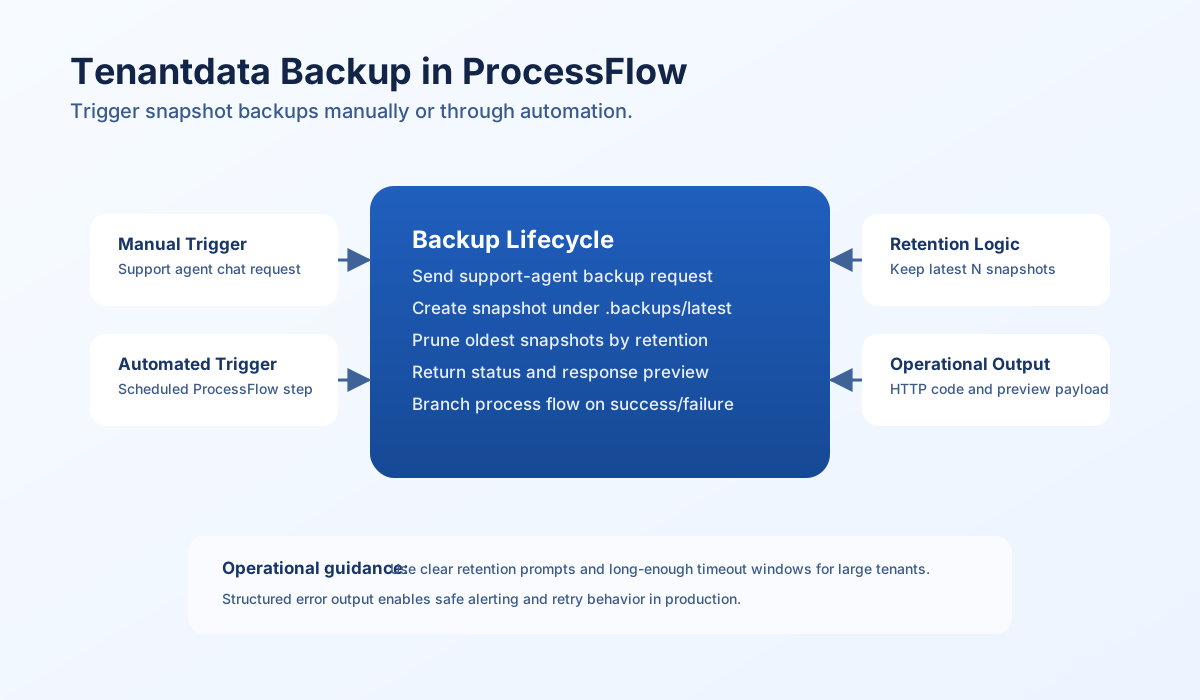
How tenantdata snapshots work
Tenant backups are stored as point-in-time snapshots under .backups/latest/<timestamp>, for example .backups/latest/2026-02-16-14-30. The backup mechanism uses hard-link optimization so unchanged files do not consume full duplicate storage in each snapshot. This keeps backup history efficient while preserving restore points.
The backup process excludes .backups and .cache and keeps only the latest configured number of snapshots, typically 30. When a new snapshot is created and the limit is exceeded, the oldest snapshot is removed. This retention behavior is important when sizing storage and recovery windows.
The backup MCP tool lives on the platform-safeguards platform skill (skill_id: platform-safeguards). Trace AI loads that skill in its tool loop, then runs the snapshot.
Trigger a backup manually from Trace AI
You can request a backup directly in Trace AI chat when you need an immediate snapshot. This is useful before high-risk data changes, migrations, or external sync operations. No process code is required for manual execution.
Use a clear message such as: Create a new snapshot backup of the tenantdata files and directories. Keep 30 previous entries. Trace AI loads platform-safeguards and runs backup. Manual trigger is the fastest route for ad hoc backup needs.
Automate backups from ProcessFlow
For scheduled or event-driven backups, call POST /api/v1/chat/trace-ai from a ProcessFlow step through api. Do not use fetch: the sandbox api client already sends X-Process-Authorization-Key, X-Tenant-ID, X-User-ID, and X-Execution-ID. Set stream: false so the chat route returns JSON (success, session_id, content, error) instead of SSE. The TypeScript api.post(path, body) helper throws on non-2xx; PHP $api->post returns { status_code, data, body, success } and does not throw on HTTP errors.
The route binds the agent to trace_ai_mcp. Do not send agent: "support_agent_mcp". Optional _execution_auth_key, _tenant_id, and _user_id in the body are a fallback when a proxy strips X-* headers.
const keepBackups = Number(process_input.keep_backups ?? 30);
const prompt =
  String(process_input.message ?? "").trim() ||
  `Create a new snapshot backup of the tenantdata files and directories. Keep ${keepBackups} previous entries.`;

try {
  const response = (await api.post("/api/v1/chat/trace-ai", {
    message: prompt,
    stream: false,
    _execution_auth_key: execution_auth_key ?? "",
    _tenant_id: tenant_id ?? "",
    _user_id: user_id ?? "",
  })) as Record<string, unknown>;

  if (response.success === false) {
    return {
      success: false,
      error: {
        code: "TRACE_AI_BACKUP_FAILED",
        message: "Trace AI backup request failed",
        details: String(response.error ?? "unknown error"),
      },
      data: {
        session_id: response.session_id ?? null,
        response_preview: null,
      },
    };
  }

  const content = typeof response.content === "string" ? response.content : "";
  return {
    success: true,
    data: {
      session_id: response.session_id ?? null,
      response_preview: content.slice(0, 1000),
    },
    message: "Backup request completed via Trace AI",
  };
} catch (err) {
  return {
    success: false,
    error: {
      code: "TRACE_AI_BACKUP_FAILED",
      message: "Trace AI backup request failed",
      details: err instanceof Error ? err.message : "request failed",
    },
    data: { session_id: null, response_preview: null },
  };
}
The Nest sandbox api.post default timeout is 30 minutes (SANDBOX_INTERNAL_HTTP_TIMEOUT_MS). PHP $api->post takes a fourth $options argument; timeout is seconds (300 in the example). Do not pass extra header or timeout arguments to TypeScript api.post — that helper only accepts (path, body).
API request examples
To test the same JSON shape outside a process step, call Trace AI with an API key (chat.write) or with process execution headers. Use stream: false.
curl -sS -X POST "https://dev.tealfabric.io/api/v1/chat/trace-ai" \
  -H "Content-Type: application/json" \
  -H "Accept: application/json" \
  -H "X-API-Key: <API_KEY>" \
  -H "X-Tenant-ID: <TENANT_ID>" \
  -d '{
    "message": "Create a new snapshot backup of the tenantdata files and directories. Keep 30 previous entries.",
    "stream": false
  }'
{
  "success": true,
  "session_id": "session-…",
  "content": "Created a snapshot under .backups/latest/… and kept 30 previous entries.",
  "error": null
}
Process step success envelope (what your step should return):
{
  "success": true,
  "data": {
    "session_id": "session-…",
    "response_preview": "Created a snapshot under .backups/latest/…"
  },
  "message": "Backup request completed via Trace AI"
}
Optional inputs and return behavior
The automation step supports optional prompt override and retention override fields so teams can tune backup behavior per process. If no custom prompt is provided, the default backup instruction is generated using keep_backups.
| Input | Type | Description |
|---|---|---|
message | string | Custom Trace AI instruction prompt. |
keep_backups | int | Number of snapshots to retain when using the default prompt (default 30). |
On success, the step returns success: true with session_id and a truncated content preview. On failure, it returns structured error data (TRACE_AI_BACKUP_FAILED) for alerting or retry routing. TypeScript failures from transport or HTTP errors are thrown by api.post and caught as details. PHP reports http_code from $api->post.
Final checklist
Use this checklist before deploying automated backup steps:
- The step calls
POST /api/v1/chat/trace-aithroughapi.post/$api->post, notfetch, and not/api/v1/chat/support-agent. - Body includes
stream: false(JSON, not SSE). - Backup instruction prompt is explicit and includes retention target.
- Process execution auth is present (
apiinjects headers; body_execution_auth_keyis optional proxy fallback). - Step timeout is long enough for backup execution on large datasets.
- Failure branch handles
success: false, thrown transport errors, and (PHP) non-2xxstatus_code. - Response preview is truncated to avoid oversized process payloads.
See also
- Trace AI Agent
- Platform skills quick reference (
skill_id: platform-safeguards, toolbackup) - Process sandbox
tfAPI