Array and Collection Operations
Document information
- Canonical URL:
/docs/03_writing-step-code/70_array-collection-operations - Version:
2026-05-08 - Tags:
code-snippets,collections,arrays
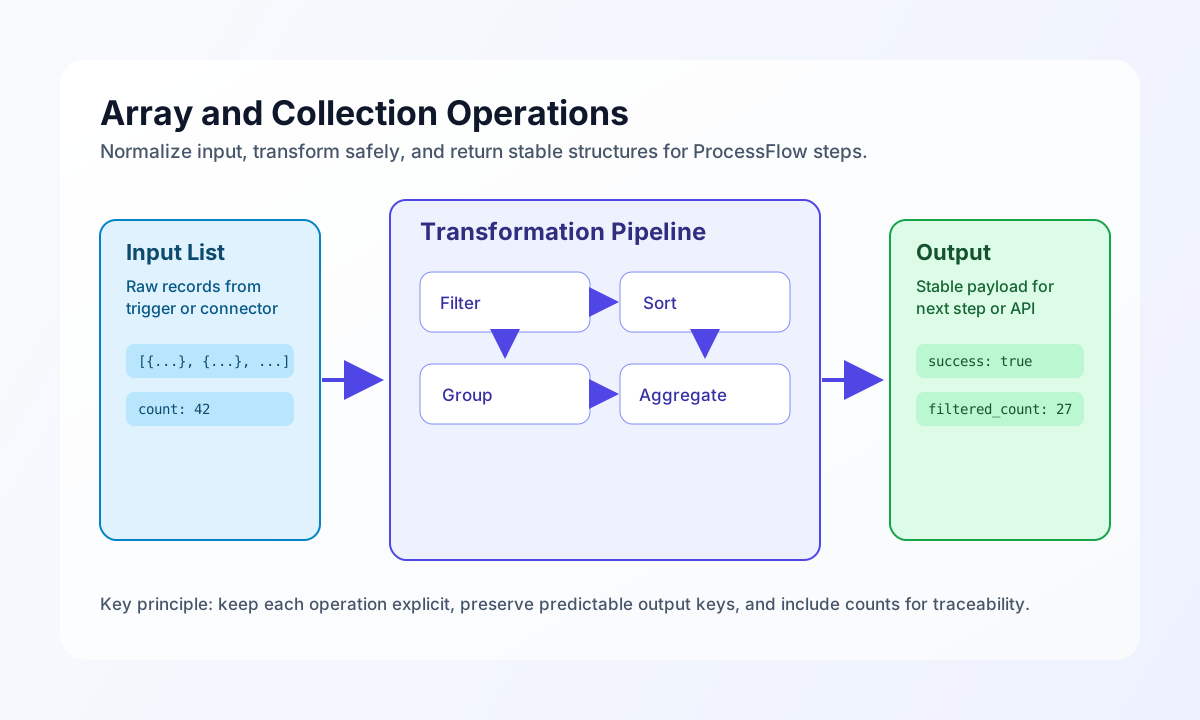
Arrays are the backbone of most ProcessFlow transformations because nearly every trigger, connector response, and query result is a list of records. This guide shows how to filter, sort, group, and reshape collections safely so each step returns predictable output for downstream steps. By the end, you will have reusable patterns for common collection tasks without introducing side effects.
Build a reliable collection pipeline
A strong collection pipeline starts with defensive input handling, then applies one operation at a time, and finally returns a stable structure with counts and metadata. This keeps your ProcessFlow logs readable and makes failures easier to troubleshoot. A practical baseline is to normalize missing input to an empty array, avoid mutating the original list, and always return success, data, and key counters.
const items = process_input.result?.items ?? [];

if (!Array.isArray(items) || items.length === 0) {
    return {
        success: true,
        data: {
            items: [],
            count: 0,
        },
    };
}

const normalized = [...items];

return {
    success: true,
    data: {
        items: normalized,
        count: normalized.length,
    },
};
Filter and sort records for downstream steps
Filtering and sorting usually happen together when you prepare data for notifications, API calls, or report generation. The safest pattern is to apply strict comparisons where possible, then reindex and sort with explicit field defaults to avoid warnings on missing keys. This example keeps only active records with positive totals and sorts newest first.
const items = (process_input.result?.items ?? []) as Array<Record<string, unknown>>;

const filtered = items.filter((item) => {
    const status = item.status ?? null;
    const total = Number(item.total ?? 0);
    return status === "active" && Number.isFinite(total) && total > 0;
});

filtered.sort((a, b) => {
    const left = Date.parse(String(a.created_at ?? "1970-01-01T00:00:00Z")) || 0;
    const right = Date.parse(String(b.created_at ?? "1970-01-01T00:00:00Z")) || 0;
    return right - left;
});

return {
    success: true,
    data: {
        items: filtered,
        filtered_count: filtered.length,
    },
};
Group and aggregate values for summaries
Grouping turns a flat list into decision-ready summaries, which is useful for dashboard widgets and conditional branching in later steps. You can group by a business field such as category and calculate totals in the same pass. Returning both the grouped data and high-level totals helps downstream steps choose between detail and summary views.
const items = (process_input.result?.items ?? []) as Array<Record<string, unknown>>;
const groups: Record<string, { category: string; items: unknown[]; count: number; total_amount: number }> = {};

for (const item of items) {
    const key = String(item.category ?? "uncategorized");

    if (!groups[key]) {
        groups[key] = { category: key, items: [], count: 0, total_amount: 0 };
    }

    groups[key].items.push(item);
    groups[key].count++;
    groups[key].total_amount += Number(item.amount ?? 0);
}

const groupList = Object.values(groups);

return {
    success: true,
    data: {
        groups: groupList,
        group_count: groupList.length,
        item_count: items.length,
    },
};
Use equivalent SDK-style patterns across languages
When your team implements the same collection behavior in service code outside ProcessFlow, aligned examples in TypeScript and JavaScript reduce drift and make reviews faster. These snippets keep active records, sort by score descending, and return a consistent shape.
type RecordItem = {
  id: string;
  status: string;
  score: number;
};

function selectTopActive(items: RecordItem[]): { items: RecordItem[]; count: number } {
  const filtered = items
    .filter((item) => item.status === "active" && Number.isFinite(item.score))
    .sort((a, b) => b.score - a.score);

  return { items: filtered, count: filtered.length };
}
Send transformed collections to the API
After collection operations, you often post a compact payload to an API endpoint for archival, analytics, or downstream workflows. This request pattern keeps the payload explicit, includes tenant context, and captures a small response object that can be logged in the same step.
curl -X POST "https://api.example.com/api/v1/collections/summaries" \
  -H "X-API-Key: <API_KEY>" \
  -H "X-Tenant-ID: <TENANT_ID>" \
  -H "Content-Type: application/json" \
  -d '{
    "batch_id": "batch-2026-05-08",
    "item_count": 42,
    "groups": [
      {"category": "hardware", "count": 18, "total_amount": 2450.50},
      {"category": "software", "count": 24, "total_amount": 3180.00}
    ]
  }'
{
  "success": true,
  "data": {
    "summary_id": "sum_01J2EXAMPLE",
    "received_count": 42,
    "status": "queued"
  }
}
Practical checks before you save step code
Collection bugs usually come from inconsistent keys, mixed value types, or hidden null values. A short pre-save check reduces rework and keeps automation runs stable in production. Confirm your step handles empty arrays, uses strict comparison where needed, and returns predictable field names on both success and failure paths.
See Also
- Data Transformation & Mapping
- Data Validation & Sanitization
- Mathematical & Statistical Calculations
Collection operations are most effective when each transformation is small, explicit, and easy to test in isolation. If you keep inputs normalized and outputs stable, your ProcessFlow steps remain easier to debug, scale, and reuse.