Notifications
Document information
| Field | Value |
|---|---|
| Canonical URL | /docs/03_writing-step-code/25_notifications |
| Version (published date) | 2026-05-08 |
| Tags | code-snippets, notifications, reference |
Summary
This guide explains how to send in-app, email, SMS, and push notifications from ProcessFlow snippets with consistent payloads and error handling. It focuses on channel-specific execution patterns and a reusable multi-channel fan-out strategy. Use these recipes when process events must notify users, admins, or external recipients reliably.
Choose the right notification channel
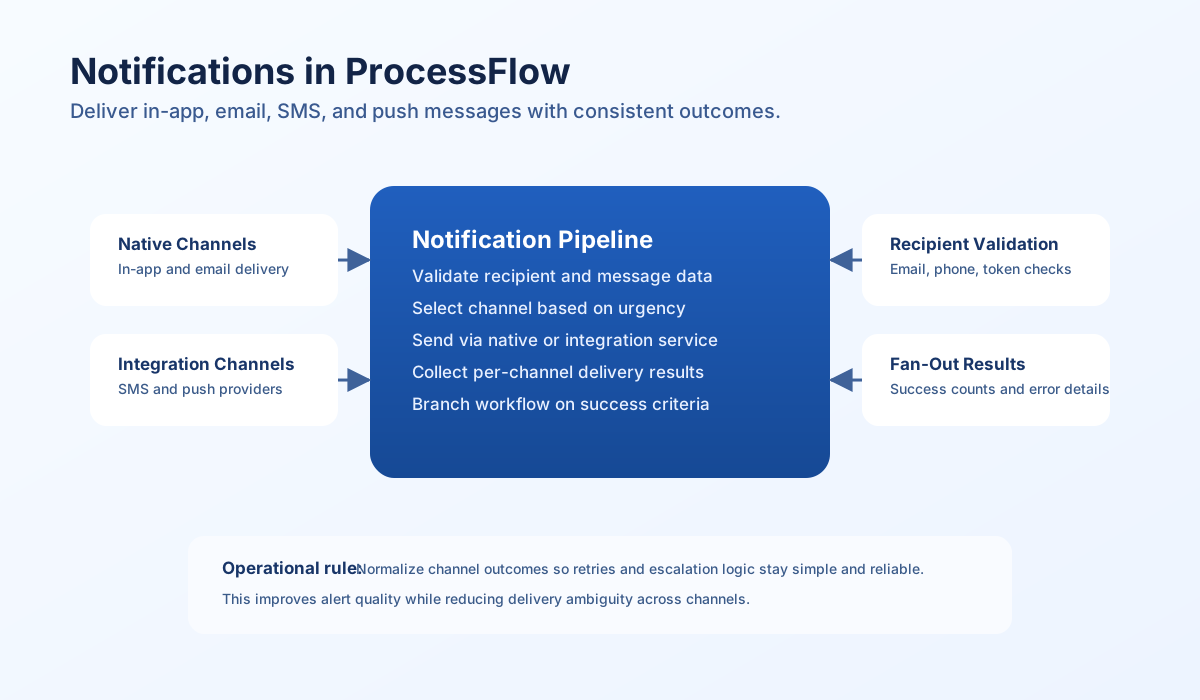
Use notification for in-app, tenant-aware delivery to users and administrative audiences. Use email when message detail is longer or requires formal communication history. For SMS and push, trigger preconfigured integrations through integration so delivery credentials and provider logic stay centralized.
Channel choice should match urgency, message size, and expected user behavior. In-app notifications are ideal for routine product events, while SMS and push are better for urgent actions or real-time alerts. Consistent channel policy helps avoid alert fatigue and improves response quality.
In-app notification pattern
A reliable in-app pattern validates recipient and message fields, sends through notification, and returns normalized metadata for downstream routing. This keeps process behavior predictable and simplifies alert dashboards.
const userId = process_input.result?.user_id ?? "";
const title = process_input.result?.title ?? "";
const message = process_input.result?.message ?? "";
const type = process_input.result?.type ?? "info";
const actionUrl = process_input.result?.action_url ?? null;

if (userId === "" || title === "" || message === "") {
    return {success: false, error: "user_id, title, and message are required"};
}

const payload = [
    title: title,
    message: message,
    type: type,
    action_url: actionUrl,
    metadata: {
        source: "processflow",
        created_at: new Date().toISOString().slice(0, 10)
    ]
};

const context = {tenant_id: tenant_id, user_id: userId};
const result = await notification.createNotification(payload, context);

if (!(result.success ?? false)) {
    return {success: false, error: result.error ?? "notification send failed"};
}

return {
    success: true,
    data: {
        notification_id: result.notification?.notification_id ?? null,
        user_id: userId,
        title: title
    ]
};
SMS and push via integrations
SMS and push are provider-specific, so route them through integration actions like send_sms and send_push. Validate contact identifiers before calling integrations and keep message payloads concise for mobile channels. This pattern avoids provider lock-in inside business logic.
type SmsRequest = {
  integrationId: string;
  to: string;
  message: string;
};

function buildSmsPayload(input: SmsRequest) {
  return {
    integration_id: input.integrationId,
    data: {
      action: "send_sms",
      to: input.to,
      body: input.message,
    },
  };
}
Multi-channel fan-out pattern
For critical events, send across multiple channels in one step and return channel-level outcomes. This allows your process to continue when partial delivery is acceptable or fail fast when all channels must succeed. Per-channel result reporting is essential for retry and escalation logic.
const channels = (process_input.result?.channels ?? ["in_app"]) as string[];
const recipient = (process_input.result?.recipient ?? {}) as Record<string, unknown>;
const title = String(process_input.result?.title ?? "");
const message = String(process_input.result?.message ?? "");
const integrations = (process_input.result?.integrations ?? {}) as Record<string, unknown>;

if (channels.length === 0 || title === "" || message === "") {
    return { success: false, error: "channels, title, and message are required" };
}

const results: Record<string, { success: boolean; error?: string }> = {};

for (const channel of channels) {
    try {
        if (channel === "in_app" && recipient.user_id) {
            const res = await notification.createNotification(
                { title, message, type: "info" },
                { tenant_id, user_id: recipient.user_id },
            );
            results.in_app = { success: Boolean((res as { success?: boolean }).success ?? false) };
        } else if (channel === "email" && recipient.email) {
            const html = `<h2>${title}</h2><p>${message.replace(/\n/g, "<br>")}</p>`;
            const sent = await email.sendEmail(String(recipient.email), title, html);
            results.email = { success: Boolean(sent) };
        } else if (channel === "sms" && recipient.phone && integrations.sms) {
            const res = await integration.executeSync(integrations.sms, {
                action: "send_sms",
                to: recipient.phone,
                body: message,
            });
            results.sms = { success: Boolean((res as { success?: boolean }).success ?? false) };
        } else if (channel === "push" && recipient.device_token && integrations.push) {
            const res = await integration.executeSync(integrations.push, {
                action: "send_push",
                token: recipient.device_token,
                notification: { title, body: message },
            });
            results.push = { success: Boolean((res as { success?: boolean }).success ?? false) };
        } else {
            results[channel] = { success: false, error: "missing recipient or integration config" };
        }
    } catch (err) {
        results[channel] = {
            success: false,
            error: err instanceof Error ? err.message : "channel delivery failed",
        };
    }
}

const succeeded = Object.values(results).filter((r) => r.success).length;

return {
    success: succeeded > 0,
    data: {
        channels_attempted: channels.length,
        channels_succeeded: succeeded,
        results,
    },
};
Notification safety checklist
Use this checklist before rolling notification steps into production:
- Contact identifiers are validated (email, phone, device token).
- Channel selection matches urgency and business impact.
- User preferences are checked before non-critical delivery.
- Secrets and auth headers are never logged.
- Channel-level outcomes are returned for retries and audits.
- Multi-channel fan-out defines clear success criteria.