Data Validation & Sanitization
Document information
- Canonical URL:
/docs/03_writing-step-code/45_data-validation-sanitization - Version:
2026-05-08 - Tags:
code-snippets,validation,security
Validation and sanitization are the safety layer of every ProcessFlow automation that accepts external or user-provided input. Validation confirms that required fields and value types are correct, while sanitization removes unsafe or malformed content before downstream use. When both are applied consistently, automations become more reliable, secure, and easier to troubleshoot.
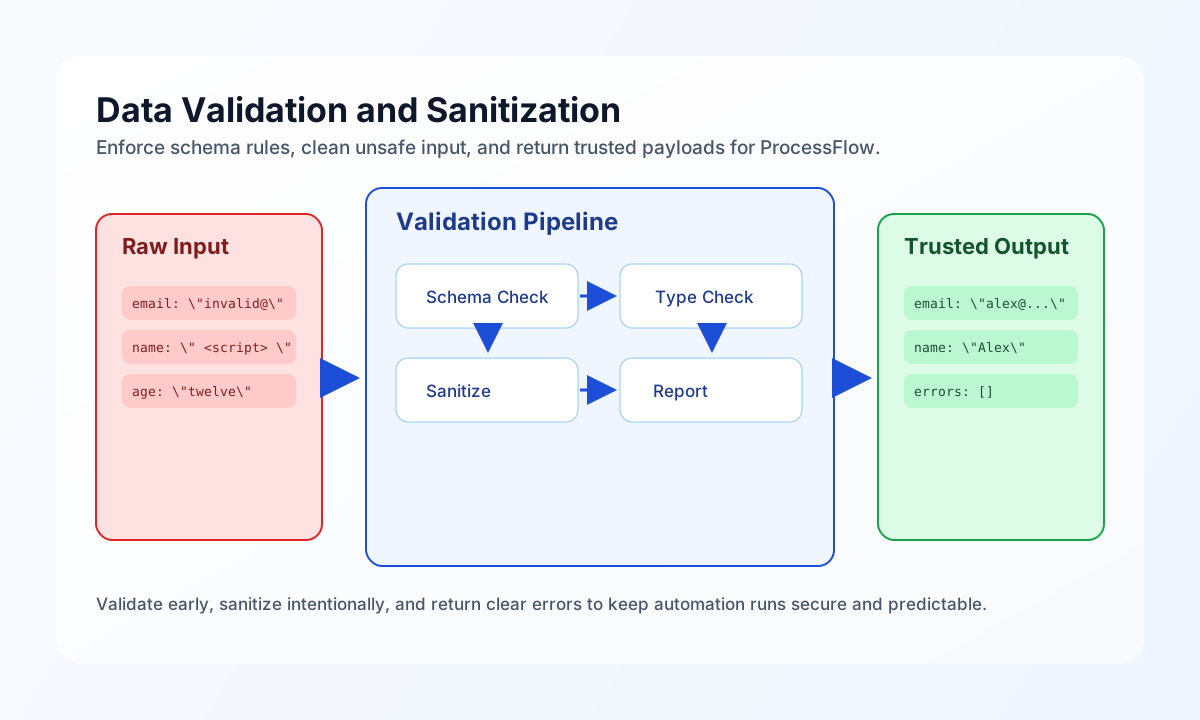
Build a clear validation contract first
A reliable validation step starts with explicit schema rules for required fields, type checks, and value constraints. This gives every workflow run a consistent pass/fail decision and prevents ambiguous behavior in later steps. The pattern below validates a payload against a lightweight schema and returns structured errors by field.
const data = (process_input.result?.data ?? {}) as Record<string, unknown>;
const schema = (process_input.result?.schema ?? {}) as Record<string, Record<string, unknown>>;
const errors: Record<string, string[]> = {};
const validated: Record<string, unknown> = {};

for (const [field, rules] of Object.entries(schema)) {
    const value = data[field] ?? null;
    const fieldErrors: string[] = [];

    if ((rules.required ?? false) && (value === null || value === "")) {
        fieldErrors.push(`Field "${field}" is required.`);
    }

    if (value !== null && value !== "") {
        const type = String(rules.type ?? "string");
        if (type === "email" && !/^[^\s@]+@[^\s@]+\.[^\s@]+$/.test(String(value))) {
            fieldErrors.push(`Field "${field}" must be a valid email address.`);
        }
        if (type === "integer" && !Number.isInteger(Number(value))) {
            fieldErrors.push(`Field "${field}" must be an integer.`);
        }
        if (type === "string" && typeof value !== "string") {
            fieldErrors.push(`Field "${field}" must be a string.`);
        }
    }

    if (fieldErrors.length > 0) {
        errors[field] = fieldErrors;
        continue;
    }

    validated[field] = value;
}

const valid = Object.keys(errors).length === 0;

return {
    success: valid,
    data: {
        valid,
        validated,
        errors,
    },
};
Sanitize values before storage or rendering
After data passes validation, sanitization should normalize format and remove unsafe characters while preserving business meaning. The safest approach is to sanitize by field intent, not with one generic filter for every value. This keeps customer-facing text readable while reducing risk from HTML injection or malformed encodings.
const input = (process_input.result?.data ?? {}) as Record<string, unknown>;

function stripTags(text: string): string {
    return text.replace(/<[^>]*>/g, "");
}

function titleCase(text: string): string {
    return text.replace(/\b\w/g, (c) => c.toUpperCase());
}

const sanitized = {
    full_name: titleCase(stripTags(String(input.full_name ?? "")).trim()),
    email: String(input.email ?? "").trim().toLowerCase(),
    website: String(input.website ?? "").trim(),
    notes: stripTags(String(input.notes ?? "")).trim().replace(/\s+/g, " "),
};

return {
    success: true,
    data: {
        sanitized,
        field_count: Object.keys(sanitized).length,
    },
};
Validate and sanitize JSON payloads safely
JSON input needs two checks: first confirm the payload parses correctly, then confirm required keys and types exist. This two-step approach prevents partial processing of malformed payloads and keeps error messages actionable for the caller. Returning parse errors separately from schema errors makes support triage much faster.
const jsonInput = process_input.result?.json ?? "{}";
const requiredKeys = ["event_type", "entity_id", "timestamp"];

let decoded: unknown;
try {
    decoded = typeof jsonInput === "string" ? JSON.parse(jsonInput) : jsonInput;
} catch (err) {
    const message = err instanceof Error ? err.message : "parse failed";
    return { success: false, error: `Invalid JSON: ${message}` };
}

if (decoded == null || typeof decoded !== "object" || Array.isArray(decoded)) {
    return { success: false, error: "JSON payload must decode to an object" };
}

const record = decoded as Record<string, unknown>;
const missing = requiredKeys.filter((key) => !(key in record));
if (missing.length > 0) {
    return { success: false, error: `Missing required keys: ${missing.join(", ")}` };
}

return {
    success: true,
    data: {
        validated_json: record,
    },
};
Keep validation behavior aligned across languages
Teams often reuse the same validation logic in ProcessFlow snippets and external services, so aligned examples prevent drift between runtimes. These snippets apply the same checks for required fields and email format, and return the same shape for success and errors. Consistent behavior across languages reduces debugging time and integration surprises.
type InputPayload = { email?: string; name?: string };

function validateInput(payload: InputPayload) {
  const errors: Record<string, string[]> = {};
  if (!payload.name?.trim()) errors.name = ["Name is required."];
  if (!payload.email?.trim()) {
    errors.email = ["Email is required."];
  } else if (!/^[^\s@]+@[^\s@]+\.[^\s@]+$/.test(payload.email)) {
    errors.email = ["Email format is invalid."];
  }

  return { valid: Object.keys(errors).length === 0, errors };
}
Validate records through the API
If your automation uses a central validation endpoint, include tenant headers and a full request body so operations teams can replay failures exactly. A concise response payload should include accepted and rejected counts, plus enough detail to identify failing records. This keeps validation outcomes transparent without exposing sensitive raw payloads in logs.
curl -X POST "https://api.example.com/api/v1/validation/records" \
  -H "X-API-Key: <API_KEY>" \
  -H "X-Tenant-ID: <TENANT_ID>" \
  -H "Content-Type: application/json" \
  -d '{
    "schema": {
      "email": {"required": true, "type": "email"},
      "name": {"required": true, "type": "string"}
    },
    "records": [
      {"email": "alex@example.com", "name": "Alex Taylor"},
      {"email": "invalid-email", "name": ""}
    ]
  }'
{
  "success": true,
  "data": {
    "accepted_count": 1,
    "rejected_count": 1,
    "validation_id": "val_01J2EXAMPLE"
  }
}
Reduce validation-related incidents
Most data-quality incidents come from missing required fields, inconsistent type coercion, or over-sanitizing values that should remain unchanged. You can avoid this by validating early, coercing types deliberately, and documenting field-by-field sanitization intent for your workflow. When every step returns clear errors and normalized output, troubleshooting and retries become significantly faster.
See also
Validation and sanitization are most effective when they are treated as a consistent contract rather than ad hoc checks. With clear schema rules and predictable cleaning behavior, your ProcessFlow automations stay safe, maintainable, and production-ready.