File Operations
Document information
| Field | Value |
|---|---|
| Canonical URL | /docs/03_writing-step-code/75_file-operations |
| Version (published date) | 2026-05-08 |
| Tags | code-snippets, files, io |
Summary
This guide explains how to read, write, organize, and validate files in ProcessFlow using tenant-scoped file functions. It focuses on safe, repeatable patterns for production workflows, including filename sanitization, directory handling, JSON and CSV operations, and attachment processing. Use this page as the working reference when your step logic needs file I/O.
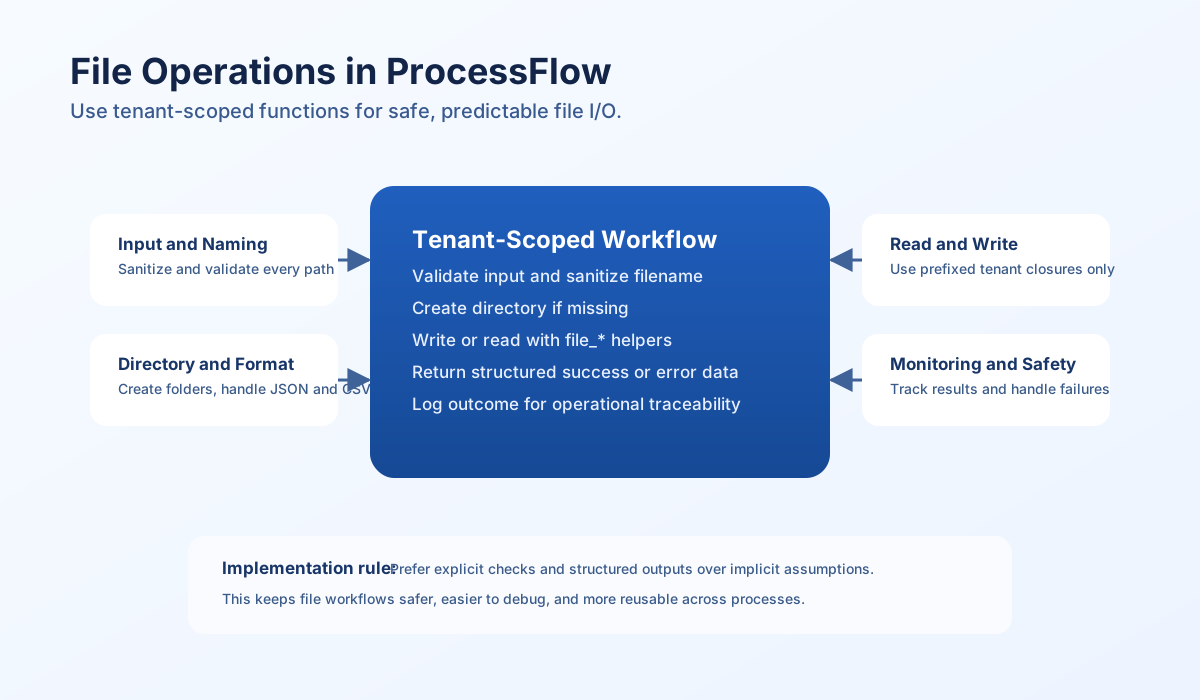
How file operations work in ProcessFlow
ProcessFlow exposes file I/O through the tenant-scoped files service, not direct Node.js filesystem APIs. In step code, use files.write, files.read, and files.list so the sandbox can enforce tenant boundaries and path validation.
This model keeps file access scoped to your tenant directory, which reduces cross-tenant risk and accidental access to system paths. You still need to validate inputs and control filenames, but the runtime adds an additional safety layer around path handling.
Use the correct function set
Use the files service for operations that touch tenant storage. Use JSON.stringify and JSON.parse for payload formatting, and standard string methods for path and filename handling.
| Operation | Use this in ProcessFlow |
|---|---|
| Write file | await files.write(path, content) |
| Read file | await files.read(path) |
| List directory | await files.list(directory) |
Core write and read patterns
The most reliable pattern is to sanitize user-provided names, ensure the target directory exists, then perform the write and return structured metadata. The next step usually validates existence and file type before reading content. This gives you safer behavior and clearer troubleshooting in production.
const filename = process_input.result?.filename ?? "";
const content = process_input.result?.content ?? "";
const directory = process_input.result?.directory ?? "uploads";

if (filename === "" || content === "") {
    return {success: false, error: "filename and content are required"};
}

const safeFilename = filename.replace(/[^a-zA-Z0-9._-]/g, "_");
if (!safeFilename) {
    return { success: false, error: "invalid filename" };
}

const path = `${directory}/${safeFilename}`;
const bytes = await files.write(path, content);

return {
    success: true,
    data: {
        path,
        bytes_written: bytes
    ]
};
const path = process_input.result?.path ?? "";
if (path === "") {
    return {success: false, error: "path is required"};
}

const content = await files.read(path);

return {
    success: true,
    data: {
        path,
        size: content.length,
        content
    ]
};
JSON and CSV recipe examples
JSON and CSV are common exchange formats in ProcessFlow jobs, so the safest approach is to validate structure before writing and to include deterministic headers when exporting tabular data. The snippets below show aligned preprocessing patterns in TypeScript and JavaScript so teams using mixed stacks can follow the same intent before handing data to ProcessFlow file steps.
type ExportRow = Record<string, string | number | boolean | null>;

function buildCsv(rows: ExportRow[], headers?: string[]): string {
  if (!rows.length) throw new Error("No rows to export");
  const finalHeaders = headers ?? Object.keys(rows[0]);
  const escaped = (value: unknown) => `"${String(value ?? "").replaceAll('"', '""')}"`;
  const lines = [
    finalHeaders.map(escaped).join(","),
    ...rows.map((row) => finalHeaders.map((h) => escaped(row[h])).join(",")),
  ];
  return lines.join("\n");
}
Attachment and directory workflows
Attachment workflows should always normalize filenames and handle duplicates before writing to disk. Directory workflows should confirm path type and return structured listings so later steps can make deterministic decisions. These checks prevent collisions and reduce silent failures in batch processing.
const attachments = (process_input.result?.attachments ?? []) as Array<Record<string, unknown>>;
const directory = String(
    process_input.result?.directory ?? `attachments/${new Date().toISOString().slice(0, 10)}`,
);

const saved: Array<{ path: string; bytes_written: number }> = [];

for (let index = 0; index < attachments.length; index++) {
    const attachment = attachments[index];
    const name = String(attachment.filename ?? `attachment_${index}`);
    const safeName = name.replace(/[^a-zA-Z0-9._-]/g, "_");
    let content = String(attachment.content ?? "");

    if (attachment.is_base64 === true) {
        try {
            content = Buffer.from(content, "base64").toString("utf8");
        } catch {
            continue;
        }
    }

    let path = `${directory}/${safeName}`;
    let counter = 1;
    while (counter < 100) {
        try {
            const bytes = await files.write(path, content);
            saved.push({ path, bytes_written: Number(bytes ?? content.length) });
            break;
        } catch {
            const dot = safeName.lastIndexOf(".");
            const base = dot >= 0 ? safeName.slice(0, dot) : safeName;
            const ext = dot >= 0 ? safeName.slice(dot) : "";
            path = `${directory}/${base}_${counter}${ext}`;
            counter++;
        }
    }
}

return { success: true, data: { saved, directory } };
Operational best practices
Treat every file path and filename as untrusted input, even when it originates from internal systems. Validate required fields early, sanitize names before path creation, and log outcomes with enough metadata for incident review. This reduces both security risk and debugging time.
Run file operations with explicit success and error payloads so downstream steps can branch predictably. Add file size checks for large content flows and review retention or cleanup logic for long-running tenants. Stable file workflows are mostly about consistency, not complexity.
Security considerations
Path traversal, filename injection, and oversized payloads are the most common file I/O risks in workflow engines. ProcessFlow sandbox controls help enforce tenant boundaries, but application-level validation is still required for robust behavior. Combine platform safeguards with strict input checks for best results.
| Risk area | Recommended control |
|---|---|
| Path traversal | Use tenant-scoped file closures and reject unexpected path input. |
| Filename injection | Sanitize filenames before path concatenation. |
| Oversized content | Validate file size before read/write operations. |
| Data leakage | Keep exports in controlled tenant directories and avoid broad sharing patterns. |