Email Sending
Document information
- Canonical URL:
/docs/03_writing-step-code/15_email-sending - Version:
2026-05-08 - Tags:
code-snippets,email,reference
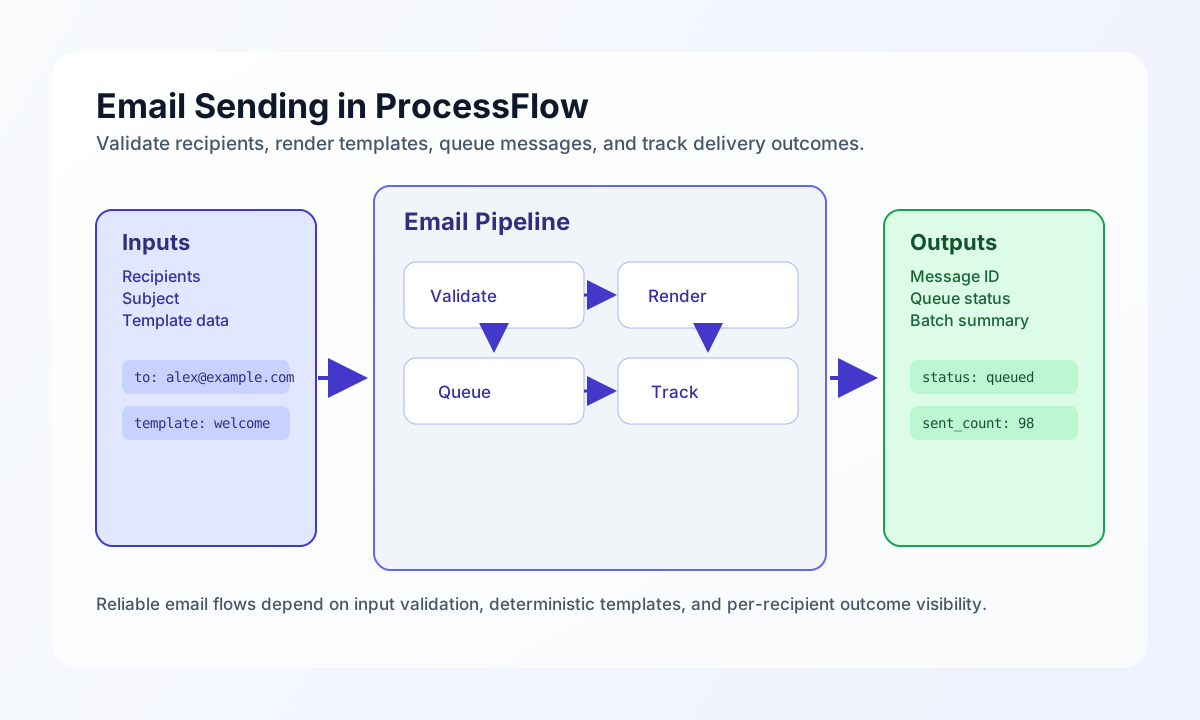
Email delivery in ProcessFlow works best when each step validates recipient input, builds predictable message content, and returns queue results that downstream steps can inspect. This guide covers practical patterns for single sends, template-driven content, and batch operations without exposing sensitive payload data in logs. When you keep each send deterministic and traceable, retries and incident response become much simpler.
Start with a safe single-email pattern
A reliable single-email step should validate required fields before calling the email service and should return explicit queue status fields for auditability. This prevents silent failures and helps operators quickly identify whether the issue was input quality or queue behavior. The example below validates a single recipient, normalizes plain text to HTML when needed, and returns a compact response object.
const to = String(process_input.result?.to ?? "").trim();
const subject = String(process_input.result?.subject ?? "").trim();
const body = String(process_input.result?.body ?? "");
const isHtml = Boolean(process_input.result?.is_html ?? true);
if (to === "" || subject === "" || body === "") {
return {success: false, error: "Missing required fields: to, subject, body"};
}
if (!/^[^\s@]+@[^\s@]+\.[^\s@]+$/.test(to)) {
return {success: false, error: "Invalid email address"};
}
const htmlBody = isHtml ? body : body.replace(/&/g, "&").replace(/</g, "<").replace(/>/g, ">").replace(/\n/g, "<br />");
const queued = await email.sendEmail(to, subject, htmlBody);
return {
success: Boolean(queued),
data: {
recipient: to,
subject: subject,
queued: Boolean(queued),
},
};
Render templates with explicit placeholders
Template-based email keeps messaging consistent across flows, but only when placeholders are clearly defined and fallback behavior is intentional. A good pattern is to choose a template from a small allowlist, replace only known keys, and return metadata about which template was used. This gives you consistent content and easier troubleshooting when a field is missing.
const to = String(process_input.result?.to ?? "").trim();
const subject = String(process_input.result?.subject ?? "").trim();
const templateName = String(process_input.result?.template ?? "default");
const templateData = (process_input.result?.template_data ?? {}) as Record<string, unknown>;

const templates: Record<string, string> = {
    welcome: "<h1>Welcome, {{name}}!</h1><p>Sign in: <a href=\"{{login_url}}\">{{login_url}}</a></p>",
    alert: "<h2>{{title}}</h2><p>{{message}}</p><p>{{timestamp}}</p>",
    default: "<p>{{content}}</p>",
};

let htmlBody = templates[templateName] ?? templates.default;

for (const [key, value] of Object.entries(templateData)) {
    htmlBody = htmlBody.replaceAll(`{{${key}}}`, String(value ?? ""));
}

const queued = await email.sendEmail(to, subject, htmlBody);

return {
    success: Boolean(queued),
    data: {
        recipient: to,
        template: templateName,
        queued: Boolean(queued),
    },
};
Keep cross-language patterns aligned
If your team also sends email from services outside ProcessFlow, aligned snippets in TypeScript and JavaScript make behavior comparisons straightforward. Each variant below validates core input, calls an email endpoint, and returns the same response shape so teams can reason about outcomes consistently.
const baseUrl = "https://api.example.com/api/v1";
const tenantId = "<TENANT_ID>";
const apiKey = "<API_KEY>";

type SendEmailInput = {
  to: string;
  subject: string;
  html: string;
};

async function sendEmail(input: SendEmailInput) {
  const response = await fetch(`${baseUrl}/messages/email`, {
    method: "POST",
    headers: {
      "X-API-Key": apiKey,
      "X-Tenant-ID": tenantId,
      "Content-Type": "application/json",
    },
    body: JSON.stringify(input),
  });
  if (!response.ok) throw new Error(`Request failed: ${response.status}`);
  return response.json();
}
Send and verify email through the API
When your flow depends on API-driven messaging, include tenant headers and an explicit request body so support teams can reproduce issues quickly. A concise response example also makes it easier to map external message IDs back to ProcessFlow execution logs. Use placeholders for keys and tenant identifiers in all shared documentation or runbooks.
curl -X POST "https://api.example.com/api/v1/messages/email" \
  -H "X-API-Key: <API_KEY>" \
  -H "X-Tenant-ID: <TENANT_ID>" \
  -H "Content-Type: application/json" \
  -d '{
    "to": "alex@example.com",
    "subject": "Your weekly automation summary",
    "html": "<p>Your report is ready.</p>",
    "metadata": {
      "workflow_run_id": "wf_01HXYZEXAMPLE"
    }
  }'
{
  "success": true,
  "data": {
    "message_id": "msg_01J2EXAMPLE",
    "status": "queued",
    "queued_at": "2026-05-08T10:25:00Z"
  }
}
Handle batches without losing per-recipient visibility
Batch sending is efficient, but it can hide partial failures if you only return one top-level status flag. A safer approach is to validate each recipient independently, capture sent and failed lists, and return counts that can trigger retry logic in later steps. This structure keeps high-volume workflows observable while still short-circuiting invalid addresses early.
const recipients = (process_input.result?.recipients ?? []) as unknown[];
const subjectTemplate = String(process_input.result?.subject ?? "");
const bodyTemplate = String(process_input.result?.body_template ?? "");
const results: {
    sent: string[];
    failed: Array<{ email: string; error: string }>;
    invalid: Array<{ email: string; error: string }>;
} = { sent: [], failed: [], invalid: [] };

function applyTemplate(template: string, data: Record<string, unknown>): string {
    let output = template;
    for (const [key, value] of Object.entries(data)) {
        output = output.replaceAll(`{{${key}}}`, String(value ?? ""));
    }
    return output;
}

for (const recipient of recipients) {
    const isObject = recipient != null && typeof recipient === "object" && !Array.isArray(recipient);
    const address = isObject
        ? String((recipient as Record<string, unknown>).email ?? "")
        : String(recipient ?? "");
    if (!/^[^\s@]+@[^\s@]+\.[^\s@]+$/.test(address)) {
        results.invalid.push({ email: address, error: "Invalid email format" });
        continue;
    }

    const data = isObject ? (recipient as Record<string, unknown>) : { email: recipient };
    let subject = subjectTemplate;
    let body = bodyTemplate;
    for (const [key, value] of Object.entries(data)) {
        subject = subject.replaceAll(`{{${key}}}`, String(value ?? ""));
        body = body.replaceAll(`{{${key}}}`, String(value ?? ""));
    }

    try {
        const queued = await email.sendEmail(address, subject, body);
        if (queued) {
            results.sent.push(address);
        } else {
            results.failed.push({ email: address, error: "Queue rejected" });
        }
    } catch (err) {
        results.failed.push({
            email: address,
            error: err instanceof Error ? err.message : "Send failed",
        });
    }
}

return {
    success: results.failed.length === 0 && results.invalid.length === 0,
    data: {
        total_recipients: recipients.length,
        sent_count: results.sent.length,
        failed_count: results.failed.length,
        invalid_count: results.invalid.length,
        results: results,
    },
};
See also
Email steps remain dependable when input validation, template rendering, queue submission, and response logging are all treated as first-class parts of the same flow. With this structure in place, your automations can scale from one recipient to large batches while keeping behavior predictable.