Process-to-Process Communication
Document information
- Canonical URL:
/docs/03_writing-step-code/80_process-communication - Version:
2026-05-08 - Tags:
code-snippets,ipc,processflow
Process-to-process communication lets one workflow delegate work to another workflow so teams can keep automation logic modular and reusable. Prefer a Call process step (call_process) with tf.process.execute (or $process->execute in PHP). That stores the target process on the step and keeps the visual editor accurate. Raw api.post to execute-process remains valid for dynamic routers and older snippets.
When a process invokes another (helper or execute-process from a running step), the child run stores parent_execution_id and parent_step_id on its process-level ProcessExecutionLogs row. The visual editor overlays that child status on the calling step and offers Sub-run to open the nested process editor for that child execution. To split a connected chain of steps into its own process, select them on the canvas and use Extract to process (toolbar Ext, or the step context menu). That copies the selection into a new processflow and replaces it with a Call process step.
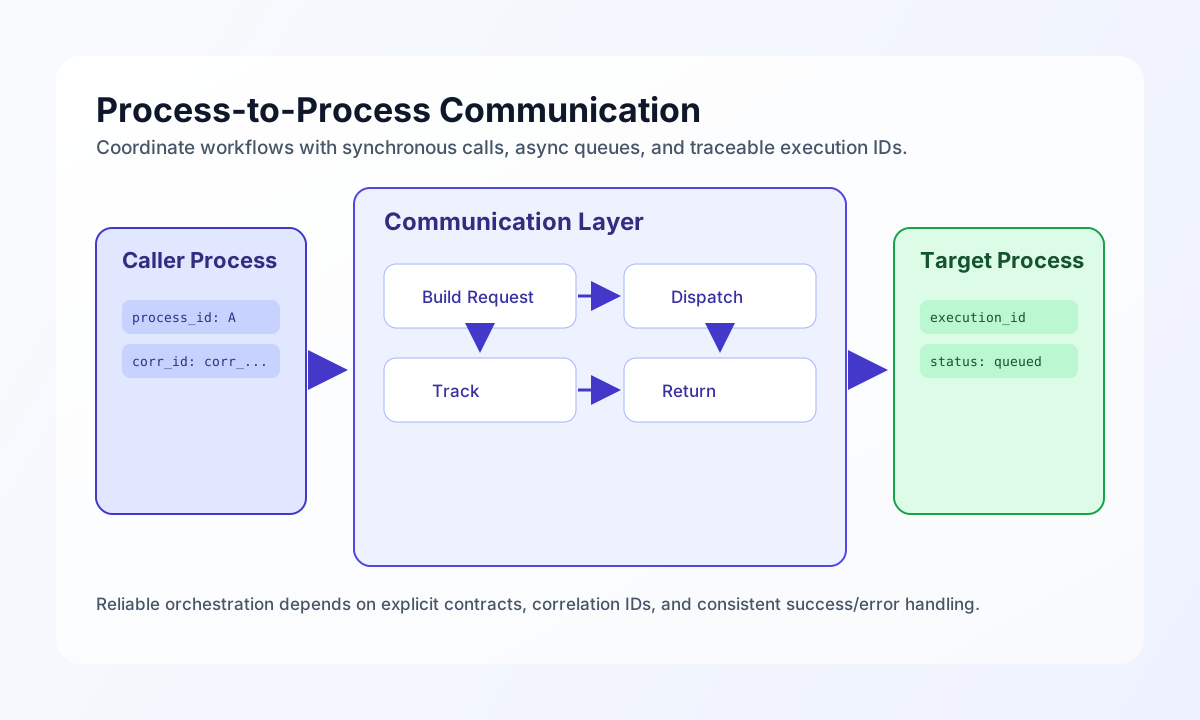
Use a consistent call contract
Internal process calls are easier to support when every request includes a process identifier, input payload, and an explicit wait mode. tf.process.execute posts to the same tenant-scoped execute-process action as a hand-written api.post, including execution auth headers. The example below demonstrates a synchronous invocation with explicit error handling.
const targetProcessId = String(process_input.result?.process_id ?? "");
const inputData = process_input.result?.data ?? {};
const correlationId = String(process_input.result?.correlation_id ?? `corr_${Date.now()}`);

if (targetProcessId === "") {
  return { success: false, error: "Target process ID is required" };
}

const response = await tf.process.execute(targetProcessId, inputData, { async: false });

if (!(response.success ?? false)) {
  return {
    success: false,
    error: "Process invocation failed",
    data: response,
  };
}

return {
  success: true,
  data: {
    process_id: targetProcessId,
    execution_id: response.data?.execution_id ?? response.execution_id ?? null,
    result: response.data?.result ?? response.result ?? null,
    correlation_id: correlationId,
  },
};
Queue asynchronous calls for non-blocking workflows
If the caller does not need immediate output, asynchronous execution keeps the parent process responsive and improves throughput under load. The caller should still capture queue acknowledgement fields so operations teams can trace delayed or failed child runs. This pattern is useful for notifications, enrichment, or long-running batch tasks.
const targetProcessId = String(process_input.result?.process_id ?? "");
const payload = process_input.result?.data ?? {};
const response = await tf.process.execute(targetProcessId, payload, { async: true });

return {
    success: Boolean(response.success ?? false),
    data: {
        status: (response.success ?? false) ? "queued" : "failed",
        execution_id: response.data?.execution_id ?? null,
        process_id: targetProcessId,
    },
};
Chain processes when output feeds the next step
Sequential process chaining is useful when each child process transforms data for the next child in a deterministic order. You should pass the prior result forward and decide whether to stop on first error or continue collecting failures based on business criticality. Returning per-step outcomes makes chain behavior transparent during debugging.
const chain = process_input.result?.chain ?? []
const currentInput = process_input.result?.input ?? []
const stopOnError = Boolean(process_input.result?.stop_on_error ?? true);
const endpoint = `${app_url}/api/v1/processflow?action=execute-process`;
const results: Array<{ step: number; process_id: string; success: boolean }> = [];

let current = currentInput;
for (let index = 0; index < chain.length; index++) {
    const processId = String(chain[index]);
    const response = await api.post(endpoint, {
        process_id: processId,
        input_data: current,
    });

    const ok = Boolean(response.success ?? false) && (response.status_code ?? 500) < 400;
    results.push({ step: index, process_id: processId, success: ok });

    if (!ok && stopOnError) {
        return { success: false, data: { chain_results: results } };
    }

    if (ok) {
        current = response.data?.result ?? response.data ?? current;
    }
}

return { success: true, data: { chain_results: results, final_output: current } };return {success: true, data: {chain_results: results, final_output: currentInput]};
Keep process-call patterns aligned across languages
In ProcessFlow step code, use the injected api client for every internal process call. The examples earlier on this page already follow that pattern. External orchestrators that run outside Tealfabric should use the curl request in the next section instead of copying fetch scaffolding into snippets.
Trigger process execution through API
When documenting process orchestration, include complete request fields so readers can reproduce calls exactly in test and staging environments. Required headers and full endpoint paths make troubleshooting much faster when cross-process behavior fails. A concise response object should expose execution IDs for later status tracking.
curl -X POST "https://api.example.com/api/v1/processflow?action=execute-process" \
  -H "X-API-Key: <API_KEY>" \
  -H "X-Tenant-ID: <TENANT_ID>" \
  -H "Content-Type: application/json" \
  -d '{
    "process_id": "<ENTITY_ID>",
    "input_data": {
      "order_id": "ord_1024",
      "correlation_id": "corr_01J2EXAMPLE"
    },
    "async": true
  }'
{
  "success": true,
  "data": {
    "execution_id": "exe_01J2EXAMPLE",
    "status": "queued",
    "process_id": "<ENTITY_ID>"
  }
}
Keep orchestration resilient
Inter-process orchestration fails most often when callers omit trace context, rely on implicit timeouts, or ignore partial failures in chained and fan-out workflows. You can reduce incidents by standardizing correlation IDs, logging each call boundary, and defining fallback behavior for failed child executions. With those controls in place, distributed ProcessFlow logic stays observable and easier to recover.
See also
Process-to-process communication works best when each invocation is explicit, traceable, and easy to retry. A clear call contract and consistent error handling allow complex automation architectures to remain maintainable over time.