JSON, XML, and CSV Parsing
Document information
| Field | Value |
|---|---|
| Canonical URL | /docs/03_writing-step-code/35_json-xml-csv-parsing |
| Version (published date) | 2026-05-08 |
| Tags | code-snippets, parsing, data |
Summary
This guide shows how to parse, validate, and convert JSON, XML, and CSV payloads in ProcessFlow step code. It focuses on practical patterns that reduce parsing errors and keep downstream logic predictable. Use these recipes when integrating external systems, importing files, or normalizing mixed-format payloads.
Choose a stable parsing strategy
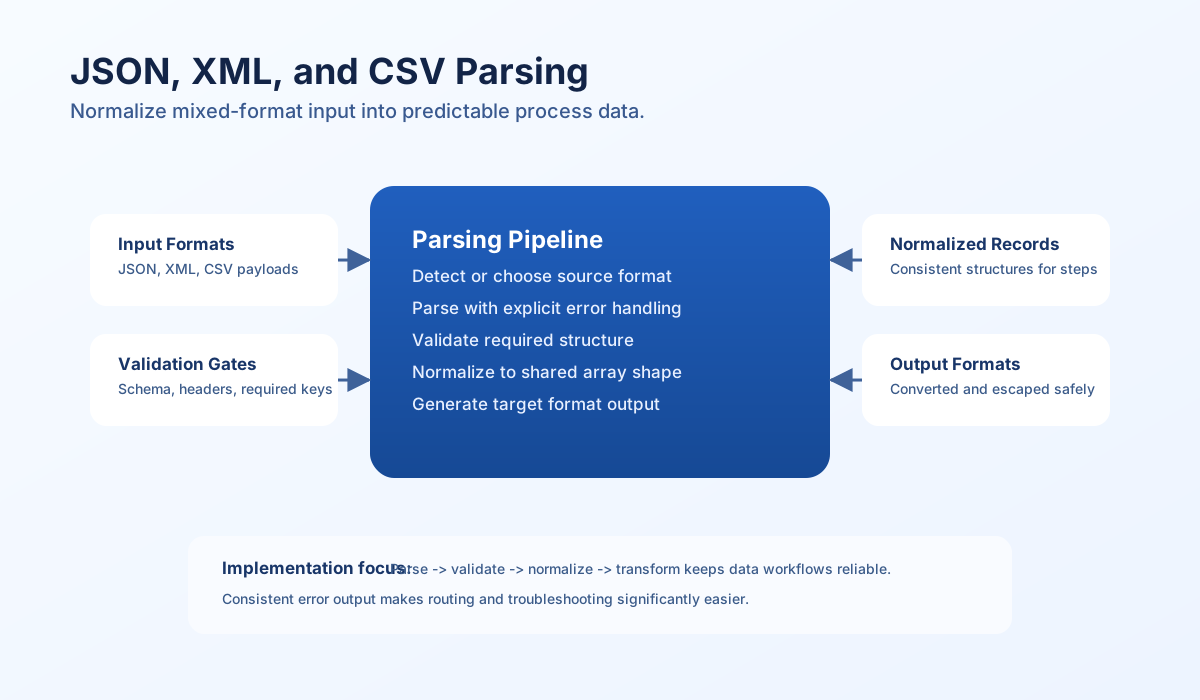
Reliable parsing starts with a simple rule: parse first, validate structure second, and transform only after both succeed. This sequence prevents subtle data quality issues from leaking into later steps. It also gives clearer error messages when input payloads are malformed.
In ProcessFlow snippets, returning consistent success and error shapes is as important as parser correctness. If every parser output follows the same schema, conditional routing and monitoring become easier to maintain. Stable structure is what turns parsing code into reusable process logic.
JSON parsing and generation
JSON is usually the easiest format to work with, but malformed strings, unexpected types, and null handling can still break workflows. Always wrap JSON.parse in try/catch (or validate parsed shape) immediately after decode operations. When encoding output, set explicit flags so your payload shape stays predictable.
const jsonInput = process_input.result?.json ?? "";
if (jsonInput === "") {
    return {success: false, error: "json input is required"};
}

let decoded: unknown;
try {
    decoded = JSON.parse(jsonInput);
} catch {
    return { success: false, error: "invalid json" };
}

if (decoded == null || typeof decoded !== "object" || Array.isArray(decoded)) {
    return { success: false, error: "json must decode to an object" };
}

const record = decoded as Record<string, unknown>;
if (!("records" in record)) {
    return { success: false, error: "missing required key: records" };
}

const normalized = {
    records: record.records,
    metadata: record.metadata ?? [],
};

const jsonOutput = JSON.stringify(normalized);

return { success: true, data: { normalized, json: jsonOutput } };
XML parsing with controlled conversion
XML payloads need stronger error handling because invalid tags, namespace complexity, and mixed text nodes can fail silently if not checked. Wrap XML parsing in try/catch and validate the parsed structure before routing. Converting XML into a normalized JavaScript object makes later logic easier to test and route.
const xmlInput = String(process_input.result?.xml ?? "").trim();
if (xmlInput === "") {
    return { success: false, error: "xml input is required" };
}

if (!xmlInput.startsWith("<")) {
    return { success: false, error: "invalid xml", details: ["Input does not look like XML"] };
}

// Prefer connector-parsed XML when available (common in integration steps).
const preParsed = process_input.result?.parsed_xml;
if (preParsed != null && typeof preParsed === "object" && !Array.isArray(preParsed)) {
    return {
        success: true,
        data: {
            root: String(process_input.result?.root_name ?? "root"),
            parsed: preParsed,
        },
    };
}

return {
    success: false,
    error: "Provide parsed_xml from a connector or preprocessing step",
};
CSV parsing and conversion
CSV handling is most reliable when you normalize line endings, define delimiter behavior explicitly, and enforce column consistency per row. Header-aware parsing is usually the best default because later steps can refer to named keys instead of numeric indexes. For large inputs, process incrementally to reduce memory pressure.
type CsvRecord = Record<string, string | null>;

function csvRowsToRecords(csv: string, delimiter = ","): CsvRecord[] {
  const rows = csv.split(/\r?\n/).filter((line) => line.trim() !== "");
  if (rows.length < 2) return [];
  const headers = rows[0].split(delimiter).map((h) => h.trim());
  return rows.slice(1).map((line) => {
    const values = line.split(delimiter);
    const record: CsvRecord = {};
    headers.forEach((header, index) => {
      record[header] = values[index] ?? null;
    });
    return record;
  });
}
Auto-detect and convert formats carefully
Automatic format detection can be useful for ingestion pipelines, but it should still return explicit confidence and fallback behavior. Try JSON first, then XML, and finally CSV heuristics with delimiter checks. If format confidence is low, return an actionable error instead of guessing silently.
When converting between formats, normalize into one internal array shape before generating output. This keeps transformation logic simple and avoids format-specific drift across branches. A consistent intermediate representation is the safest way to support multi-format workflows.
const input = String(process_input.result?.input ?? "").trim();
const target = String(process_input.result?.target_format ?? "json");

if (input === "") {
    return { success: false, error: "input is required" };
}

let parsed: unknown = null;
let format: string | null = null;

try {
    parsed = JSON.parse(input);
    format = "json";
} catch {
    format = null;
}

if (format === null && input.startsWith("<")) {
    const preParsed = process_input.result?.parsed_xml;
    if (preParsed != null) {
        parsed = preParsed;
        format = "xml";
    }
}

if (format === null) {
    const lines = input.split(/\r?\n/).map((line) => line.trim()).filter(Boolean);
    if (lines.length >= 2) {
        const headers = lines[0].split(",").map((h) => h.trim());
        const rows = lines.slice(1).map((line) => {
            const values = line.split(",");
            const record: Record<string, string | null> = {};
            headers.forEach((header, index) => {
                record[header] = values[index] ?? null;
            });
            return record;
        });
        parsed = rows;
        format = "csv";
    }
}

if (format === null) {
    return { success: false, error: "could not detect supported format" };
}

if (target === "json") {
    return { success: true, data: { source_format: format, output: JSON.stringify(parsed) } };
}

if (target === "xml") {
    return {
        success: false,
        error: "XML output requires a dedicated serializer or connector; use target_format=json for sandbox steps",
    };
}

return { success: false, error: "unsupported target format" };
Final parsing checklist
Use this checklist before promoting a parser step to production:
- Input presence and type checks happen before parsing.
- Parser errors are captured and returned in structured form.
- Required fields are validated after parsing.
- CSV header and row-column consistency are enforced.
- Output format generation uses explicit encoding and escaping rules.
- Large payload flows use chunking or incremental processing strategy.