Using LLM in ProcessFlow Code Snippets
Document information
- Canonical URL:
/docs/03_writing-step-code/95_llm-integration - Version:
2026-05-08 - Tags:
code-snippets,llm,ai
The llm service gives ProcessFlow steps tenant-scoped access to language models for summarization, classification, extraction, and content generation. This guide focuses on production-safe usage: clear prompts, constrained outputs, explicit error handling, and predictable return payloads. When LLM calls are treated like any other integration dependency, your flows remain easier to audit and maintain.
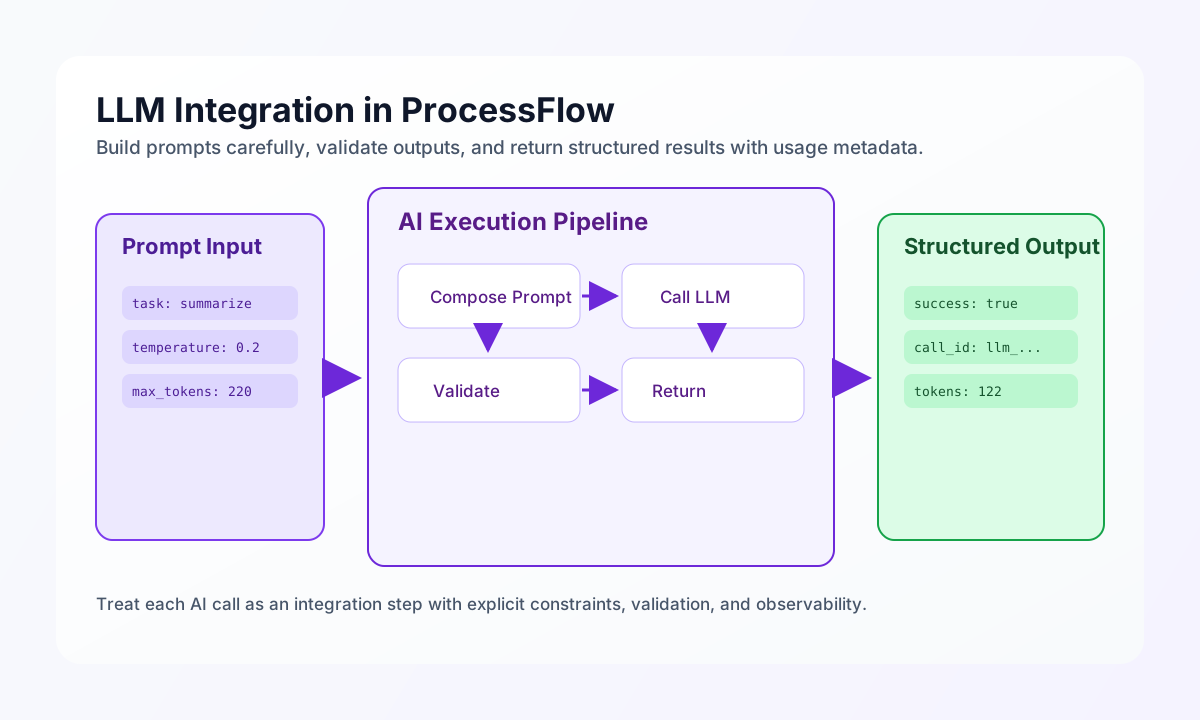
Use a reliable LLM call pattern
A reliable LLM step starts by validating input and setting conservative defaults for temperature, max_tokens, and timeout behavior. The call should always check success before reading response text, and it should return usage metadata to support cost tracking. This pattern keeps failures explicit and reduces hidden branching in downstream steps.
const data = process_input.result?.data ?? null;

if (data == null || (typeof data === "object" && Object.keys(data as object).length === 0)) {
    return { success: false, error: "No input data provided" };
}

const prompt = `Summarize the following payload in 2-3 sentences:\n\n${JSON.stringify(data, null, 2)}`;

try {
    const result = (await llm.callLLM(prompt, { temperature: 0.2, max_tokens: 220 })) as {
        response?: { response?: string; usage?: { total_tokens?: number } };
        call_id?: string;
    };

    return {
        success: true,
        data: {
            summary: result.response?.response ?? "",
            tokens_used: result.response?.usage?.total_tokens ?? 0,
            call_id: result.call_id ?? null,
        },
    };
} catch (err) {
    return {
        success: false,
        error: err instanceof Error ? err.message : "LLM call failed",
    };
}
Classify text with constrained output
Classification prompts are most stable when the allowed labels are explicit and the model is instructed to return only one label. You should still validate the output against a known list before trusting it in routing logic. This ensures unexpected responses do not break conditional branches in later ProcessFlow steps.
const feedback = String(process_input.result?.feedback ?? "").trim();
if (feedback === "") {
    return {success: false, error: "Feedback is required"};
}

const prompt = `Classify this feedback into exactly one label:
positive, negative, neutral, feature_request, bug_report, question.
Return only the label.

Feedback:
${feedback}`;

try {
    const result = (await llm.callLLM(prompt, { temperature: 0.1, max_tokens: 20 })) as {
        response?: { response?: string };
    };

    const raw = String(result.response?.response ?? "").trim().toLowerCase();
    const allowed = ["positive", "negative", "neutral", "feature_request", "bug_report", "question"];
    const label = allowed.includes(raw) ? raw : "unknown";

    return { success: true, data: { category: label } };
} catch {
    return { success: false, error: "Classification failed" };
}```


## Extract structured JSON and validate it

When you ask an LLM for JSON, always parse and validate the response before using it. Even with strong prompt instructions, malformed payloads can occur and must be handled gracefully. A validation gate protects downstream services from incomplete objects and unexpected field types.
const rawText = String(process_input.result?.raw_text ?? "").trim();
if (rawText === "") {
    return { success: false, error: "No text provided" };
}

const prompt = `Extract the following fields as JSON:
- company_name (string)
- contact_email (string|null)
- phone_number (string|null)
- products_mentioned (array of strings)

Text:
${rawText}

Return valid JSON only.`;

try {
    const result = (await llm.callLLM(prompt, { temperature: 0.1, max_tokens: 400 })) as {
        response?: { response?: string };
    };

    const responseText = String(result.response?.response ?? "").trim();
    const jsonMatch = responseText.match(/\{[\s\S]*\}/);
    const parsed = JSON.parse(jsonMatch?.[0] ?? responseText) as Record<string, unknown>;

    if (typeof parsed !== "object" || parsed === null || !("company_name" in parsed)) {
        return { success: false, error: "LLM response JSON is invalid or incomplete" };
    }

    return { success: true, data: { extracted: parsed } };
} catch {
    return { success: false, error: "Extraction failed" };
}

```


## Keep equivalent patterns across languages

If your team mixes ProcessFlow snippets with external services, aligned language examples help keep LLM call behavior consistent. The snippets below use the same intent: summarize input, fail on non-OK responses, and return a typed data payload. This reduces drift when teams implement the same feature in different runtimes.
const baseUrl = "https://api.example.com/api/v1";
const tenantId = "<TENANT_ID>";
const apiKey = "<API_KEY>";

async function summarizeWithLlm(input: unknown) {
  const response = await fetch(`${baseUrl}/ai/summarize`, {
    method: "POST",
    headers: {
      "X-API-Key": apiKey,
      "X-Tenant-ID": tenantId,
      "Content-Type": "application/json",
    },
    body: JSON.stringify({ input, max_tokens: 220, temperature: 0.2 }),
  });
  if (!response.ok) throw new Error(`Request failed: ${response.status}`);
  return response.json();
}
Call an LLM endpoint with explicit request metadata
When your process depends on AI output, request metadata such as model, temperature, and token limits should be explicit in the API body. This improves reproducibility and helps support teams compare behavior across runs. The response example below includes a call identifier and token usage so workflows can track costs over time.
curl -X POST "https://api.example.com/api/v1/ai/summarize" \
  -H "X-API-Key: <API_KEY>" \
  -H "X-Tenant-ID: <TENANT_ID>" \
  -H "Content-Type: application/json" \
  -d '{
    "input": {
      "ticket_id": "TCK-1042",
      "message": "Customer reports delayed settlement and asks for timeline."
    },
    "model": "gpt-5-mini",
    "temperature": 0.2,
    "max_tokens": 220
  }'
{
  "success": true,
  "data": {
    "call_id": "llm_01J2EXAMPLE",
    "summary": "The customer reports settlement delays and requests a clear timeline for resolution.",
    "usage": {
      "prompt_tokens": 84,
      "completion_tokens": 38,
      "total_tokens": 122
    }
  }
}
Work with tenant-scoped files safely
If your LLM step reads source files or writes generated output, use tenant-scoped file helpers and explicit size limits to avoid token overrun and path mistakes. Content should be truncated before model submission, and generated reports should include metadata so later steps can trace origin and timing. These guardrails keep file-based AI workflows operational in production.
See also
LLM features are most dependable when prompts are constrained, outputs are validated, and every call reports enough metadata for audit and retry decisions. With that foundation, ProcessFlow can use AI capabilities without sacrificing reliability.