IMAP Client Connector Guide
The IMAP Client connector lets you retrieve mailbox data from IMAP servers and acknowledge processed messages in place. It is useful for inbox triage, ticket intake, notification processing, unread-message monitoring, and moving or flagging mail after a downstream write succeeds.
Document information
| Field | Value |
|---|---|
| Canonical URL | /docs/04_connecting-systems/connectors/i/imap-client |
| Version (published date) | 2026-05-08 |
| Tags | connectors, reference, imap-client |
| Connector ID | imap-client-1.0.0 |
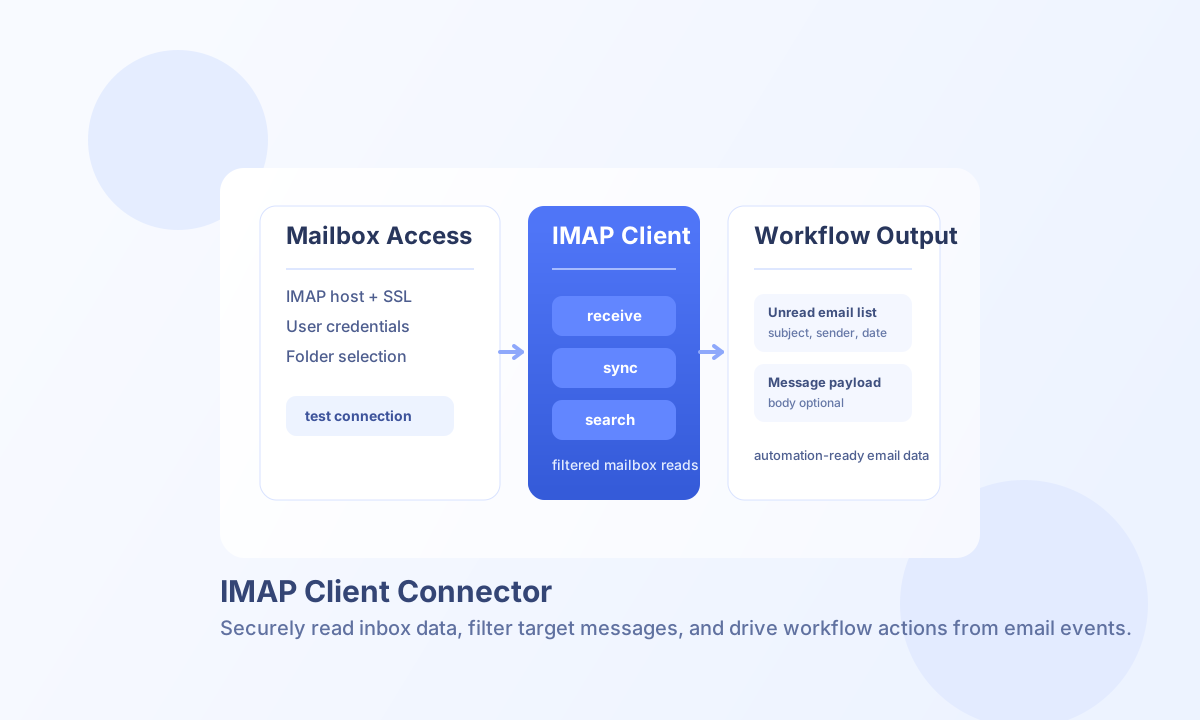
Configure IMAP access
Set imap_host, username, and password to the mailbox credentials you want Tealfabric to use. For most providers, keep use_ssl enabled with imap_port set to 993 so credentials and message data are encrypted in transit.
Use mailbox to target a specific folder such as INBOX or Support, and tune timeout for larger mailbox operations. Run test before enabling production automations so you can validate connectivity and permissions early.
Retrieve messages with receive
Use receive when you need mailbox polling with custom search_criteria, pagination, or optional body retrieval. This operation gives you the most control when building workflow logic around sender filters, date windows, or keyword matching.
const baseUrl = "https://api.example.com/api/v1";
const tenantId = "<TENANT_ID>";
const apiKey = "<API_KEY>";

async function receiveUnreadInvoices(integrationId: string) {
  const response = await fetch(`${baseUrl}/integrations/${encodeURIComponent(integrationId)}/execute`, {
    method: "POST",
    headers: {
      "X-API-Key": apiKey,
      "X-Tenant-ID": tenantId,
      "Content-Type": "application/json",
    },
    body: JSON.stringify({
      operation: "receive",
      search_criteria: 'UNSEEN AND SUBJECT "invoice"',
      limit: 25,
      offset: 0,
      include_body: false
    }),
  });
  if (!response.ok) throw new Error(`Request failed: ${response.status}`);
  return response.json();
}
curl -X POST "https://api.example.com/api/v1/integrations/<ENTITY_ID>/execute" \
-H "X-API-Key: <API_KEY>" \
-H "X-Tenant-ID: <TENANT_ID>" \
-H "Content-Type: application/json" \
-d '{
"operation": "receive",
"search_criteria": "UNSEEN AND SUBJECT \"invoice\"",
"limit": 25,
"offset": 0,
"include_body": false
}'
{
  "success": true,
  "data": {
    "message_count": 3,
    "total_available": 8,
    "emails": [
      {
        "message_number": 42,
        "uid": 8021,
        "subject": "Invoice INV-1042",
        "from": "billing@example.com",
        "to": "ops@example.com",
        "date": "2026-05-08 08:11:00",
        "seen": false
      }
    ]
  }
}
Poll unread mail with sync
Use sync when you want a simpler unread-mail workflow without manually setting search_criteria. This operation behaves like receive with UNSEEN preconfigured and is often the fastest way to build intake pipelines.
const baseUrl = "https://api.example.com/api/v1";
const tenantId = "<TENANT_ID>";
const apiKey = "<API_KEY>";

async function syncUnreadMessages(integrationId: string) {
  const response = await fetch(`${baseUrl}/integrations/${encodeURIComponent(integrationId)}/execute`, {
    method: "POST",
    headers: {
      "X-API-Key": apiKey,
      "X-Tenant-ID": tenantId,
      "Content-Type": "application/json",
    },
    body: JSON.stringify({
      operation: "sync",
      limit: 10,
      offset: 0,
      include_body: true
    }),
  });
  if (!response.ok) throw new Error(`Request failed: ${response.status}`);
  return response.json();
}
curl -X POST "https://api.example.com/api/v1/integrations/<ENTITY_ID>/execute" \
-H "X-API-Key: <API_KEY>" \
-H "X-Tenant-ID: <TENANT_ID>" \
-H "Content-Type: application/json" \
-d '{
"operation": "sync",
"limit": 10,
"offset": 0,
"include_body": true
}'
{
  "success": true,
  "data": {
    "message_count": 2,
    "total_available": 2,
    "emails": [
      {
        "message_number": 44,
        "uid": 8044,
        "subject": "Action required: contract review",
        "from": "legal@example.com",
        "to": "team@example.com",
        "date": "2026-05-08 09:30:00",
        "seen": false,
        "size": 412,
        "body": "Please review the attached draft..."
      }
    ]
  }
}
Validate connectivity with test
Run test before production polling to confirm host, port, TLS, credentials, and mailbox access. The connector returns mailbox status metrics under data.details.
{
  "success": true,
  "data": {
    "message": "IMAP connection test successful",
    "details": {
      "imap_host": "imap.example.com",
      "imap_port": 993,
      "use_ssl": true,
      "mailbox": "INBOX",
      "total_messages": 120,
      "recent_messages": 0,
      "unseen_messages": 4,
      "mailbox_count": 6
    }
  }
}
Acknowledge processed mail with acknowledge_message
Use acknowledge_message after a downstream create/update succeeds. The connector fetches the IMAP UID in the integration mailbox, validates that it exists, then either adds a flag (default \Flagged), MOVEs the message, or both.
already_acknowledged is true only when mode is flag and the flag was already present (STORE add is a no-op). IMAP UIDs are per-mailbox: after MOVE the source UID is gone, so a retry with the same UID fails validation instead of inventing success. Persist the first successful acknowledge in your workflow.
Gmail stores \Seen and \Flagged and can MOVE to another label/folder. Arbitrary IMAP keywords such as Processed are often ignored on Gmail; prefer \Flagged or MOVE to a processed folder.
const baseUrl = "https://api.example.com/api/v1";
const tenantId = "<TENANT_ID>";
const apiKey = "<API_KEY>";

async function acknowledgeProcessedLead(integrationId: string, uid: number) {
  const response = await fetch(`${baseUrl}/integrations/${encodeURIComponent(integrationId)}/execute`, {
    method: "POST",
    headers: {
      "X-API-Key": apiKey,
      "X-Tenant-ID": tenantId,
      "Content-Type": "application/json",
    },
    body: JSON.stringify({
      operation: "acknowledge_message",
      uid,
      flag: "\\Flagged",
      destination: "IO-processed",
      mode: "flag_and_move"
    }),
  });
  if (!response.ok) throw new Error(`Request failed: ${response.status}`);
  return response.json();
}
curl -X POST "https://api.example.com/api/v1/integrations/<ENTITY_ID>/execute" \
-H "X-API-Key: <API_KEY>" \
-H "X-Tenant-ID: <TENANT_ID>" \
-H "Content-Type: application/json" \
-d '{
"operation": "acknowledge_message",
"uid": 4,
"flag": "\\Flagged",
"destination": "IO-processed",
"mode": "flag_and_move"
}'
{
  "success": true,
  "data": {
    "uid": 4,
    "mailbox": "IO-pipeline",
    "acknowledged": true,
    "already_acknowledged": false,
    "mode": "flag_and_move",
    "flag": "\\Flagged",
    "destination": "IO-processed",
    "destination_uid": 12,
    "flags": ["\\Flagged"]
  }
}
Store flags with store_flags
Use store_flags for raw IMAP STORE. action is add (default, +FLAGS), remove (-FLAGS), or set (replace). Address the message by uid from receive/sync, not by message_number (sequence numbers change).
curl -X POST "https://api.example.com/api/v1/integrations/<ENTITY_ID>/execute" \
  -H "X-API-Key: <API_KEY>" \
  -H "X-Tenant-ID: <TENANT_ID>" \
  -H "Content-Type: application/json" \
  -d '{
    "operation": "store_flags",
    "uid": 4,
    "flags": ["\\Flagged", "\\Seen"],
    "action": "add"
  }'
Move or copy with move_message and copy_message
move_message runs IMAP MOVE to destination. copy_message leaves the source UID in place. Set create_destination to true only when the destination folder should be created if missing.
curl -X POST "https://api.example.com/api/v1/integrations/<ENTITY_ID>/execute" \
  -H "X-API-Key: <API_KEY>" \
  -H "X-Tenant-ID: <TENANT_ID>" \
  -H "Content-Type: application/json" \
  -d '{
    "operation": "move_message",
    "uid": 4,
    "destination": "IO-processed"
  }'
IMAP search criteria examples
search_criteria accepts IMAP-style terms that the connector maps to ImapFlow search queries. Supported patterns include ALL, UNSEEN, SEEN, FLAGGED, header filters such as FROM "sender@example.com" and SUBJECT "keyword", date filters such as SINCE "01-May-2026", and AND combinations like UNSEEN AND SUBJECT "invoice".
receive defaults search_criteria to ALL when omitted (legacy ?? semantics). sync defaults to UNSEEN only when search_criteria is omitted. Complex OR/NOT expressions are not translated yet; use simpler AND combinations for parity with legacy imap_search behavior.
When include_body is true, body contains the RFC822 message source (ImapFlow source), which may differ from legacy connector text extraction. Each row also includes size. If the UTF-8 size of body exceeds MAIL_BODY_INLINE_MAX_BYTES (default 51200), the connector writes the RFC822 to tenantdata/{tenant}/.cache/mail-bodies/, omits body, and returns body_path, body_bytes, and body_spooled: true. Agents and ProcessFlow steps should read_file that body_path rather than ingesting the whole integration result JSON.
Troubleshooting and operational guidance
Authentication failures usually come from incorrect credentials or account security requirements such as app passwords. Connection failures are commonly tied to host, port, TLS mismatch, or blocked network access between your runtime and the IMAP server.
Write operations (store_flags, move_message, copy_message, acknowledge_message) address messages by IMAP UID in the integration mailbox. Sequence numbers from message_number are not accepted. APPEND (create a new message in a mailbox) is not implemented.
If mailbox reads are slower than expected, reduce include_body, page through results with limit and offset, and run test before every large sync schedule. This keeps email ingestion predictable and easier to debug in production.