Infor LN / M3 Connector Guide
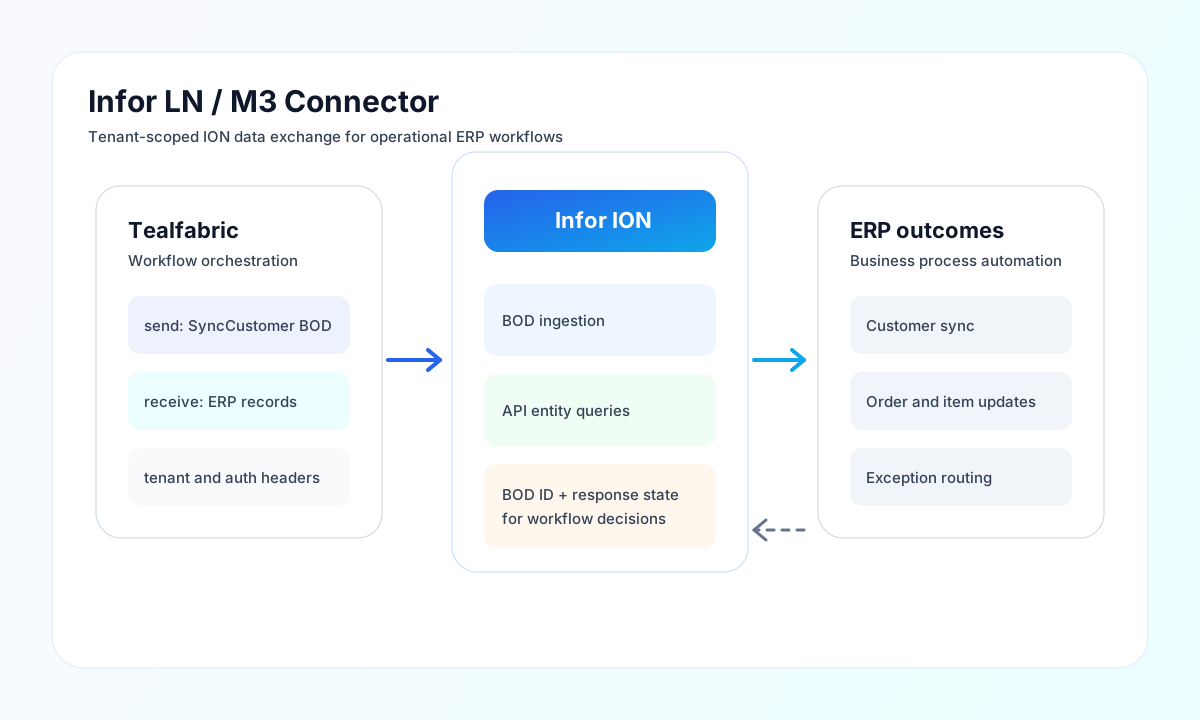
The Infor LN / M3 connector helps Tealfabric workflows exchange operational ERP data through Infor ION. It supports document-style integration with BOD payloads as well as direct API calls for transactional and master-data workflows.
Document information
| Field | Value |
|---|---|
| Canonical URL | /docs/04_connecting-systems/connectors/i/infor-ln-m3 |
| Version (published date) | 2026-05-08 |
| Tags | connectors, reference, infor-ln-m3 |
| Connector ID | infor-ln-m3-1.0.0 |
Configure ION access and tenant scope
Set base_url to your Infor ION API domain, then provide api_key and tenant_id that match your target LN or M3 environment. Keep credentials and tenant values aligned to the same environment to avoid cross-tenant authorization errors.
Use timeout_seconds for large payloads or slower network paths, especially when BOD processing includes deeper object trees. Run test after configuration to validate authentication and endpoint reachability before enabling production runs.
Configuration parameters (base_url, api_key, tenant_id, timeout_seconds) are integration settings—not callData fields on send, receive, or execute.
Send ERP data with send
Use send to POST, PUT, or PATCH JSON to {base_url}/{endpoint}. The default HTTP method is POST. Pass the request body in data (or omit data to forward the full callData object as the body, matching legacy PHP ?? semantics).
const response = await connector.execute(context, {
  operation: "send",
  input: {
    config: {
      base_url: "https://your-instance.inforcloudsuite.com",
      api_key: "<API_KEY>",
      tenant_id: "<TENANT_ID>",
    },
    endpoint: "api/v1/bod",
    method: "POST",
    data: {
      bod_type: "SyncCustomer",
      Customer: {
        CustomerID: "CUST001",
        CustomerName: "Acme Components",
      },
    },
  },
});
// { success: true, data: { message: "...", result: { ... } } }
{
"success": true,
"data": {
"message": "Infor LN/M3 operation completed successfully",
"result": {
"bod_id": "BOD-12345",
"status": "accepted"
}
}
}
When the ION response body is XML/BOD instead of JSON, result contains { "xml_response": "<...>" }.
Retrieve ERP records with receive
Use receive to GET {base_url}/{endpoint} with optional query parameters. Responses with an items array return that list; otherwise the decoded payload is wrapped as a single-item array.
{
  "operation": "receive",
  "input": {
    "config": {
      "base_url": "https://your-instance.inforcloudsuite.com",
      "api_key": "<API_KEY>",
      "tenant_id": "<TENANT_ID>"
    },
    "endpoint": "api/v1/customers",
    "query": { "limit": "50" }
  }
}
{
  "success": true,
  "data": {
    "message": "Infor LN/M3 data retrieved successfully",
    "record_count": 2,
    "items": [{ "CustomerID": "CUST001" }, { "CustomerID": "CUST002" }]
  }
}
Execute arbitrary ION methods with execute
Use execute for any HTTP verb against {base_url}/{endpoint}. Default method is GET. Request body uses body when present, otherwise data, otherwise an empty body (no JSON body is sent when empty, matching legacy PHP empty() behavior).
Test connectivity with test
test validates required configuration (base_url, api_key, tenant_id) and probes GET api/v1/health. Configuration failures return Configuration validation failed; API failures return Infor LN/M3 API error: ….
Reliability and production guidance
Most operational failures are caused by invalid API keys, tenant mismatches, unsupported BOD structures, or aggressive request rates. Verify credentials and tenant mapping first, then confirm your payload structure against the relevant BOD or endpoint contract.
For resilient integrations, use retries with exponential backoff for transient failures, keep payload schemas versioned, and log BOD or entity identifiers for traceability. This improves recovery speed and reduces reconciliation effort.