iCalendar Connector Guide
The iCalendar connector helps you automate calendar event creation and retrieval against CalDAV-compatible services. It is designed for workflows that need dependable scheduling, reminders, and follow-up actions driven by event data.
Document information
| Field | Value |
|---|---|
| Canonical URL | /docs/04_connecting-systems/connectors/i/icalendar |
| Version (published date) | 2026-05-08 |
| Tags | connectors, reference, icalendar |
| Connector ID | icalendar-1.0.0 |
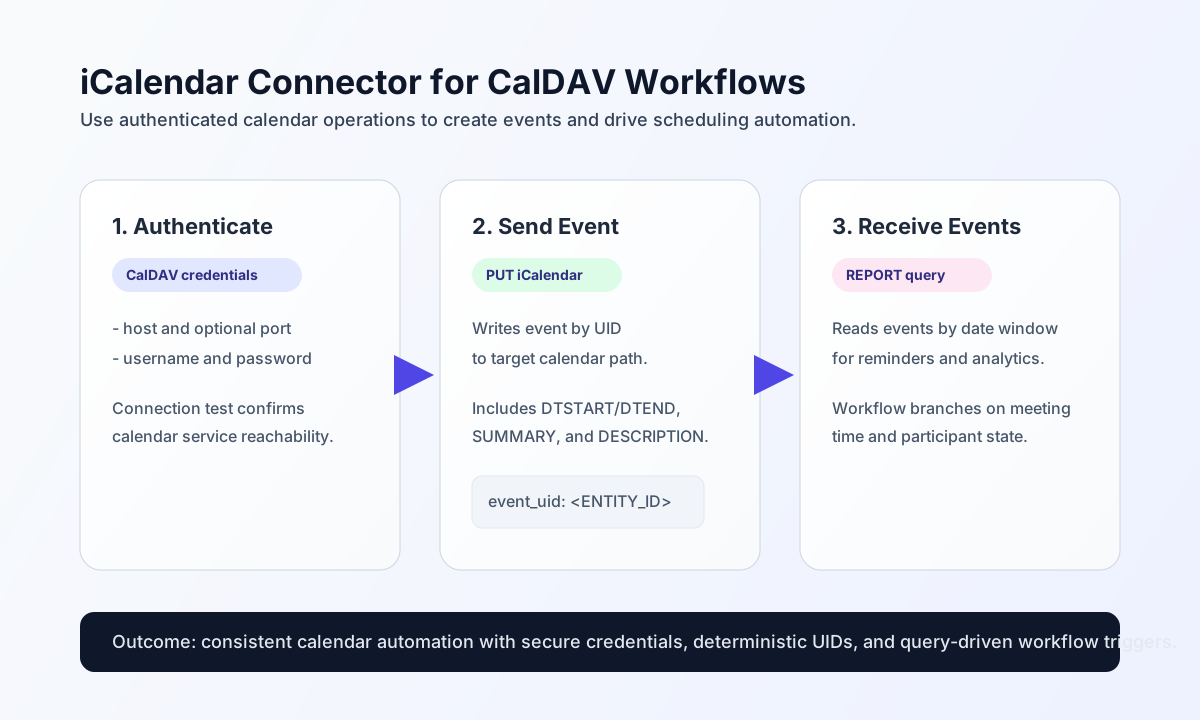
Configure access and validate connectivity
Configure the connector with your CalDAV server details and account credentials so workflows can authenticate consistently.
host(required): CalDAV server hostname, IP address, or full URL (https://cal.example.com).username(required): HTTP Basic auth username.password(required): HTTP Basic auth password.port(optional): server port whenhostis a bare hostname (default443for HTTPS).timeout_seconds(optional): request timeout in seconds (default30).
After saving configuration, run test to confirm the account can authenticate and reach the calendar service. The connector issues OPTIONS / and reports whether a DAV response header is present.
Create or update calendar events with send
Use send when a workflow needs to create a new event or replace an existing event payload. Provide the CalDAV collection path as path (alias endpoint), the iCalendar body as ical_data (aliases data, body), and optionally event_id (alias uid) to append /{event_id}.ics when it is not already in the path. Default HTTP method is PUT (alias http_method).
const baseUrl = "https://api.example.com/api/v1";
const tenantId = "<TENANT_ID>";
const apiKey = "<API_KEY>";

const icalData = `BEGIN:VCALENDAR
VERSION:2.0
PRODID:-//Tealfabric//Calendar//EN
BEGIN:VEVENT
UID:evt-001
DTSTART:20260601T090000Z
DTEND:20260601T093000Z
SUMMARY:Customer onboarding call
DESCRIPTION:Kickoff meeting with implementation team
END:VEVENT
END:VCALENDAR`;

async function createEvent(integrationId: string) {
  const response = await fetch(`${baseUrl}/integrations/${encodeURIComponent(integrationId)}/execute`, {
    method: "POST",
    headers: {
      "X-API-Key": apiKey,
      "X-Tenant-ID": tenantId,
      "Content-Type": "application/json",
    },
    body: JSON.stringify({
      operation: "send",
      path: "/calendars/user@example.com/calendar/",
      event_id: "evt-001",
      method: "PUT",
      ical_data: icalData
    }),
  });
  if (!response.ok) throw new Error(`Request failed: ${response.status}`);
  return response.json();
}
curl -X POST "https://api.example.com/api/v1/integrations/<ENTITY_ID>/execute" \
-H "X-API-Key: <API_KEY>" \
-H "X-Tenant-ID: <TENANT_ID>" \
-H "Content-Type: application/json" \
-d '{
"operation": "send",
"path": "/calendars/user@example.com/calendar/",
"event_id": "evt-001",
"method": "PUT",
"ical_data": "BEGIN:VCALENDAR\nVERSION:2.0\nPRODID:-//Tealfabric//Calendar//EN\nBEGIN:VEVENT\nUID:evt-001\nDTSTART:20260601T090000Z\nDTEND:20260601T093000Z\nSUMMARY:Customer onboarding call\nEND:VEVENT\nEND:VCALENDAR"
}'
{
  "success": true,
  "data": {
    "message_count": 1,
    "http_status": 201,
    "data": {
      "status_code": 201,
      "headers": {},
      "body": ""
    }
  }
}
Retrieve events with receive
Use receive to fetch calendar data via CalDAV. Default method is PROPFIND with Depth: 1, which returns parsed href and ical_data records from the XML response. Use method: "GET" for direct resource reads. Set path (alias endpoint) to the calendar collection or resource path.
const baseUrl = "https://api.example.com/api/v1";
const tenantId = "<TENANT_ID>";
const apiKey = "<API_KEY>";

async function queryEvents(integrationId: string) {
  const response = await fetch(`${baseUrl}/integrations/${encodeURIComponent(integrationId)}/execute`, {
    method: "POST",
    headers: {
      "X-API-Key": apiKey,
      "X-Tenant-ID": tenantId,
      "Content-Type": "application/json",
    },
    body: JSON.stringify({
      operation: "receive",
      path: "/calendars/user@example.com/calendar/",
      method: "PROPFIND",
      depth: "1"
    }),
  });
  if (!response.ok) throw new Error(`Request failed: ${response.status}`);
  return response.json();
}
curl -X POST "https://api.example.com/api/v1/integrations/<ENTITY_ID>/execute" \
-H "X-API-Key: <API_KEY>" \
-H "X-Tenant-ID: <TENANT_ID>" \
-H "Content-Type: application/json" \
-d '{
"operation": "receive",
"path": "/calendars/user@example.com/calendar/",
"method": "PROPFIND",
"depth": "1"
}'
{
  "success": true,
  "data": {
    "message_count": 1,
    "total_size": 1,
    "http_status": 207,
    "data": [
      {
        "href": "/calendars/user@example.com/calendar/evt-001.ics",
        "ical_data": "BEGIN:VCALENDAR\nVERSION:2.0\n..."
      }
    ]
  }
}
Bidirectional sync and batch
Use sync to run optional outbound (send) and/or inbound (receive) sub-operations in one call. Empty outbound/inbound payloads are skipped, matching legacy PHP empty() semantics.
Use batch to run multiple send or receive sub-operations sequentially. Each entry may specify operation (alias type) and nested data; per-item failures are captured without aborting the whole batch.
Reliability guidance
Use HTTPS endpoints, validate iCalendar payloads before sending, and keep event_id/uid values stable for idempotent updates. The connector applies a local rate limit of 60 requests per minute.
If requests fail, check credentials first, then verify path and iCalendar format quality (especially UID, DTSTART, and DTEND). Network failures surface with a cURL error: prefix to match legacy connector behavior.