Image File Connector Guide
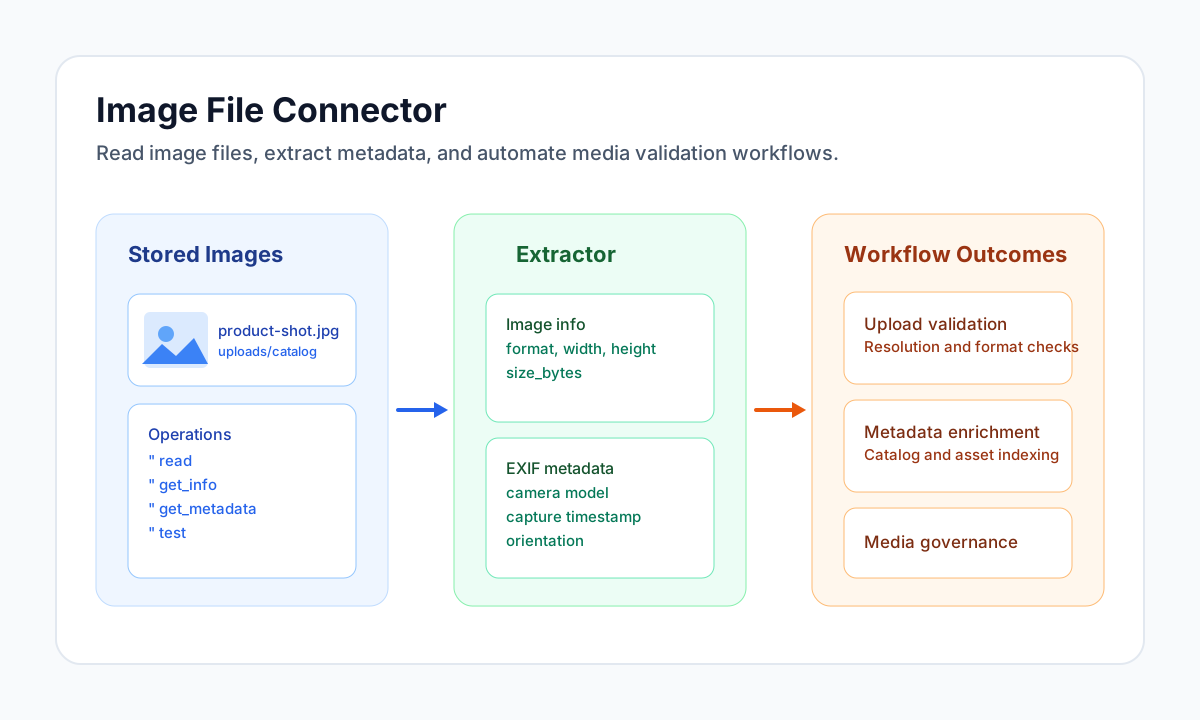
The Image File connector lets your workflows read stored image files and extract technical metadata such as dimensions, format, and EXIF tags. It is useful when you need to validate uploads, enrich media records, or route files based on image properties.
Document information
| Field | Value |
|---|---|
| Canonical URL | /docs/04_connecting-systems/connectors/i/image-file |
| Version (published date) | 2026-05-08 |
| Tags | connectors, reference, image-file |
| Connector ID | image-file-1.0.0 |
Configure file location
Set filename to the image you want to process and use optional path to target a subdirectory under tenant storage. Keep file naming conventions consistent so workflows can resolve assets predictably across environments.
Run test during setup to confirm the connector can access configured storage locations. This helps catch path and permission issues before processing live media.
Read image content with read
Use read when you need file-level output that includes core image details and payload fields for downstream steps. This is a common first step in moderation, cataloging, or transformation pipelines.
const baseUrl = "https://api.example.com/api/v1";
const tenantId = "<TENANT_ID>";
const apiKey = "<API_KEY>";

async function readProductImage(integrationId: string) {
  const response = await fetch(`${baseUrl}/integrations/${encodeURIComponent(integrationId)}/execute`, {
    method: "POST",
    headers: {
      "X-API-Key": apiKey,
      "X-Tenant-ID": tenantId,
      "Content-Type": "application/json",
    },
    body: JSON.stringify({
      operation: "read",
      filename: "product-shot.jpg",
      path: "uploads/catalog"
    }),
  });
  if (!response.ok) throw new Error(`Request failed: ${response.status}`);
  return response.json();
}
curl -X POST "https://api.example.com/api/v1/integrations/<ENTITY_ID>/execute" \
-H "X-API-Key: <API_KEY>" \
-H "X-Tenant-ID: <TENANT_ID>" \
-H "Content-Type: application/json" \
-d '{
"operation": "read",
"filename": "product-shot.jpg",
"path": "uploads/catalog"
}'
{
  "success": true,
  "data": {
    "filename": "product-shot.jpg",
    "format": "jpeg",
    "width": 2400,
    "height": 1600,
    "size_bytes": 582311
  }
}
Extract metadata with get_metadata
Use get_metadata when your workflow needs EXIF fields such as camera model, capture timestamp, orientation, or geotags. Metadata availability depends on file type and whether the image still contains embedded EXIF blocks.
const baseUrl = "https://api.example.com/api/v1";
const tenantId = "<TENANT_ID>";
const apiKey = "<API_KEY>";

async function extractExifMetadata(integrationId: string) {
  const response = await fetch(`${baseUrl}/integrations/${encodeURIComponent(integrationId)}/execute`, {
    method: "POST",
    headers: {
      "X-API-Key": apiKey,
      "X-Tenant-ID": tenantId,
      "Content-Type": "application/json",
    },
    body: JSON.stringify({
      operation: "get_metadata",
      filename: "field-photo.jpg",
      path: "uploads/inspections"
    }),
  });
  if (!response.ok) throw new Error(`Request failed: ${response.status}`);
  return response.json();
}
curl -X POST "https://api.example.com/api/v1/integrations/<ENTITY_ID>/execute" \
-H "X-API-Key: <API_KEY>" \
-H "X-Tenant-ID: <TENANT_ID>" \
-H "Content-Type: application/json" \
-d '{
"operation": "get_metadata",
"filename": "field-photo.jpg",
"path": "uploads/inspections"
}'
{
  "success": true,
  "data": {
    "filename": "field-photo.jpg",
    "metadata": {
      "camera_model": "ExampleCam Pro",
      "captured_at": "2026-05-08T08:30:00Z",
      "orientation": "Landscape"
    }
  }
}
Operational guidance
Use get_info when you only need dimensions, format, and file size without full metadata parsing. This reduces overhead for simple validation rules such as minimum resolution checks.
Metadata extraction depends on runtime extensions (for example EXIF support) and on whether source files preserve embedded tags. For production reliability, handle missing metadata gracefully and always validate file existence before processing.