IFS ERP Connector Guide
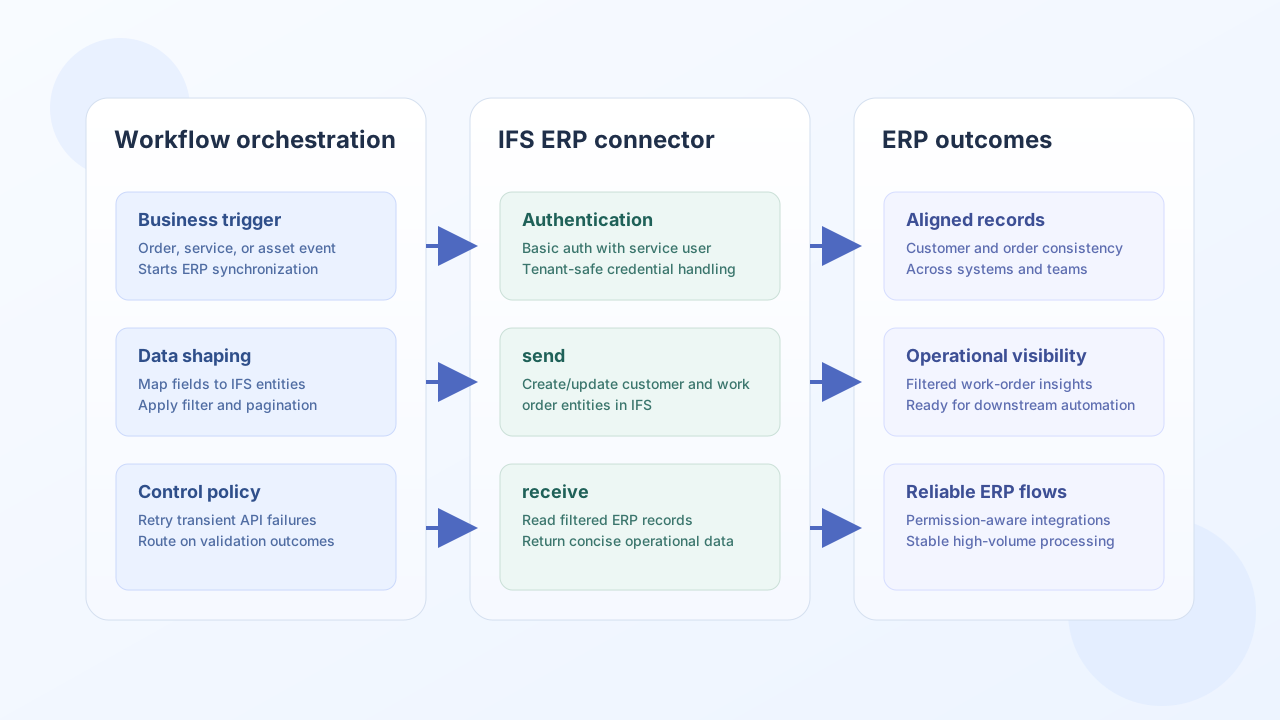
The IFS ERP connector enables Tealfabric workflows to create, update, and retrieve ERP records used in manufacturing, service, and asset operations. It is designed for teams that need reliable data movement between workflow logic and IFS business entities.
Document information
| Field | Value |
|---|---|
| Canonical URL | /docs/04_connecting-systems/connectors/i/ifs-erp |
| Version (published date) | 2026-05-08 |
| Tags | connectors, reference, ifs-erp |
| Connector ID | ifs-erp-1.0.0 |
Configuration and authentication
Configure your IFS base URL and service credentials so the connector can authenticate and execute ERP operations consistently. A dedicated integration user with least-privilege access is recommended for production environments.
base_url(required): IFS ERP instance URL, such ashttps://ifs.example.com.username(required): IFS user with API permissions.password(required): password for the configured user.timeout_seconds(optional): request timeout value, default60.
The connector uses Basic Authentication for API access. Run test after setup to confirm connectivity before enabling business-critical workflows.
Create or update records with send
Use send when a workflow needs to create or update IFS entities such as customers, work orders, or service objects. Keep entity payloads aligned with your IFS data model and validate required fields before submission.
const baseUrl = "https://api.example.com/api/v1";
const tenantId = "<TENANT_ID>";
const apiKey = "<API_KEY>";

async function upsertIfsCustomer(integrationId: string) {
  const response = await fetch(`${baseUrl}/integrations/${encodeURIComponent(integrationId)}/execute`, {
    method: "POST",
    headers: {
      "X-API-Key": apiKey,
      "X-Tenant-ID": tenantId,
      "Content-Type": "application/json",
    },
    body: JSON.stringify({
      operation: "send",
      entity: "Customer",
      method: "PUT",
      key: "CUST001",
      data: {
        customerNo: "CUST001",
        name: "Acme Industrial Services",
        email: "ops@acme-industrial.example",
        phone: "+1-555-0142",
      },
    }),
  });
  if (!response.ok) throw new Error(`Request failed: ${response.status}`);
  const payload = await response.json();
  return payload.result;
}
curl -X POST "https://api.example.com/api/v1/integrations/<ENTITY_ID>/execute" \
-H "X-API-Key: <API_KEY>" \
-H "X-Tenant-ID: <TENANT_ID>" \
-H "Content-Type: application/json" \
-d '{
"operation": "send",
"entity": "Customer",
"method": "PUT",
"key": "CUST001",
"data": {
"customerNo": "CUST001",
"name": "Acme Industrial Services",
"email": "ops@acme-industrial.example",
"phone": "+1-555-0142"
}
}'
{
  "success": true,
  "entity_key": "CUST001",
  "result": {
    "customerNo": "CUST001",
    "name": "Acme Industrial Services",
    "status": "Updated"
  }
}
Retrieve ERP data with receive
Use receive for lookup and reporting flows, such as loading customer details, work-order context, or filtered entity lists. Limit returned fields and paginate large results to keep workflows fast and stable.
const baseUrl = "https://api.example.com/api/v1";
const tenantId = "<TENANT_ID>";
const apiKey = "<API_KEY>";

async function listOpenWorkOrders(integrationId: string) {
  const response = await fetch(`${baseUrl}/integrations/${encodeURIComponent(integrationId)}/execute`, {
    method: "POST",
    headers: {
      "X-API-Key": apiKey,
      "X-Tenant-ID": tenantId,
      "Content-Type": "application/json",
    },
    body: JSON.stringify({
      operation: "receive",
      entity: "WorkOrder",
      filter: "status eq 'Released'",
      fields: ["workOrderNo", "partNo", "startDate", "dueDate"],
      top: 25,
      skip: 0,
    }),
  });
  if (!response.ok) throw new Error(`Request failed: ${response.status}`);
  const payload = await response.json();
  return payload.entities ?? [];
}
curl -X POST "https://api.example.com/api/v1/integrations/<ENTITY_ID>/execute" \
-H "X-API-Key: <API_KEY>" \
-H "X-Tenant-ID: <TENANT_ID>" \
-H "Content-Type: application/json" \
-d '{
"operation": "receive",
"entity": "WorkOrder",
"filter": "status eq '\''Released'\''",
"fields": ["workOrderNo", "partNo", "startDate", "dueDate"],
"top": 25,
"skip": 0
}'
{
  "success": true,
  "record_count": 2,
  "entities": [
    {
      "workOrderNo": "WO-10421",
      "partNo": "PART-1007",
      "startDate": "2026-05-09",
      "dueDate": "2026-05-14"
    },
    {
      "workOrderNo": "WO-10422",
      "partNo": "PART-2001",
      "startDate": "2026-05-09",
      "dueDate": "2026-05-16"
    }
  ]
}
Reliability guidance
Most integration issues come from permission mismatches, invalid entity field names, or unbounded high-volume queries. Validate credentials with test, scope API user permissions carefully, and add retry with exponential backoff for transient failures such as HTTP 429 or timeouts.
These controls help maintain reliable ERP automations as data volume and process complexity grow.