Instagram Connector Guide
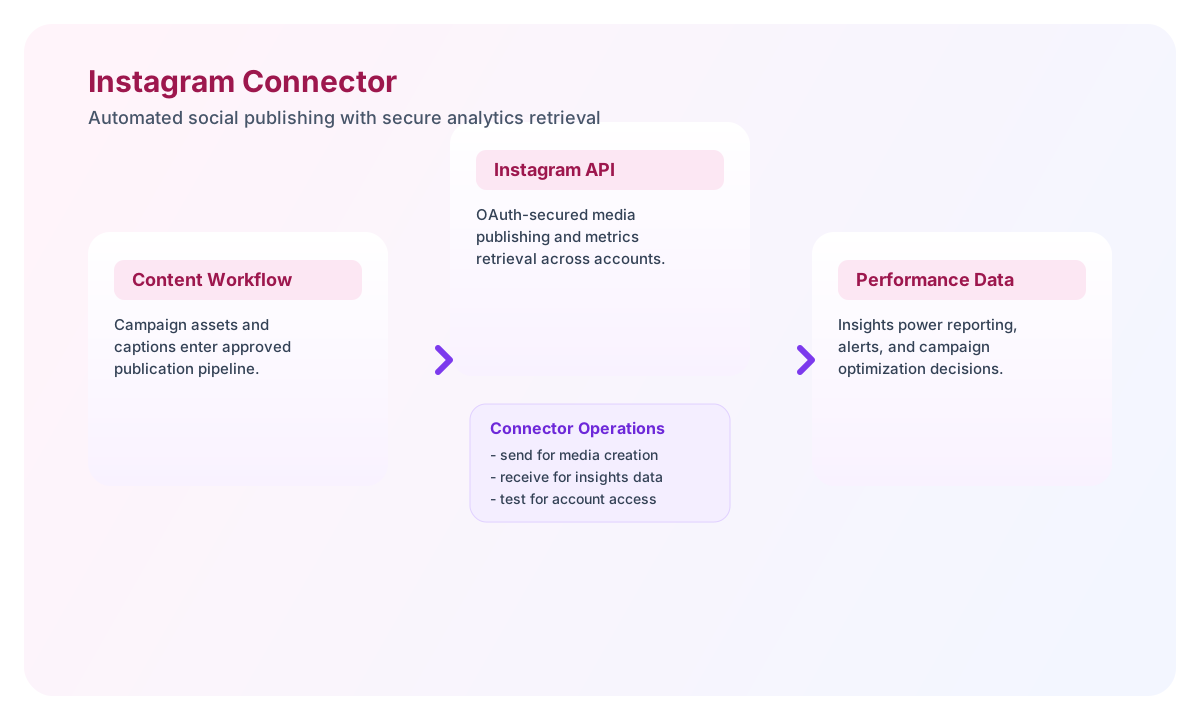
The Instagram connector helps Tealfabric workflows publish media and retrieve account insights through the Instagram Graph API. It is ideal for teams that automate social publishing, campaign tracking, and engagement reporting from a single workflow layer.
Document information
| Field | Value |
|---|---|
| Canonical URL | /docs/04_connecting-systems/connectors/i/instagram |
| Version (published date) | 2026-05-08 |
| Tags | connectors, reference, instagram |
| Connector ID | instagram-1.0.0 |
Configure OAuth and account access
Set client_id, client_secret, and redirect_uri from your Meta app configuration, then complete the OAuth authorization flow to store a valid access_token. Keep scopes limited to the actions your workflow performs, such as media publishing or insights retrieval.
client_id(required): Meta app client ID.client_secret(required): Meta app client secret.redirect_uri(required): OAuth callback URL configured in your app.access_token(optional): active OAuth token.refresh_token(optional): long-lived token used forfb_exchange_tokenrefresh on HTTP 401.scope(optional): requested Instagram Graph permissions.timeout_seconds(optional): request timeout value.
The test operation validates client_id, client_secret, and redirect_uri. Other operations require only a valid access_token (and use refresh_token on HTTP 401 when configured).
Use timeout_seconds for long-running calls and verify the setup with test before enabling production schedules. This ensures the connected Instagram Business account is reachable and authorized.
Publish media with send
Use send to create a media container and publish content on the connected Instagram account. In production workflows, this usually runs after content approval and asset validation.
const baseUrl = "https://api.example.com/api/v1";
const tenantId = "<TENANT_ID>";
const apiKey = "<API_KEY>";

async function createInstagramMedia(integrationId: string) {
  const response = await fetch(`${baseUrl}/integrations/${encodeURIComponent(integrationId)}/execute`, {
    method: "POST",
    headers: {
      "X-API-Key": apiKey,
      "X-Tenant-ID": tenantId,
      "Content-Type": "application/json",
    },
    body: JSON.stringify({
      operation: "send",
      endpoint: "<ENTITY_ID>/media",
      method: "POST",
      data: {
        image_url: "https://example.com/assets/campaign-image.jpg",
        caption: "Launch day update from our team."
      }
    }),
  });
  if (!response.ok) throw new Error(`Request failed: ${response.status}`);
  return response.json();
}
curl -X POST "https://api.example.com/api/v1/integrations/<ENTITY_ID>/execute" \
-H "X-API-Key: <API_KEY>" \
-H "X-Tenant-ID: <TENANT_ID>" \
-H "Content-Type: application/json" \
-d '{
"operation": "send",
"endpoint": "<ENTITY_ID>/media",
"method": "POST",
"data": {
"image_url": "https://example.com/assets/campaign-image.jpg",
"caption": "Launch day update from our team."
}
}'
{
  "success": true,
  "data": {
    "message_count": 1,
    "data": {
      "id": "17932445000112233"
    },
    "response": {
      "id": "17932445000112233"
    }
  }
}
Retrieve performance data with receive
Use receive to collect media, profile details, or insight metrics for reporting workflows. Limit fields and page sizes so runs remain efficient and easier to troubleshoot.
const baseUrl = "https://api.example.com/api/v1";
const tenantId = "<TENANT_ID>";
const apiKey = "<API_KEY>";

async function fetchInstagramInsights(integrationId: string) {
  const response = await fetch(`${baseUrl}/integrations/${encodeURIComponent(integrationId)}/execute`, {
    method: "POST",
    headers: {
      "X-API-Key": apiKey,
      "X-Tenant-ID": tenantId,
      "Content-Type": "application/json",
    },
    body: JSON.stringify({
      operation: "receive",
      endpoint: "<ENTITY_ID>/insights",
      query: {
        metric: "impressions,reach,profile_views",
        period: "day"
      }
    }),
  });
  if (!response.ok) throw new Error(`Request failed: ${response.status}`);
  const payload = await response.json();
  return payload.data?.data ?? [];
}
curl -X POST "https://api.example.com/api/v1/integrations/<ENTITY_ID>/execute" \
-H "X-API-Key: <API_KEY>" \
-H "X-Tenant-ID: <TENANT_ID>" \
-H "Content-Type: application/json" \
-d '{
"operation": "receive",
"endpoint": "<ENTITY_ID>/insights",
"query": {
"metric": "impressions,reach,profile_views",
"period": "day"
}
}'
{
  "success": true,
  "data": {
    "message_count": 2,
    "data": [
      {
        "name": "impressions",
        "period": "day",
        "values": [{"value": 1240, "end_time": "2026-05-08T07:00:00+0000"}]
      },
      {
        "name": "reach",
        "period": "day",
        "values": [{"value": 980, "end_time": "2026-05-08T07:00:00+0000"}]
      }
    ],
    "total_size": 2
  }
}
Test connection with test
The test operation calls GET me?fields=id,username and returns account details when authentication succeeds.
{
  "success": true,
  "data": {
    "message": "Instagram connection test successful",
    "details": {
      "api_base_url": "https://graph.instagram.com",
      "account_id": "17841400000000000",
      "username": "example_business"
    }
  }
}
Reliability and compliance guidance
Most failures are caused by expired tokens, missing app scopes, or endpoint-specific rate limits. Keep your OAuth credentials current, validate granted permissions, and watch app review requirements for advanced Instagram API access.
For resilient automations, add backoff retries for temporary failures and verify success before triggering downstream actions. This helps you maintain stable social workflows during high-traffic campaign windows.