Informatica Cloud Connector Guide
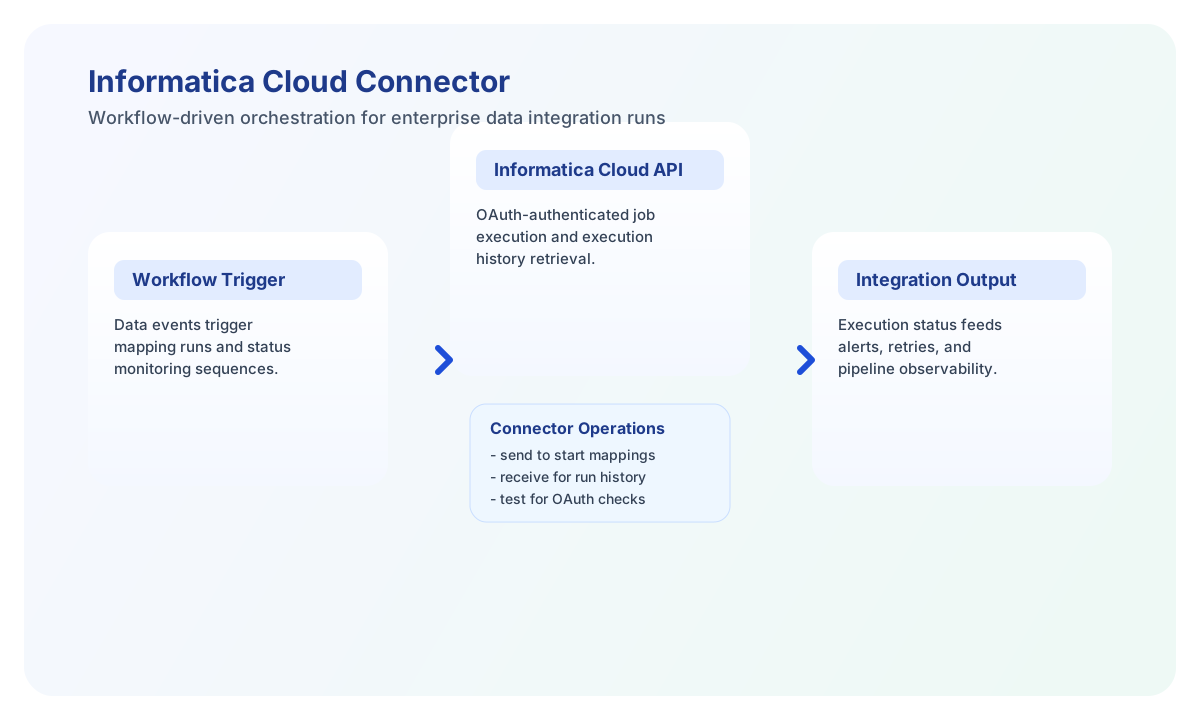
The Informatica Cloud connector lets Tealfabric workflows trigger and monitor Informatica integration resources such as mappings and executions. It is useful for organizations that orchestrate ETL and data movement processes across cloud systems.
Document information
| Field | Value |
|---|---|
| Canonical URL | /docs/04_connecting-systems/connectors/i/informatica-cloud |
| Version (published date) | 2026-05-08 |
| Tags | connectors, reference, informatica-cloud |
| Connector ID | informatica-cloud-1.0.0 |
Configure OAuth credentials and endpoint
Set base_url, client_id, and client_secret from your Informatica Cloud API access settings. The connector uses OAuth2 Client Credentials flow and automatically includes bearer tokens in API calls after authentication.
Use timeout_seconds to account for longer-running integration calls, especially when workflows query execution history or trigger large jobs. Run test during setup to confirm your API client can authenticate and access resources.
Trigger mappings with send
Use send to create or execute mappings in Informatica Cloud. Most production workflows use this operation to start integration jobs after source data validation or scheduled release events.
const baseUrl = "https://api.example.com/api/v1";
const tenantId = "<TENANT_ID>";
const apiKey = "<API_KEY>";

async function runMapping(integrationId: string) {
  const response = await fetch(`${baseUrl}/integrations/${encodeURIComponent(integrationId)}/execute`, {
    method: "POST",
    headers: {
      "X-API-Key": apiKey,
      "X-Tenant-ID": tenantId,
      "Content-Type": "application/json",
    },
    body: JSON.stringify({
      operation: "send",
      endpoint: "api/v2/mapping/<ENTITY_ID>/execute",
      method: "POST",
      data: {
        runtime_environment: "<ENTITY_ID>",
        parameters: [
          { name: "runMode", value: "incremental" }
        }
      }
    }),
  });
  if (!response.ok) throw new Error(`Request failed: ${response.status}`);
  return response.json();
}
curl -X POST "https://api.example.com/api/v1/integrations/<ENTITY_ID>/execute" \
-H "X-API-Key: <API_KEY>" \
-H "X-Tenant-ID: <TENANT_ID>" \
-H "Content-Type: application/json" \
-d '{
"operation": "send",
"endpoint": "api/v2/mapping/<ENTITY_ID>/execute",
"method": "POST",
"data": {
"runtime_environment": "<ENTITY_ID>",
"parameters": [
{"name": "runMode", "value": "incremental"}
]
}
}'
{
  "success": true,
  "result": {
    "id": "<ENTITY_ID>",
    "status": "RUNNING"
  }
}
Monitor integration runs with receive
Use receive to list mappings, retrieve execution history, and audit operational status. Time-window filtering is useful for dashboards and post-run alerting workflows.
const baseUrl = "https://api.example.com/api/v1";
const tenantId = "<TENANT_ID>";
const apiKey = "<API_KEY>";

async function listExecutions(integrationId: string) {
  const response = await fetch(`${baseUrl}/integrations/${encodeURIComponent(integrationId)}/execute`, {
    method: "POST",
    headers: {
      "X-API-Key": apiKey,
      "X-Tenant-ID": tenantId,
      "Content-Type": "application/json",
    },
    body: JSON.stringify({
      operation: "receive",
      endpoint: "api/v2/execution",
      query: {
        filter: "mapping_id=<ENTITY_ID>",
        start_date: "2026-05-01T00:00:00Z",
        end_date: "2026-05-08T23:59:59Z",
        limit: 20
      }
    }),
  });
  if (!response.ok) throw new Error(`Request failed: ${response.status}`);
  return response.json();
}
curl -X POST "https://api.example.com/api/v1/integrations/<ENTITY_ID>/execute" \
-H "X-API-Key: <API_KEY>" \
-H "X-Tenant-ID: <TENANT_ID>" \
-H "Content-Type: application/json" \
-d '{
"operation": "receive",
"endpoint": "api/v2/execution",
"query": {
"filter": "mapping_id=<ENTITY_ID>",
"start_date": "2026-05-01T00:00:00Z",
"end_date": "2026-05-08T23:59:59Z",
"limit": 20
}
}'
{
  "success": true,
  "record_count": 2,
  "data": [
    {
      "id": "<ENTITY_ID>",
      "status": "SUCCESS",
      "start_time": "2026-05-08T10:01:00Z"
    },
    {
      "id": "<ENTITY_ID>",
      "status": "FAILED",
      "start_time": "2026-05-08T08:15:00Z"
    }
  ]
}
Reliability guidance
Most integration failures involve OAuth credential issues, incorrect endpoint paths, or rate limits during monitoring loops. Validate API client permissions and apply backoff retries for temporary API throttling.
For stable production behavior, treat mapping runs as asynchronous, poll execution status explicitly, and avoid assuming immediate completion. This keeps workflow logic resilient across large data volumes.