Integration workers guide
Document information
- Canonical URL:
/docs/04_connecting-systems/08_integration-workers-guide - Version:
2026-06-09 - Tags:
integrations,workers,guides
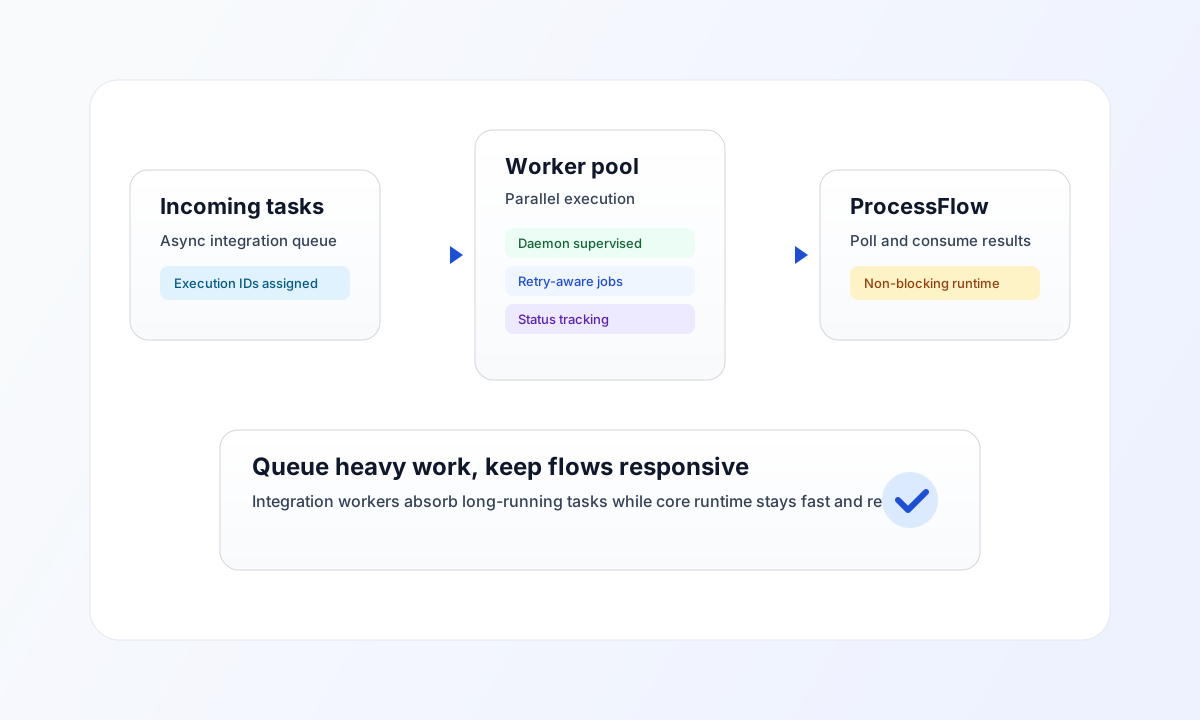
Long-running connector calls—large syncs, file transfers, or slow external APIs—should not block your process steps or API responses. Tealfabric queues those jobs in the background and runs them on integration workers. You get an execution reference right away and can check status or fetch the result when the job finishes.
Choose synchronous or asynchronous execution
| Mode | Best for | What you get back |
|---|---|---|
| Synchronous | Short calls where the caller must wait (validation, quick lookups, small updates) | The connector result in the same request |
| Asynchronous | Heavy payloads, batch jobs, rate-limited APIs, or any work that may take minutes | An execution_id immediately; result available after the job completes |
Use synchronous execution when the next step in your workflow needs the answer now. Use asynchronous execution when waiting would risk timeouts, frustrate users, or tie up a WebApp request unnecessarily.
When you queue async work, Tealfabric stores the job, runs it on a background worker, and keeps a full execution record you can inspect later.
Run integrations asynchronously from ProcessFlow
Inside ProcessFlow steps, use the built-in integration service. It handles queueing, retries, and status tracking for you.
// Start a long-running integration
const executionId = await integration.executeAsync("<INTEGRATION_ID>", {
  batch_id: "b_20260508",
  priority: "high",
});

// Poll until the job reaches a terminal state
const status = await integration.getStatus(executionId);
if (status.status === "completed") {
  const result = await integration.getResult(executionId);
  process_output.sync_summary = result.result;
} else if (status.status === "failed") {
  return { success: false, error: status.error_message ?? "Integration failed" };
}
For short calls in the same step, use integration.executeSync() instead. See WebApp functions guide for the full integration service API and Integration connector usage for payload patterns.
Practical tip: Split “submit work” and “wait for result” across two steps when the integration may run for a long time. The first step queues the job and passes execution_id forward; the second step polls getStatus / getResult or branches on failure.
Queue integrations from external systems
External apps (partner backends, schedulers, custom services) can queue work through the Integrations API. Send async: true with your integration ID and payload; the response includes an execution_id to poll.
curl -X POST "https://api.example.com/api/v1/integrations?action=execute" \
  -H "X-API-Key: <API_KEY>" \
  -H "X-Tenant-ID: <TENANT_ID>" \
  -H "Content-Type: application/json" \
  -d '{
    "integration_id": "<INTEGRATION_ID>",
    "async": true,
    "operation": "sync",
    "data": {
      "batch_id": "b_20260508",
      "priority": "high"
    }
  }'
{
  "success": true,
  "data": {
    "execution_id": "exec_01JTVHNRM8Q1",
    "integration_id": "<INTEGRATION_ID>",
    "status": "pending"
  }
}
Your API key needs the integrations.execute scope. See Connectors architecture for how integrations relate to connectors.
const baseUrl = "https://api.example.com/api/v1";
const tenantId = "<TENANT_ID>";
const apiKey = "<API_KEY>";

type QueueResponse = { execution_id: string; status: string };
type StatusResponse = {
  execution_id: string;
  status: string;
  error_message?: string | null;
  response_data?: unknown;
};

async function queueIntegration(
  integrationId: string,
  data: Record<string, unknown>,
  operation = "default"
): Promise<QueueResponse> {
  const response = await fetch(`${baseUrl}/integrations?action=execute`, {
    method: "POST",
    headers: {
      "X-API-Key": apiKey,
      "X-Tenant-ID": tenantId,
      "Content-Type": "application/json",
    },
    body: JSON.stringify({ integration_id: integrationId, async: true, operation, data }),
  });
  if (!response.ok) throw new Error(`Request failed: ${response.status}`);
  const payload = (await response.json()) as { data?: QueueResponse };
  if (!payload.data?.execution_id) throw new Error("Missing execution_id");
  return payload.data;
}

async function getIntegrationStatus(executionId: string): Promise<StatusResponse> {
  const url = new URL(`${baseUrl}/integrations`);
  url.searchParams.set("action", "status");
  url.searchParams.set("execution_id", executionId);
  const response = await fetch(url.toString(), {
    method: "GET",
    headers: {
      "X-API-Key": apiKey,
      "X-Tenant-ID": tenantId,
      "Content-Type": "application/json",
    },
  });
  if (!response.ok) throw new Error(`Request failed: ${response.status}`);
  const payload = (await response.json()) as { data?: StatusResponse };
  if (!payload.data) throw new Error("Missing status payload");
  return payload.data;
}
Track progress and retrieve results
Execution status moves through pending → running → completed or failed. Poll until you reach a terminal state, or list recent jobs when building dashboards or support tooling.
Check one execution
curl -X GET "https://api.example.com/api/v1/integrations?action=status&execution_id=exec_01JTVHNRM8Q1" \
  -H "X-API-Key: <API_KEY>" \
  -H "X-Tenant-ID: <TENANT_ID>"
Fetch the result after completion
curl -X GET "https://api.example.com/api/v1/integrations?action=result&execution_id=exec_01JTVHNRM8Q1" \
  -H "X-API-Key: <API_KEY>" \
  -H "X-Tenant-ID: <TENANT_ID>"
The result endpoint returns data only when status is completed. If the job is still running, use action=status and poll again.
List queued and recent executions
curl -X GET "https://api.example.com/api/v1/integrations?action=queue-list&limit=25&status=pending,running" \
  -H "X-API-Key: <API_KEY>" \
  -H "X-Tenant-ID: <TENANT_ID>"
Use a modest polling interval (for example every 5–15 seconds) instead of tight loops. For user-facing flows, show progress in the UI and notify when the job completes.
Operate reliably in production
- Design for retries — External APIs fail intermittently. Prefer idempotent operations so a retried job does not create duplicate records.
- Keep payloads explicit — Pass
operationand structureddatafields so execution history is easy to read when something goes wrong. - Set expectations — Tell users when work runs in the background and how they will be notified.
- Use callbacks when appropriate — You can supply a
callback_urlwhen queueing via the API if your integration should POST back on completion (ensure the endpoint is HTTPS and validates the caller).
If executions stay in pending or running much longer than expected, check the integration’s execution history in Tealfabric, confirm the external system is reachable, then contact your platform administrator. Background worker capacity and platform health are managed on the server side—you do not need to start workers yourself.
For broader integration design, continue with Connectors architecture and OAuth2 authentication guide.