WebApp Functions Guide
Document information
- Canonical URL:
/docs/05_apps-webhooks-and-surfaces/16_webapp-functions-guide - Version:
2026-08-13 - Tags:
webapps,scripting,reference
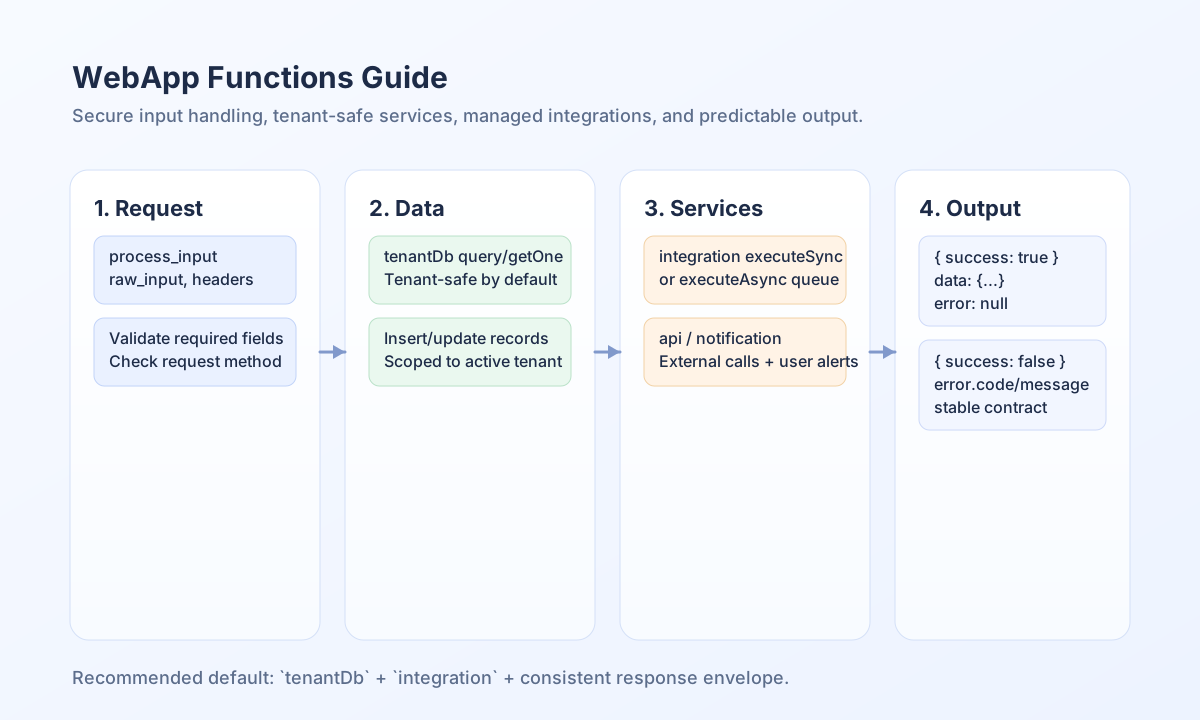
This guide explains the core functions and services available when your WebApp or ProcessFlow step runs code in Tealfabric. It focuses on practical patterns you can use immediately: reading request input, querying tenant-scoped data, calling integrations, and returning reliable responses. The safest baseline is to prefer tenant-aware services such as tenantDb and integration so security and operational controls are applied by default.
Understand the execution context
When a WebApp-triggered process runs, Tealfabric injects context variables so your code can work with request payloads and platform services without bootstrapping infrastructure. Common inputs include process_input for normalized request data and raw_input for signature verification workflows. You also receive runtime context values such as tenant_id and user_id, which help you record actions and enforce business rules.
For HTTP metadata, use WebApp-provided variables such as http_headers, request_method, and request_uri rather than server globals. This keeps your code compatible with platform security boundaries and avoids blocked runtime functions. In practice, this means your step logic remains portable across trigger types and deployment environments.
Issue and verify WebApp end-user JWTs
Use jwt.issueWebappAccess from a WebApp-triggered process to mint an end-user token (type: webapp_access). Do not use a generic jwt.sign. jwt.verify accepts webapp_access when the token is bound to this WebApp and tenant; product token types continue to verify with the product secret.
const issued = jwt.issueWebappAccess({
  user_id: endUserId,
  email,
  role: "member"
});
// issued.access_token, issued.expires_at, issued.token_type === "Bearer"

const claims = jwt.verify(issued.access_token);
// claims.sub / claims.user_id, claims.email, claims.role, claims.tenantId, claims.webapp_id, claims.type
Inbound requests that already carry a valid token expose process_input.auth_token and process_input.auth. Full login, transport, and password rules: WebApps Authentication.
Use tenant-safe services by default
Most production workflows should use tenantDb instead of raw db. The tenant database service automatically scopes reads and writes to the active tenant, which reduces leakage risk and simplifies query logic. For external systems, prefer integration over deprecated connectors so retries, rate controls, and execution tracking stay consistent.
type Customer = { customer_id: string; email: string; status: string };

async function loadActiveCustomer(email: string): Promise<Customer | null> {
  const rows = await tenantDb.query(
    "SELECT customer_id, email, status FROM Customers WHERE email = ? AND status = ?",
    [email, "active"],
  );
  return rows.length > 0 ? (rows[0] as Customer) : null;
}
Orchestrate integrations and notifications
Use integration.executeSync() for short calls where the current step needs an immediate result, and integration.executeAsync() when the task may run longer or should be queued. Pair integration outcomes with notifications so users get clear feedback when actions succeed or require attention. This combination is useful for CRM updates, payment confirmation flows, and approval routing.
Call APIs with explicit request contracts
If your WebApp logic needs direct HTTP calls, api supports predictable request patterns. Define required headers, validate response status, and return structured output so downstream steps can rely on stable fields. The example below shows a tenant-scoped webhook dispatch contract.
curl -X POST "https://api.example.com/api/v1/webapps/functions/dispatch" \
  -H "X-API-Key: <API_KEY>" \
  -H "X-Tenant-ID: <TENANT_ID>" \
  -H "Content-Type: application/json" \
  -d '{
    "event_type": "order_confirmed",
    "entity_id": "<ENTITY_ID>",
    "payload": {
      "channel": "email",
      "priority": "normal"
    }
  }'
{
  "success": true,
  "data": {
    "execution_id": "exec_9f2a4f2a",
    "status": "queued",
    "event_type": "order_confirmed"
  }
}
Return responses that are easy to consume
Use a consistent response envelope so each step can be chained reliably. A practical shape is success, optional data, and optional error with machine-readable codes. This keeps troubleshooting straightforward for both users and operators and avoids brittle parsing in downstream automation.
Avoid common mistakes
The most frequent issues are missing input validation, using deprecated connectors, and bypassing tenant-safe database access. Another recurring problem is returning inconsistent response fields across success and error paths. Standardizing these basics improves reliability more than adding complexity.
See also
WebApp functions are most effective when you treat them as a secure orchestration layer, not just a scripting surface. With tenant-safe data access, managed integrations, and predictable response contracts, you can build workflows that scale without sacrificing control.