WebApp Component Library User Guide
Document information
- Canonical URL:
/docs/05_apps-webhooks-and-surfaces/28_webapp-library-user-guide - Version:
2026-08-13 - Tags:
webapps,library,guides
This guide helps you build schema-driven WebApps using the Tealfabric WebApp Component Library. It focuses on practical setup, rendering flow, and operational patterns that keep library-based apps maintainable in production. Use it when you want to ship structured forms, cards, and interactive screens without hand-coding every UI behavior.
Start with a stable library setup
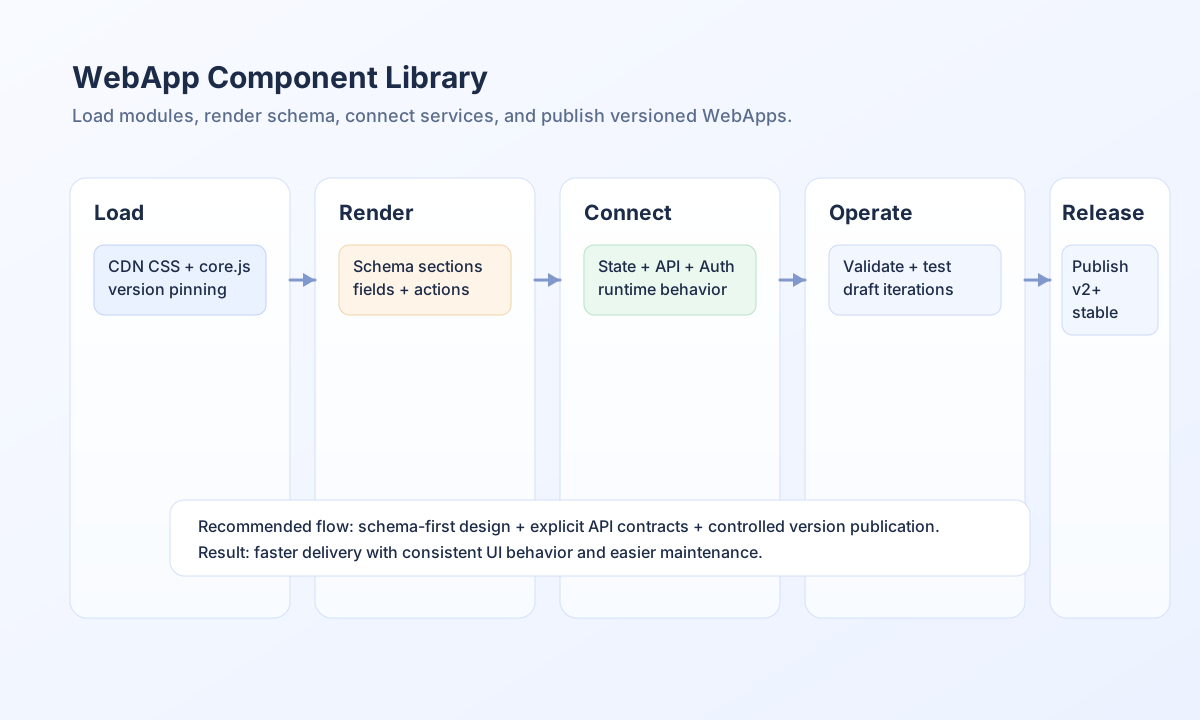
The library is loaded from CDN and initialized in the browser with a root container, schema object, and optional API base URL. For development, latest is convenient, but production should pin a version so behavior stays predictable between releases. This prevents accidental runtime drift from upstream updates.
<link rel="stylesheet" href="https://cdn.tealfabric.io/webapp-library/v1.0.0/styles.css" />
<script type="module" src="https://cdn.tealfabric.io/webapp-library/v1.0.0/core.js"></script>
Render schema-defined UI quickly
A schema-first approach keeps UI structure declarative and easier to evolve. The renderer interprets page sections, fields, and actions, then wires validation and submission behavior from configuration. This allows teams to update user experiences through schema changes rather than full frontend rewrites.
<div id="webapp-root" data-webapp-id="contact-form-webapp"></div>
<script type="module">
  import { WebAppRenderer } from "https://cdn.tealfabric.io/webapp-library/v1.0.0/core.js";

  const schema = {
    page: {
      id: "contact-form",
      title: "Contact Us",
      sections: [
        {
          type: "form",
          id: "contact-form",
          schema: {
            fields: [
              { name: "name", type: "input", label: "Your Name", required: true },
              { name: "email", type: "input", inputType: "email", label: "Email", required: true }
            ]
          },
          actions: [{ type: "submit", label: "Send", variant: "primary" }]
        }
      ]
    }
  };

  new WebAppRenderer({
    root: "#webapp-root",
    schema,
    apiBase: "https://api.example.com",
    webappId: "contact-form-webapp"
  }).init();
</script>
When the WebApp auth_transport is bearer or both, send the login access_token as Authorization: Bearer on later POSTs (including library API actions that hit the published WebApp). Prefer in-memory storage over localStorage. Cookie transport still uses HttpOnly tf_session for same-origin forms. See WebApps Authentication.
Manage state and API access deliberately
The library can provide state, API, and auth services from the renderer instance, but these should be enabled intentionally rather than by default. Persist only the state your workflow truly needs, and keep TTL/clear behavior aligned with business expectations. This avoids stale data surprises and reduces client-side storage risk.
When API calls fail, check schema endpoint paths first, then verify auth token handling and CORS policy. Most runtime issues come from contract mismatch between schema actions and backend endpoints.
Automate library-backed WebApp releases
If your team deploys schemas and publishes versions via API pipelines, keep request contracts explicit and versioned. The examples below align one intent across languages: publish a specific WebApp version after validation passes.
const baseUrl = "https://api.example.com/api/v1/webapps";
const tenantId = "<TENANT_ID>";
const apiKey = "<API_KEY>";

async function publishLibraryWebApp(webappId: string, version: number): Promise<void> {
  const response = await fetch(`${baseUrl}/${encodeURIComponent(webappId)}/publish`, {
    method: "POST",
    headers: {
      "X-API-Key": apiKey,
      "X-Tenant-ID": tenantId,
      "Content-Type": "application/json",
    },
    body: JSON.stringify({ version }),
  });
  if (!response.ok) throw new Error(`Publish failed: ${response.status}`);
}
curl -X POST "https://api.example.com/api/v1/webapps/<ENTITY_ID>/publish" \
-H "X-API-Key: <API_KEY>" \
-H "X-Tenant-ID: <TENANT_ID>" \
-H "Content-Type: application/json" \
-d '{
"version": 2
}'
{
  "success": true,
  "message": "Version published successfully"
}
Troubleshoot common runtime problems
If the library fails to load, verify module URLs, browser module support, and network responses in developer tools. If components do not render, validate schema JSON and confirm the root element exists before init() runs. For state persistence issues, check persistence settings and storage availability, then confirm the webappId is stable across sessions.
See also
The component library is most effective when schema design, API contracts, and release management are handled together. With that approach, teams can ship consistent WebApps faster while keeping operations predictable.