Real-Time Communication Guide
Document information
- Canonical URL:
/docs/05_apps-webhooks-and-surfaces/36_realtime-communication - Version:
2026-09-03 - Tags:
webapps,realtime,reference
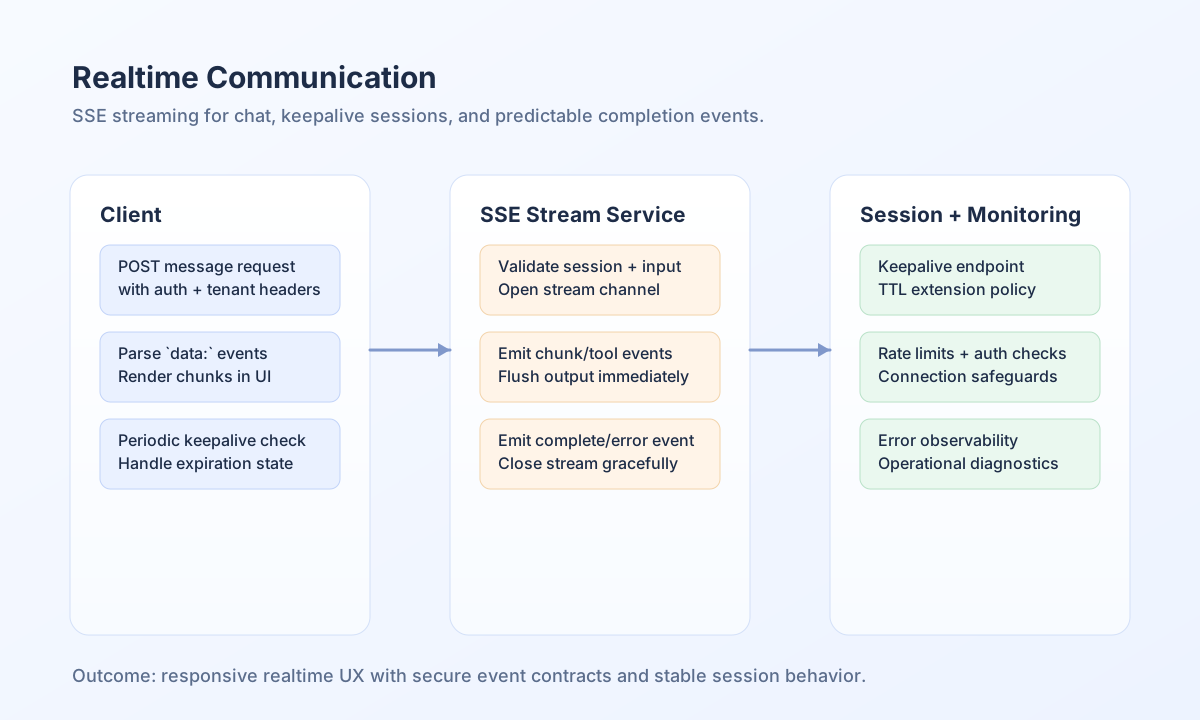
This guide explains how to implement reliable real-time communication in Tealfabric WebApps, with a focus on Server-Sent Events (SSE) for streaming responses and live session updates. It is written for teams that need responsive user interfaces without introducing unnecessary protocol complexity. By following these patterns, you can deliver realtime experiences that remain secure, observable, and production-friendly.
Choose the right realtime pattern
SSE is the recommended default for one-way server-to-client streaming such as chat responses and assistant progress updates. Inbox notifications do not use SSE today — poll GET /api/v1/notifications (and ?action=statistics) instead. SSE works well over standard HTTP infrastructure and is typically easier to operate than full-duplex protocols when client messages are already sent through regular requests. Long polling can be used as a compatibility fallback, while WebSocket should be reserved for workloads that truly require bi-directional low-latency coordination.
For most Tealfabric chat and assistant scenarios, the practical pattern is simple: submit a request with POST, stream incremental events back to the UI, then emit a completion event with final status metadata. This keeps the integration model predictable for both frontend and backend teams.
Stream chat responses with SSE
A robust SSE response should include explicit event types so the client can handle state transitions safely. Typical event types are session_info, chunk, tool_progress, tool_result, complete, and error. Keeping these events structured helps you evolve the stream protocol without breaking consumers.
type StreamEvent =
  | { type: "session_info"; session_id: string; session_ttl: number }
  | { type: "chunk"; content: string; done?: boolean }
  | { type: "complete"; message_id: string; done: true }
  | { type: "error"; content: string; done: true };

async function streamChat(message: string): Promise<void> {
  const response = await fetch("/api/v1/chat/stream", {
    method: "POST",
    headers: { "Content-Type": "application/json" },
    body: JSON.stringify({ message }),
  });
  if (!response.ok || !response.body) throw new Error(`Stream failed: ${response.status}`);
  const reader = response.body.getReader();
  const decoder = new TextDecoder();
  let buffer = "";
  while (true) {
    const { done, value } = await reader.read();
    if (done) break;
    buffer += decoder.decode(value, { stream: true });
    const lines = buffer.split("\n");
    buffer = lines.pop() ?? "";
    for (const line of lines) {
      if (!line.startsWith("data: ")) continue;
      const event = JSON.parse(line.slice(6)) as StreamEvent;
      if (event.type === "chunk") console.log(event.content);
    }
  }
}
Keep sessions alive during long conversations
Realtime streams often outlive default browser idle expectations, so a lightweight keepalive endpoint helps maintain a valid user session and avoid surprise disconnects. The client should call keepalive on a fixed interval and treat negative responses as a session-expiration signal. This gives users clear recovery behavior instead of silent stream failures.
Test realtime endpoints with API commands
Use command-line checks during rollout to validate stream framing, authentication, and tenant scoping before debugging UI rendering issues. The request below shows a complete stream test shape with required headers and payload placeholders.
curl -N -X POST "https://api.example.com/api/v1/chat/stream" \
  -H "X-API-Key: <API_KEY>" \
  -H "X-Tenant-ID: <TENANT_ID>" \
  -H "Content-Type: application/json" \
  -d '{
    "message": "Provide a realtime summary for entity <ENTITY_ID>."
  }'
{
  "type": "complete",
  "message_id": "<ENTITY_ID>",
  "done": true
}
Secure and harden streaming behavior
Production reliability depends on a few non-negotiable safeguards: enforce authentication before opening the stream, validate input size and format, and apply connection and message rate limits per user or session. You should also emit structured error events so clients can display recovery guidance and operators can monitor failure patterns. These controls prevent common stability issues under load while keeping user experience responsive.
See also
Realtime communication works best when event contracts are explicit, session health is monitored, and fallback behavior is planned. With these foundations, your WebApps can deliver fast feedback loops without sacrificing operational control.
B[Frontend: ChatSystem.sendMessage()]B --> C[POST /api/v1/chat/stream]
C --> D[Backend: Validate Authentication]
D --> E[Backend: Store User Message]
E --> F[Backend: Generate System Prompt]
F --> G[Backend: Call LLM API]
G --> H[LLM: Stream Response Chunks]
H --> I[Backend: Process Chunks]
I --> J[Backend: Send SSE Chunks]
J --> K[Frontend: HandleSSEResponse()]
K --> L[Frontend: Update UI]
L --> M[Backend: Store Complete Response]
### Session Management Flow

```mermaid
graph TD
    A[User Login] --> B[Create Session]
    B --> C[Start Keepalive Timer]
    C --> D[Periodic Keepalive Calls]
    D --> E{Session Valid?}
    E -->|Yes| F[Extend Session TTL]
    E -->|No| G[Redirect to Login]
    F --> D
    G --> H[Clear Session Data]
💻 Frontend Implementation
ChatSystem Component
SSE Connection Management
class ChatSystem extends BaseComponent {
    async streamFromServer(responseData, userMessage) {
        try {
            const response = await fetch('/api/v1/chat/stream', {
                method: 'POST',
                headers: {
                    'Content-Type': 'application/json',
                    'X-Requested-With': 'XMLHttpRequest'
                },
                body: JSON.stringify({
                    message: userMessage,
                    user_id: this.getCurrentUserId(),
                    timestamp: new Date().toISOString()
                })
            });

            if (!response.ok) {
                throw new Error(`HTTP error! status: ${response.status}`);
            }

            await this.handleSSEResponse(response, responseData);
        } catch (error) {
            this.handleStreamingError(error);
        }
    }
}
SSE Response Handling
async handleSSEResponse(response, responseData) {
    const reader = response.body.getReader();
    const decoder = new TextDecoder();
    let buffer = '';
    let fullContent = '';

    this.emit('chat:streamingStarted', { messageId: responseData.id });

    while (true) {
        const { done, value } = await reader.read();

        if (done) {
            this.log('SSE stream completed');
            break;
        }

        buffer += decoder.decode(value, { stream: true });
        const lines = buffer.split('\n');
        buffer = lines.pop() || '';

        for (const line of lines) {
            if (line.startsWith('data: ')) {
                const data = JSON.parse(line.substring(6));
                await this.processSSEData(data, responseData);
            }
        }
    }
}
SSE Data Processing
async processSSEData(data, responseData) {
    switch (data.type) {
        case 'session_info':
            this.sessionId = data.session_id;
            this.sessionTtl = data.session_ttl;
            this.startKeepalive();
            break;

        case 'chunk':
            // Handle both chunked and non-chunked content
            if (data.is_chunk) {
                // This is a chunk of a longer line
                this.appendToMessage(responseData.id, data.content);
                // Optionally show progress: data.chunk_index / data.total_chunks
            } else {
                // Short line sent as-is
                this.appendToMessage(responseData.id, data.content);
            }
            this.emit('chat:streaming', {
                messageId: responseData.id,
                content: data.content,
                isChunk: data.is_chunk || false,
                chunkIndex: data.chunk_index,
                totalChunks: data.total_chunks
            });
            break;

        case 'tool_call':
            // Tool call detected, pause streaming display
            this.emit('chat:toolCall', {
                messageId: responseData.id,
                action: data.action,
                parameters: data.parameters,
                iteration: data.iteration
            });
            break;

        case 'tool_progress':
            // Tool execution progress
            this.emit('chat:toolProgress', {
                messageId: responseData.id,
                message: data.message
            });
            break;

        case 'tool_result':
            // Tool execution complete
            this.emit('chat:toolResult', {
                messageId: responseData.id,
                success: data.success,
                result: data.result,
                error: data.error,
                iteration: data.iteration
            });
            break;

        case 'complete':
            this.finalizeMessage(responseData.id);
            this.emit('chat:streamingCompleted', {
                messageId: responseData.id
            });
            break;

        case 'error':
            this.handleStreamingError(new Error(data.content));
            break;
    }
}
Session Management
Keepalive Implementation
startKeepalive() {
    if (this.keepaliveInterval) {
        clearInterval(this.keepaliveInterval);
    }

    this.keepaliveInterval = setInterval(async () => {
        try {
            const response = await fetch('/api/v1/chat/keepalive');
            const data = await response.json();

            if (data.success && data.data.session_active) {
                this.log('Session keepalive successful');
            } else {
                this.handleSessionExpiration();
            }
        } catch (error) {
            this.log('Keepalive failed', error, 'warn');
            this.handleSessionExpiration();
        }
    }, this.keepaliveIntervalMs);
}
Session Expiration Handling
handleSessionExpiration() {
    this.log('Session expired, redirecting to login');

    if (this.keepaliveInterval) {
        clearInterval(this.keepaliveInterval);
        this.keepaliveInterval = null;
    }

    this.emit('chat:sessionExpired');

    // Redirect to login page
    window.location.href = '/login';
}
🔧 Backend Implementation
Chat Streaming Service
Stream Initialization
Session Management
/**
 * Illustrative TypeScript example.
 * Adjust for your runtime and secret handling.
 */

function sendSseEvent(controller: ReadableStreamDefaultController<Uint8Array>, payload: Record<string, unknown>) {
  const encoder = new TextEncoder();
  controller.enqueue(encoder.encode(`data: ${JSON.stringify(payload)}\n\n`));
}

const chatStorage = new ChatStorageService();
const session = chatStorage.getOrCreateSession(userId, null, "Tealfabric IO Chat");

sendSseEvent(controller, {
  type: "session_info",
  session_id: session.sessionId,
  session_ttl: chatStorage.getSessionTtl(),
});
LLM Integration
Error Handling
Connection Errors
/**
 * Illustrative TypeScript example.
 * Adjust for your runtime and secret handling.
 */

// Handle connection errors
if (fetchError) {
  sendSseEvent(controller, {
    type: "error",
    content: `Connection error: ${fetchError.message}`,
    done: true,
  });
  controller.close();
}
Timeout Handling
/**
 * Illustrative TypeScript example.
 * Adjust for your runtime and secret handling.
 */

// Handle timeouts
if (httpCode !== 200) {
  sendSseEvent(controller, {
    type: "error",
    content: `LLM service unavailable (HTTP ${httpCode})`,
    done: true,
  });
  controller.close();
}
🔒 Security Considerations
Authentication and Authorization
Session Validation
/**
 * Illustrative TypeScript example.
 * Adjust for your runtime and secret handling.
 */

// Check authentication before streaming
const auth = new AuthMiddleware();
await auth.requireAuth();

const userContext = auth.getUserContext();
if (!userContext?.user_id) {
  sendSseEvent(controller, { type: "error", content: "Authentication required", done: true });
  controller.close();
  return;
}
Input Validation
/**
 * Illustrative TypeScript example.
 * Adjust for your runtime and secret handling.
 */

// Validate and sanitize input
const userMessage = String(data.message ?? "").trim();

if (userMessage === "") {
  sendSseEvent(controller, { type: "error", content: "Message cannot be empty", done: true });
  controller.close();
  return;
}
Rate Limiting
Connection Limits
/**
 * Illustrative TypeScript example.
 * Adjust for your runtime and secret handling.
 */

// Implement connection limits
const maxConnections = 10;
const currentConnections = getActiveConnectionCount();

if (currentConnections >= maxConnections) {
  sendSseEvent(controller, { type: "error", content: "Too many connections", done: true });
  controller.close();
  return;
}
Message Rate Limiting
/**
 * Illustrative TypeScript example.
 * Adjust for your runtime and secret handling.
 */

// Implement message rate limiting
const rateLimitKey = `chat_rate_${userId}`;
const rateLimitCount = getRateLimitCount(rateLimitKey);

if (rateLimitCount > 60) {
  sendSseEvent(controller, { type: "error", content: "Rate limit exceeded", done: true });
  controller.close();
  return;
}
📊 Performance Optimization
Caching Strategies
Response Caching
/**
 * Illustrative TypeScript example.
 * Adjust for your runtime and secret handling.
 */

// Cache LLM responses
const cacheKey = `llm_response_${hashPrompt(prompt)}`;
const cachedResponse = getCachedResponse(cacheKey);

if (cachedResponse) {
    streamCachedResponse(controller, cachedResponse);
    return;
}
Session Caching
/**
 * Illustrative TypeScript example.
 * Adjust for your runtime and secret handling.
 */

// Cache session data
const sessionCache = new SessionCache();
const sessionData = sessionCache.get(sessionId);

if (!sessionData) {
    const sessionData = this.loadSessionFromDatabase(sessionId);
    sessionCache.set(sessionId, sessionData, 3600);
}
Connection Management
Connection Pooling
/**
 * Illustrative TypeScript example.
 * Adjust for your runtime and secret handling.
 */

// Implement connection pooling
class ConnectionPool {
    private connections: unknown[] = [];
    private maxConnections = 100;

    getConnection() {
        if (this.connections.length < this.maxConnections) {
            return this.createNewConnection();
        }

        return this.getAvailableConnection();
    }
}
Resource Cleanup
/**
 * Illustrative TypeScript example.
 * Adjust for your runtime and secret handling.
 */

// Clean up resources
register_shutdown_function(function() {


    if (ob_get_level()) {
        ob_end_flush();
    }
});
🚀 Advanced Features
Line-Based Streaming with Tool Call Detection
The chat system now supports real-time tool call detection during streaming, enabling the AI to execute tools while providing responses.
Implementation Details
Backend (TypeScript):
/**
 * Illustrative TypeScript example.
 * Adjust for your runtime and secret handling.
 */

// Stream line-by-line with tool detection
const fullResponse = await llmConnector.streamRequestLineByLine(prompt, llmData,
    async (content: string, metadata: Record<string, unknown> = {}) => {
        const isChunk = metadata.is_chunk ?? false;
        const isComplete = metadata.is_complete ?? true;

        if (isChunk) {
            sendSseEvent(controller, {
                type: "chunk",
                content,
                is_chunk: true,
                is_complete: isComplete,
                chunk_index: metadata.chunk_index ?? 0,
                total_chunks: metadata.total_chunks ?? 1,
                done: false,
            });

            if (isComplete) {
                const toolCall = toolExecutor.detectToolCallWithFallback(completeLine);
                if (toolCall) {
                    return { pause: true, toolCall };
                }
            }
        } else {
            const toolCall = toolExecutor.detectToolCallWithFallback(content);
            if (toolCall) {
                return { pause: true, toolCall };
            }

            sendSseEvent(controller, {
                type: "chunk",
                content: `${content}\n`,
                is_chunk: false,
                done: false,
            });
        }

        return { pause: false };
    }
);
Chunking Algorithm:
- Lines longer than 20 characters are split into 10-character chunks
- UTF-8 safe using string slice and length checks
- Configurable chunk size and threshold
- Optional delay between chunks for smoother display
Tool Call Detection:
- Single-line JSON format:
{"action":"tool_name","parameters":{...}} - Multi-line JSON fallback for compatibility
- Immediate detection as lines arrive
- Pauses streaming when tool call detected
Sequential Tool Call Loop
The system supports sequential tool calls, allowing the AI to execute multiple tools in sequence to complete complex tasks.
How It Works
- Initial Tool Call: First tool detected and executed
- Context Management: Results stored with
ToolCallContextManager - Follow-Up Prompt: LLM receives optimized context with tool results
- Iterative Execution: Process repeats until final answer or max iterations
- Context Optimization: Older results summarized, recent results in full detail
Context Management
The ToolCallContextManager service provides intelligent context management:
/**
 * Illustrative TypeScript example.
 * Adjust for your runtime and secret handling.
 */

const contextManager = new ToolCallContextManager(
    maxContextTokens: 32000,
    reservedTokens: 4000
);

// Add tool result to context
contextManager.addToolCallResult(toolCall, toolResult, iteration);

// Build optimized context for next iteration
const context = contextManager.buildContextForIteration(
    userMessage,
    conversationHistory,
    currentIteration
);
Context Strategy:
- Recent Results (2-3): Full detail with complete JSON
- Older Results: Summarized with key data preserved
- Conversation History: Excerpts or summary based on token budget
- Automatic Optimization: Adjusts to fit within token limits
Configuration
# Enable sequential tool calls
TOOL_CALL_LOOP_ENABLED=true
TOOL_CALL_MAX_ITERATIONS=10

# Context management
TOOL_CALL_CONTEXT_MAX_TOKENS=32000
TOOL_CALL_CONTEXT_RESERVED_TOKENS=4000
TOOL_CALL_CONTEXT_RECENT_RESULTS=3
TOOL_CALL_RESULT_MAX_SIZE=5000
Example Flow
User: "Search for information about X and create a process flow"

1. AI streams: "Let me search for that information..."
2. Tool call detected: search_web({"query": "X"})
3. Tool executes, results returned
4. AI streams: "Now I'll create a process flow..."
5. Tool call detected: create_process_flow({...})
6. Tool executes, results returned
7. AI streams final answer with both results
Real-Time Notifications
There is no /api/v1/notifications/stream SSE endpoint. The console and WebApps load inbox state with the notifications list/statistics HTTP APIs and refresh on an interval (or after user actions).
Notification polling
type NotificationsListResponse = {
  success: boolean;
  data?: {
    notifications: Array<{
      notification_id: string;
      title: string;
      message: string;
      type: string;
      is_read: boolean;
      created_at: string;
    }>;
    total: number;
  };
};

class NotificationPoller {
  private timer: ReturnType<typeof setInterval> | null = null;
  private readonly intervalMs = 30_000;

  start() {
    void this.refresh();
    this.timer = setInterval(() => {
      void this.refresh();
    }, this.intervalMs);
  }

  stop() {
    if (this.timer) clearInterval(this.timer);
    this.timer = null;
  }

  async refresh() {
    try {
      // List + optional unread filter — same surface the console uses.
      const response = await fetch(
        "/api/v1/notifications?page=1&items_per_page=25&sort_by=created_at&sort_direction=desc&is_read=0",
        { credentials: "include" }
      );
      const payload = (await response.json()) as NotificationsListResponse;
      if (!payload.success) return;
      this.renderNotifications(payload.data?.notifications ?? []);
    } catch (error) {
      console.error("Failed to poll notifications:", error);
    }
  }

  renderNotifications(_notifications: NonNullable<NotificationsListResponse["data"]>["notifications"]) {
    // Update badge / toast UI from the latest unread page.
  }
}
Unread badge via statistics
async function refreshUnreadBadge(setUnreadCount: (n: number) => void): Promise<void> {
  const response = await fetch("/api/v1/notifications?action=statistics", {
    credentials: "include",
  });
  const payload = (await response.json()) as {
    success: boolean;
    data?: { unread_notifications?: number };
  };
  if (!payload.success) return;
  setUnreadCount(Number(payload.data?.unread_notifications ?? 0));
}
Collaborative Features
Real-Time Collaboration
class CollaborationManager {
    constructor() {
        this.websocket = null;
        this.setupWebSocket();
    }

    setupWebSocket() {
        this.websocket = new WebSocket('ws://localhost:8080/collaboration');

        this.websocket.onmessage = (event) => {
            const data = JSON.parse(event.data);
            this.handleCollaborationUpdate(data);
        };
    }

    sendUpdate(update) {
        if (this.websocket && this.websocket.readyState === WebSocket.OPEN) {
            this.websocket.send(JSON.stringify(update));
        }
    }
}
🔍 Monitoring and Debugging
Connection Monitoring
Connection Metrics
/**
 * Illustrative TypeScript example.
 * Adjust for your runtime and secret handling.
 */

// Track connection metrics
class ConnectionMonitor {
    private metrics: Array<Record<string, unknown>> = [];

    trackConnection(userId, connectionType) {
        this.metrics.push({
            user_id: userId,
            type: connectionType,
            timestamp: Math.floor(Date.now() / 1000),
            ip: process.env.REMOTE_ADDR ?? "unknown"
        });
    }

    getActiveConnections() {
        return this.metrics.filter((metric) => {
            return (Date.now() / 1000 - Number(metric.timestamp)) < 300; // 5 minutes
        });
    }
}
Performance Monitoring
class PerformanceMonitor {
    constructor() {
        this.metrics = {
            connectionTime: 0,
            responseTime: 0,
            errorRate: 0
        };
    }

    trackConnection(startTime) {
        this.metrics.connectionTime = Date.now() - startTime;
    }

    trackResponse(startTime) {
        this.metrics.responseTime = Date.now() - startTime;
    }
}
Debug Tools
SSE Debug Console
class SSEDebugConsole {
    constructor() {
        this.logs = [];
        this.setupDebugging();
    }

    setupDebugging() {
        // Override console.log to capture SSE logs
        const originalLog = console.log;
        console.log = (...args) => {
            this.logs.push({
                timestamp: Date.now(),
                message: args.join(' '),
                type: 'log'
            });
            originalLog.apply(console, args);
        };
    }

    exportLogs() {
        return JSON.stringify(this.logs, null, 2);
    }
}
🆘 Troubleshooting
Common Issues
Connection Drops
- Check Network: Verify stable internet connection
- Check Timeout: Ensure server timeout is sufficient
- Check Proxy: Verify proxy settings allow SSE
- Check Browser: Ensure browser supports SSE
Slow Streaming
- Check LLM Performance: Monitor LLM response times
- Check Server Load: Monitor server resource usage
- Check Network Latency: Test network performance
- Check Caching: Verify caching is working properly
Authentication Issues
- Check Session: Verify session is valid
- Check Headers: Ensure proper authentication headers
- Check CORS: Verify CORS configuration
- Check Cookies: Ensure session cookies are set
Debug Commands
Test SSE Connection
curl -N -H "Accept: text/event-stream" \
     -H "Cookie: tealfabric_session=your-session-id" \
     http://localhost:8000/api/v1/chat/stream
Test Keepalive
curl -H "Cookie: tealfabric_session=your-session-id" \
     http://localhost:8000/api/v1/chat/keepalive
Monitor Server Logs
tail -f /var/log/apache2/error.log | grep "STREAM.TypeScript"
Need Help? Contact the development team or refer to the technical documentation for detailed implementation guidance.
Last Updated: January 2025 Version: 1.0
-->