Content Delivery Network
Document information
- Canonical URL:
/docs/05_apps-webhooks-and-surfaces/40_content-delivery-network - Version:
2026-05-08 - Tags:
webapps,cdn,infrastructure
This guide explains how to publish and serve static assets through the Tealfabric CDN so users can download files quickly from globally distributed nodes. It is intended for teams delivering public images, documents, and front-end assets that do not require per-request computation. Use this pattern when you need stable public URLs with policy controls and predictable propagation behavior.
Know what belongs in CDN storage
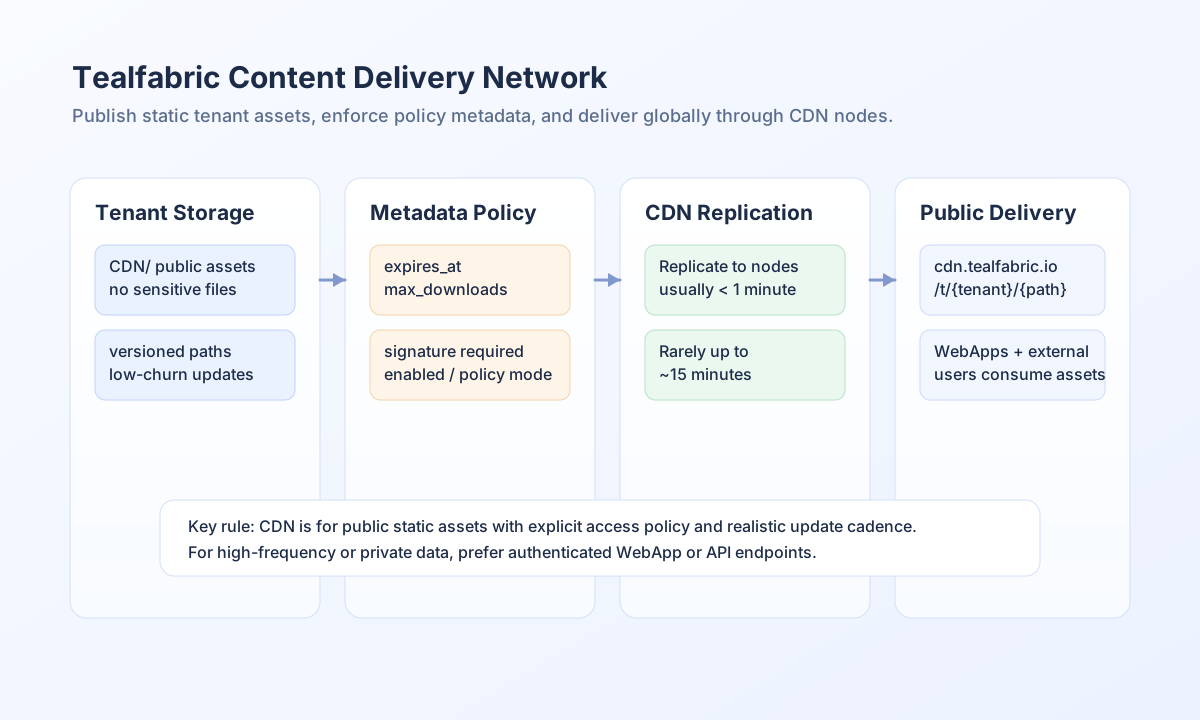
Each tenant has a public CDN directory at storage/tenantdata/<tenant-id>/CDN/. Files placed there are treated as public and can be replicated to CDN serving nodes, so this location is for non-sensitive static content only. If content must remain private or change frequently in near real time, serve it through protected APIs or WebApp endpoints instead.
Use the public URL contract
CDN assets are served with the URL structure https://cdn.tealfabric.io/t/<tenant-id>/<path>/<filename>. The tenant segment remains stable regardless of which node serves the request, so integrations should treat this URL shape as the canonical reference. Response headers may include serving-node diagnostics, but those headers are informational rather than required for normal application behavior.
Plan for replication and cache timing
Most updates propagate quickly, often within about a minute, but heavy load scenarios can delay full propagation up to around 15 minutes. For user-visible brand assets or timed campaigns, publish ahead of deadline and verify final URLs before launch. This helps avoid rollout confusion caused by temporary node-to-node cache differences.
As a practical rule, keep update frequency low for the same file path and favor versioned filenames for major changes. High-churn content reduces CDN efficiency and may trigger protective rate controls.
Integrate CDN assets in WebApps safely
WebApps can reference CDN-hosted files directly in HTML, CSS, and JavaScript. Because CDN domains can be cross-origin relative to app domains, security headers such as CSP/CORS may need explicit allow rules for https://cdn.tealfabric.io.
<img src="https://cdn.tealfabric.io/t/<TENANT_ID>/images/logo.png" alt="Tenant logo" />
<link rel="stylesheet" href="https://cdn.tealfabric.io/t/<TENANT_ID>/styles/theme.css" />
Publish and manage CDN metadata by API
Use metadata endpoints to apply per-file policy controls such as expiry, signature requirements, and download limits. This keeps external access explicit and auditable, especially when assets are shared outside authenticated user sessions.
const baseUrl = "https://api.example.com/api/v1/public-docs/metadata";
const tenantId = "<TENANT_ID>";
const apiKey = "<API_KEY>";

async function updateCdnPolicy(path: string): Promise<void> {
  const response = await fetch(baseUrl, {
    method: "PUT",
    headers: {
      "X-API-Key": apiKey,
      "X-Tenant-ID": tenantId,
      "Content-Type": "application/json",
    },
    body: JSON.stringify({
      path,
      metadata: {
        version: 1,
        policy: "token_required",
        enabled: true,
        expires_at: "2026-12-31T23:59:59Z",
        max_downloads: 3,
        require_signature: true,
      },
    }),
  });
  if (!response.ok) throw new Error(`Policy update failed: ${response.status}`);
}
curl -X PUT "https://api.example.com/api/v1/public-docs/metadata" \
-H "X-API-Key: <API_KEY>" \
-H "X-Tenant-ID: <TENANT_ID>" \
-H "Content-Type: application/json" \
-d '{
"path": "docs/product-brochure.pdf",
"metadata": {
"version": 1,
"policy": "token_required",
"enabled": true,
"expires_at": "2026-12-31T23:59:59Z",
"max_downloads": 3,
"require_signature": true
}
}'
{
  "success": true,
  "data": {
    "entity_id": "<ENTITY_ID>",
    "status": "metadata_updated",
    "path": "docs/product-brochure.pdf"
  }
}
Keep CDN operations predictable
Use execution-scoped or versioned paths to avoid overwriting active files unexpectedly, and pair policy metadata with each externally shared asset. For secure sharing, use short-lived signed URLs and keep signing secrets server-side only. If users report missing updates, validate propagation timing and metadata state before making emergency path changes.
See also
A strong CDN setup balances performance and policy control. With public-only storage discipline, explicit metadata governance, and realistic propagation planning, teams can deliver static assets safely at scale.