WebApps Public File Downloads
Document information
- Canonical URL:
/docs/05_apps-webhooks-and-surfaces/webapps/49-Webapps_Public_File_Downloads - Version:
2026-05-08 - Tags:
webapps,reference,webapps-public-file-downloads
This guide explains how to deliver downloadable files to external users through tenant public docs with metadata-based access control. It is designed for workflows where files should be streamed securely instead of returned inside ProcessFlow payloads. Use this pattern for invoices, reports, and other documents that need controlled public access.
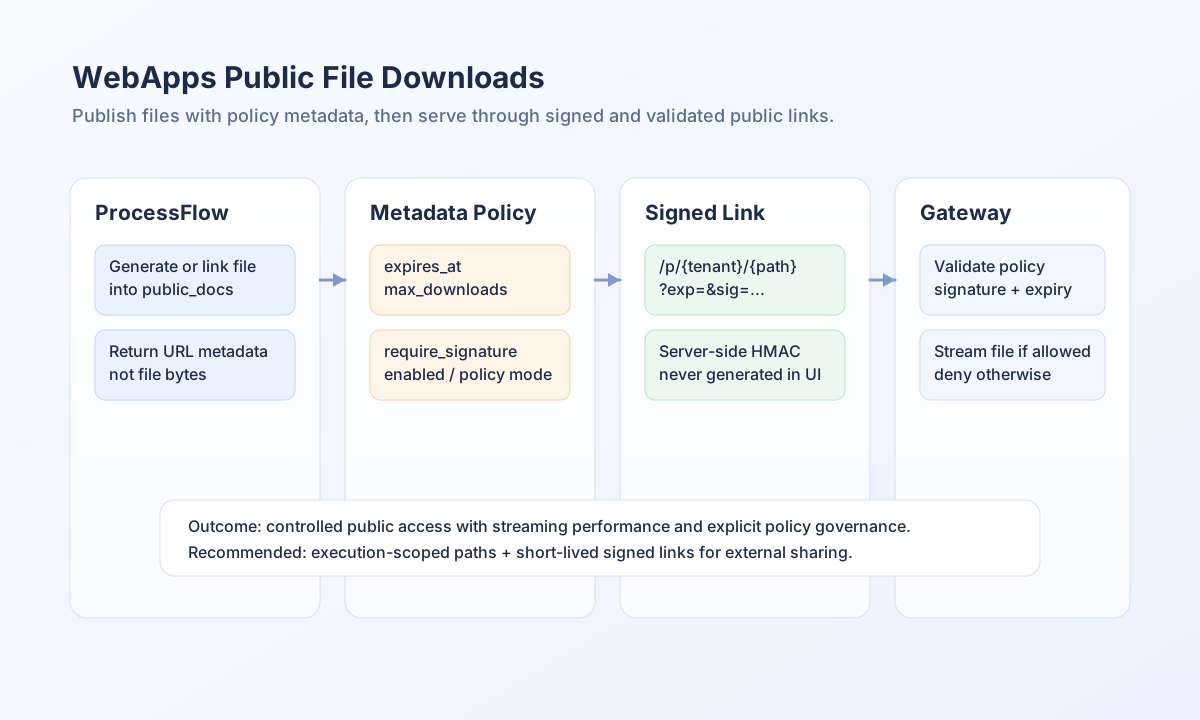
Use public docs for controlled external delivery
Public downloads work by publishing a file under public_docs, adding metadata policy sidecars, and letting the /p/<tenant_id>/<relative_path> gateway enforce access rules before streaming bytes. This avoids heavy process-output payloads and improves large-file delivery through streaming and range support. The metadata layer lets you set controls such as expiry, maximum download count, and signature requirements.
Prefer signed temporary links
For sensitive documents, generate temporary signed URLs on the server side, not in browser code. A signed link includes exp (Unix timestamp in seconds) and sig (HMAC signature) based on the payload tenant_id|relative_path|exp. If the URL is changed or the timestamp expires, the gateway should deny download access.
Publish file metadata through API
You can manage file-level and master policies with metadata endpoints. In most production flows, create file metadata explicitly so each published artifact has clear policy ownership.
const appUrl = "https://api.example.com";
const tenantId = "<TENANT_ID>";
const apiKey = "<API_KEY>";

async function setFilePolicy(relativePath: string) {
  const response = await fetch(`${appUrl}/api/v1/public-docs/metadata`, {
    method: "PUT",
    headers: {
      "X-API-Key": apiKey,
      "X-Tenant-ID": tenantId,
      "Content-Type": "application/json",
    },
    body: JSON.stringify({
      path: relativePath,
      metadata: {
        version: 1,
        policy: "token_required",
        enabled: true,
        expires_at: "2026-12-31T23:59:59Z",
        max_downloads: 1,
        require_signature: true,
      },
    }),
  });
  if (!response.ok) throw new Error(`Metadata update failed: ${response.status}`);
}
Test publish and policy workflows with curl
Use direct API tests to confirm metadata behavior before distributing links to external users. This keeps access-control validation separate from frontend behavior and makes rollout troubleshooting faster.
curl -X PUT "https://api.example.com/api/v1/public-docs/metadata" \
  -H "X-API-Key: <API_KEY>" \
  -H "X-Tenant-ID: <TENANT_ID>" \
  -H "Content-Type: application/json" \
  -d '{
    "path": "reports/order-2026-03.pdf",
    "metadata": {
      "version": 1,
      "policy": "token_required",
      "enabled": true,
      "expires_at": "2026-12-31T23:59:59Z",
      "max_downloads": 3,
      "require_signature": true
    }
  }'
{
  "success": true,
  "data": {
    "entity_id": "<ENTITY_ID>",
    "status": "metadata_updated",
    "path": "reports/order-2026-03.pdf"
  }
}
Keep public-download policies predictable
Use execution-scoped folders to avoid filename collisions across runs and set explicit per-file policy whenever access requirements differ by document. Keep links short-lived for external sharing, and pair expiry with max_downloads for sensitive assets. If downloads fail, first check metadata presence and signature freshness before changing storage paths.
Related guides
Public file delivery is most reliable when file publication, policy metadata, and signed-link generation are treated as one workflow. With that structure, external users can download safely while you keep strong control over access behavior.