WebApps Process Response Reference
Document information
- Canonical URL:
/docs/05_apps-webhooks-and-surfaces/webapps/45-Webapps_Process_Response_Reference - Version:
2026-08-13 - Tags:
webapps,reference,webapps-process-response-reference
When a WebApp triggers a ProcessFlow execution, the value returned by your step code becomes the user-facing response contract. This guide explains which response fields are supported, how behavior changes by WebApp type, and how to keep responses predictable across browser, webhook, and API-style endpoints. Use it as the practical reference for returning success, error, redirect, and custom HTTP responses safely.
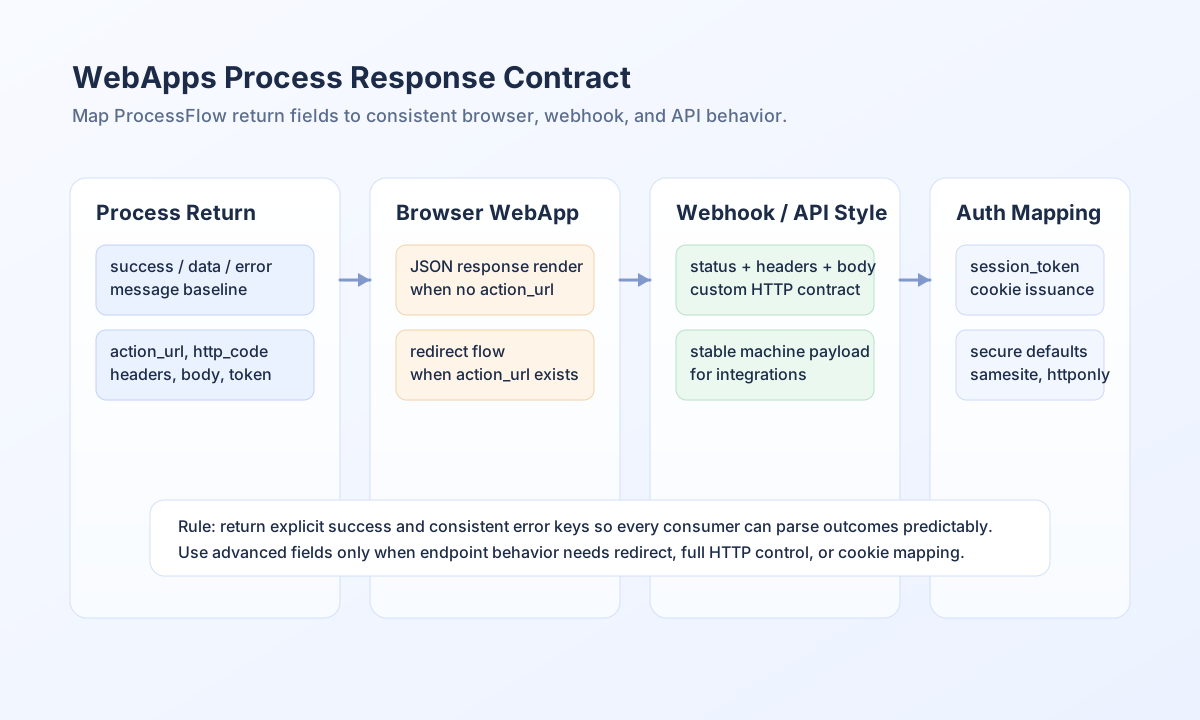
Return a consistent baseline response
Most implementations should always return success and then include either business data or a structured error. A stable baseline response shape reduces frontend branching logic and makes webhook consumers easier to maintain. The same shape also improves observability when you review logs or error traces.
type ProcessResult =
  | { success: true; data?: Record<string, unknown>; message?: string }
  | {
      success: false;
      error: { message: string; details?: string; code?: string };
    };

function buildValidationFailure(): ProcessResult {
  return {
    success: false,
    error: {
      message: "Validation failed",
      details: "Email is required",
      code: "VALIDATION_ERROR",
    },
  };
}
Understand field behavior by WebApp type
For browser-facing WebApps, action_url can trigger a redirect after a successful run, while plain data responses are rendered directly if no redirect is set. For webhook and callback patterns, responses are JSON-oriented and should keep machine-readable fields stable over time. For API-style WebApps, you can control http_code, headers, and raw body to return full HTTP responses from ProcessFlow logic.
Authentication response mapping also supports session issuance flows. If your process returns session_token (or fallback token / access_token), the runtime sets Set-Cookie (tf_session by default) when auth_transport is cookie or both. Cookie rewrite is skipped when auth_transport is bearer, so custom JavaScript can use the JSON access_token as Authorization: Bearer. Return clear_auth_cookie: true to clear tf_session on logout. See WebApps Authentication.
Use API-style response controls when needed
API-routing use cases should return explicit status and headers when caller behavior depends on HTTP semantics. This is especially useful for external clients that branch on status codes or require strict Content-Type handling.
return {
    success: true,
    http_code: 201,
    headers: [
        "Content-Type": "application/json",
        "Cache-Control": "no-store"
    ],
    body: JSON.stringify([
        success: true,
        message: "Resource created",
        entity_id: "<ENTITY_ID>"
    ])
};
Validate response behavior with curl
You can test process-response behavior quickly by calling your WebApp endpoint with explicit auth and tenant headers. This helps confirm whether your response fields are being interpreted as JSON payloads, redirects, or custom HTTP output.
curl -X POST "https://api.example.com/api/v1/webapps/<ENTITY_ID>/execute" \
  -H "X-API-Key: <API_KEY>" \
  -H "X-Tenant-ID: <TENANT_ID>" \
  -H "Content-Type: application/json" \
  -d '{
    "email": "user@example.com"
  }'
{
  "success": true,
  "data": {
    "entity_id": "<ENTITY_ID>",
    "status": "created"
  },
  "message": "Processed successfully"
}
Keep response contracts maintainable
Always return success explicitly, keep error payload keys consistent, and avoid switching field names between similar endpoints. If you use custom body, ensure it is a valid string and paired with matching Content-Type headers. For browser redirects, use action_url only when redirection is required, not as a general success mechanism.
Password and token handling in process output and logs
WebApp-triggered ProcessFlow executions redact password-like keys and mask auth tokens in process execution output and execution logs. This includes process-level and step-level input_data / output_data surfaces shown in execution history and monitoring APIs.
- Never store user-submitted passwords in the database in clear text. Hash them in the snippet if you persist users.
- Never write passwords to logs, execution history, or debug output in clear text.
usernameis intentionally not redacted.- Keys named
password,passwd,current_password,new_password(and similar) are returned as"****". access_token,session_token,refresh_token,auth_token, andAuthorizationare masked (prefix/suffix), never the full JWT.- A generic
tokenfield is not masked (legacyapi_routercompatibility). - Login snippets must compare hashes and must not log
process_input.password.
Related guides
- WebApps and ProcessFlow Integration Guide
- WebApps Getting Started
- WebApps Authentication
- WebApps Built-in Functions
- ProcessFlow API Documentation
Reliable WebApp integrations depend on clear response contracts. When success, error, redirect, and API-style fields are used consistently, user-facing behavior stays predictable across every surface.