ProcessFlow API Documentation
Document information
- Canonical URL:
/docs/02_automations-and-processflow/24_processflow-api-documentation - Version:
2026-05-08 - Tags:
processflow,api,reference
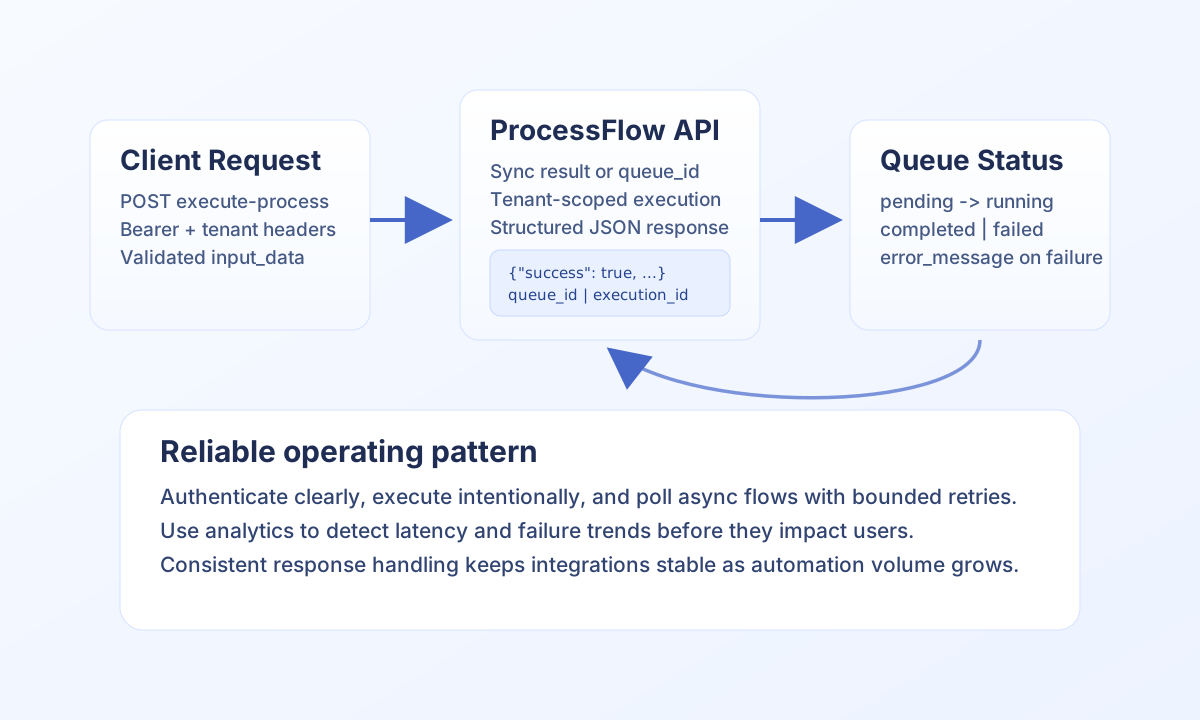
This guide explains how to run, monitor, and analyze ProcessFlow executions through the Tealfabric API. It focuses on production-safe request patterns, predictable response handling, and the endpoint flows teams use most often in WebApps and integrations. Use this page when you need to trigger automation from external systems or track asynchronous execution progress.
Base URL and authentication model
ProcessFlow API requests use the main API surface at https://<YOUR_DOMAIN>/api/v1/processflow with an action query parameter. From ProcessFlow or WebApp step code, call these endpoints through the injected api service (api.post, api.get) — do not scaffold custom fetch wrappers. The platform applies tenant context, execution auth, and routing automatically. From external systems (CI, partner backends, local scripts), send API key and tenant headers explicitly as shown in the curl examples.
If your integration fails with authorization errors, verify the token scope and tenant header before debugging business logic. Most unexpected failures at this stage are authentication or scope mismatches, not process runtime issues.
Execute processes with explicit input and execution mode
The execute-process action supports synchronous and asynchronous runs. Synchronous mode is useful for short workflows that must return results immediately, while asynchronous mode is preferred for longer or variable workloads. Choose one mode intentionally per use case so callers know whether to expect final output or a queue reference.
The TypeScript and JavaScript examples below use the injected api client from step or WebApp runtime code. For connector calls from the same context, use tf.connector.execute(...) instead of raw HTTP.
type ExecuteResponse = {
  success: boolean;
  data?: { execution_id?: string; queue_id?: string; status?: string; output?: unknown };
};

const processId = "<PROCESS_ID>";
const inputData = { order_id: "<ENTITY_ID>", source: "partner_api" };

const result = (await api.post("/api/v1/processflow?action=execute-process", {
  process_id: processId,
  input_data: inputData,
  async: true,
  options: { priority: "normal" },
})) as ExecuteResponse;

if (!result.success) {
  throw new Error("Execution request failed");
}
curl -X POST "https://<YOUR_DOMAIN>/api/v1/processflow?action=execute-process" \
-H "X-API-Key: <API_KEY>" \
-H "X-Tenant-ID: <TENANT_ID>" \
-H "Content-Type: application/json" \
-d '{
"process_id": "<PROCESS_ID>",
"input_data": {
"order_id": "<ENTITY_ID>",
"source": "partner_api"
},
"async": true,
"options": {
"priority": "normal"
}
}'
{
  "success": true,
  "queue_id": "<QUEUE_ID>",
  "status": "queued",
  "execution_mode": "async"
}
Track async state with queue-status
When you execute asynchronously, poll queue-status with the returned queue_id until the status reaches completed, failed, or cancelled. This pattern keeps client applications responsive and allows better retry and timeout handling in external systems.
Treat failed states as actionable events by capturing error_message and execution context in your own logs. Structured failure logging shortens incident resolution and helps you detect recurring process design issues.
Use analytics to improve reliability
The analytics action is tenant-scoped and useful for spotting trends such as rising execution time, growing retry rates, or process-specific failure clusters. Use date filters and optional process_id filters to compare healthy and degraded time windows. This creates a repeatable feedback loop between operations, process design, and release decisions.
Response and error handling expectations
ProcessFlow responses are JSON and typically include success, payload data, and timestamp metadata. On errors, expect standard HTTP codes such as 400, 401, 403, 404, and 500, plus a structured error body when available. Build your client logic to branch on both HTTP status and response payload so transient and validation failures are handled differently.
If you hit rate limits, reduce poll frequency for queue checks and batch non-critical analytics requests. Stable retry policy is safer than immediate repeated retries and prevents cascading failures in high-traffic workflows.
Sensitive field redaction rules
ProcessFlow execution APIs redact fields named password (case-insensitive) in process execution input_data and output_data, including step-level and process-level execution history payloads.
passwordvalues are returned as"****".usernamevalues are not redacted.- Use the exact key name
passwordfor credential fields so the redaction rule can be enforced consistently.
Related documentation
Using these patterns helps you keep ProcessFlow API integrations secure, observable, and predictable as automation volume grows.