ProcessFlow Database Access Guide
Document information
- Canonical URL:
/docs/02_automations-and-processflow/20_processflow-database-guide - Version:
2026-05-08 - Tags:
processflow,database,guides
This guide explains how to read and write transactional data from ProcessFlow using tenant-safe database services. The recommended path is tenantDb, which keeps operations scoped to the current tenant and supports parameterized queries for safer data access. Use these patterns when your process needs to look up records, create entities, or update workflow state.
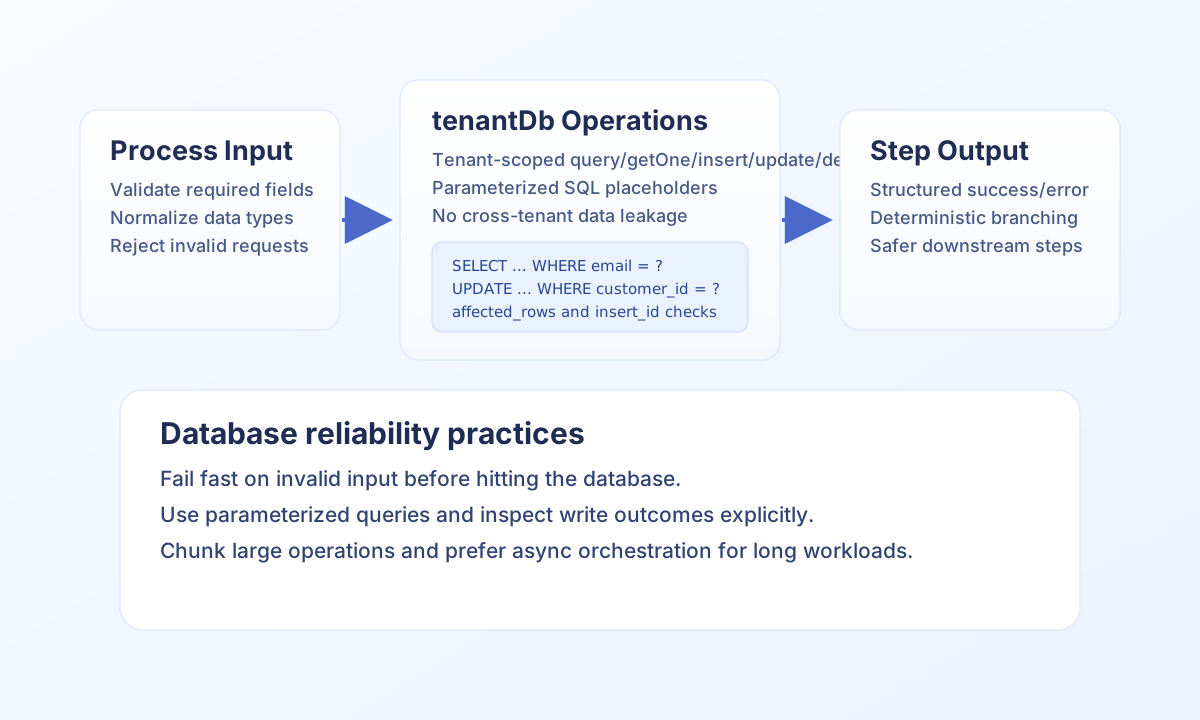
Use tenantDb as the default database interface
tenantDb is the supported direct database service for ProcessFlow snippets that interact with Tealfabric transactional tables. It provides common methods such as query, getOne, insert, update, and delete, while enforcing tenant-aware access boundaries. This reduces accidental cross-tenant leakage and keeps security behavior consistent across workflows.
For non-transactional or external data sources, prefer Datapool schemas or integration-backed connectors instead of opening raw database connections. This separation keeps ProcessFlow logic aligned with platform guardrails and data governance controls.
Build safe query patterns with validation and parameters
Always validate required input before issuing database operations, then use placeholders for dynamic values in SQL. Treat zero-row updates and missing records as expected branch states, not exceptional crashes. Returning stable response contracts makes downstream steps easier to reason about.
type StepResult = { success: boolean; data?: Record<string, unknown>; error?: { code: string; message: string } };

async function fetchActiveCustomer(
  tenantDb: { getOne(sql: string, params?: unknown[]): Promise<Record<string, unknown> | null> },
  customerEmail: string
): Promise<StepResult> {
  if (!customerEmail) {
    return { success: false, error: { code: "INVALID_INPUT", message: "email is required" } };
  }

  const customer = await tenantDb.getOne(
    "SELECT customer_id, email, status FROM Customers WHERE email = ? AND status = ?",
    [customerEmail, "active"]
  );

  if (!customer) {
    return { success: false, error: { code: "NOT_FOUND", message: "Active customer not found" } };
  }

  return { success: true, data: { customer } };
}
Verify query behavior with API-driven execution tests
Before wiring a database step into larger automations, run a controlled ProcessFlow execution through API so you can verify input validation and output shape. This helps distinguish database logic issues from orchestration wiring problems.
curl -X POST "https://<YOUR_DOMAIN>/api/v1/processflow?action=execute-process" \
  -H "X-API-Key: <API_KEY>" \
  -H "X-Tenant-ID: <TENANT_ID>" \
  -H "Content-Type: application/json" \
  -d '{
    "process_id": "<PROCESS_ID>",
    "input_data": {
      "email": "user@example.com"
    },
    "async": false
  }'
{
  "success": true,
  "data": {
    "execution_id": "<ENTITY_ID>",
    "status": "completed",
    "output": {
      "success": true,
      "data": {
        "customer": {
          "customer_id": "cust_123",
          "email": "user@example.com",
          "status": "active"
        }
      }
    }
  }
}
Handle writes, updates, and deletions predictably
For inserts, capture returned IDs and pass them explicitly to later steps instead of re-querying by weak identifiers. For updates and deletes, check affected row counts and return informative responses when no rows were changed. This prevents silent failures and improves operational observability.
When processing larger datasets, avoid unbounded reads and N+1 update loops. Use filtered queries, explicit limits, and chunked processing so steps stay within timeout and memory limits.
Related documentation
- ProcessFlow API documentation
- Sandbox guardrails and restrictions
- Tenant database queries recipe
- Datapool user guide
Following these patterns helps you ship database-backed ProcessFlow steps that are secure, maintainable, and easier to troubleshoot in production.