ProcessFlow Triggers Guide
Document information
- Canonical URL:
/docs/02_automations-and-processflow/12_processflow-triggers-guide - Version:
2026-05-13 - Tags:
processflow,triggers,guides
ProcessFlow triggers start process executions automatically when a defined schedule, event, or inbound request condition is met. They remove manual handoffs and ensure business-critical workflows run consistently across operational scenarios. Use this guide to choose the right trigger model and configure it safely for production.
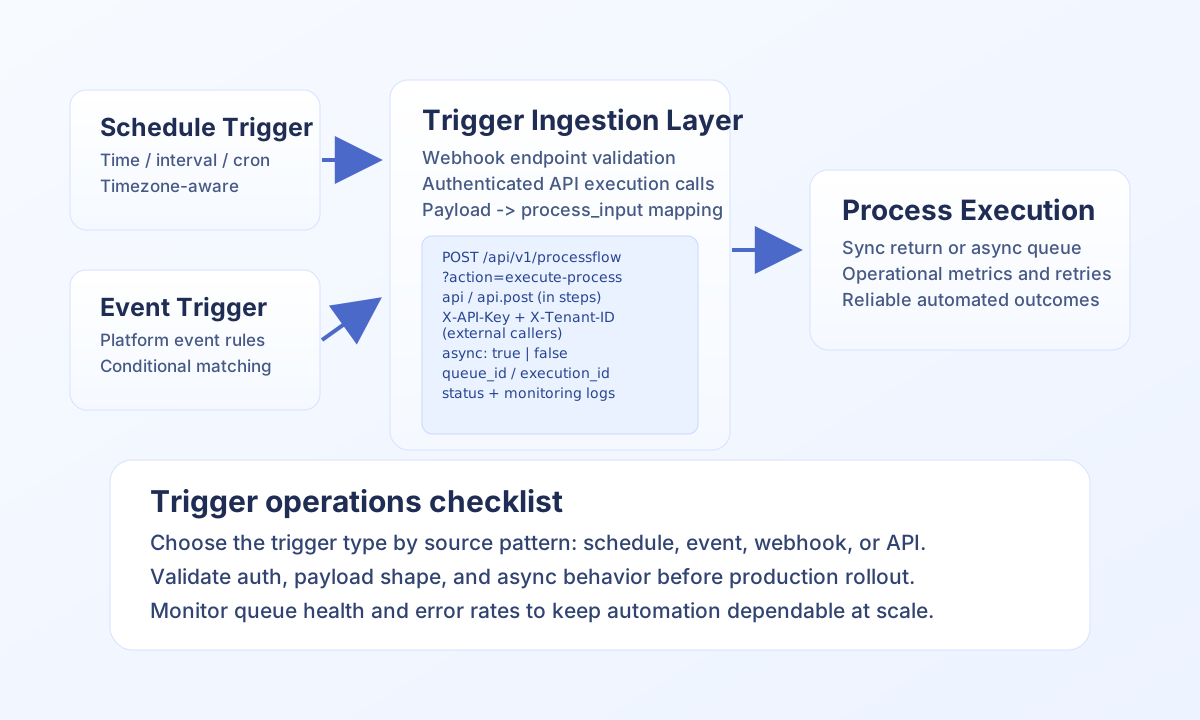
Choose the right trigger type for your workflow
Schedule triggers are best for predictable recurring jobs such as daily reporting, periodic synchronization, or routine maintenance tasks. Event-driven triggers are best when internal platform state changes should start a process automatically, such as user onboarding or order lifecycle updates. Webhook and API-driven triggers are best for external systems that need to call your workflows directly.
In most implementations, trigger setup happens in the Tealfabric UI, while API calls and payloads are used by external systems that invoke process runs. Keeping this distinction clear prevents configuration drift and simplifies incident triage.
Schedule triggers and timezone behavior
Scheduled triggers are reconciled into scheduled_tasks with task type processflow_trigger. The next run time is derived from trigger_config.schedule as implemented in the platform today:
- Cron: set
schedule.cron(optionally withschedule.timezone, defaultUTC). This is the most flexible option for complex recurrence. - Interval: set
schedule.intervalto a positive number (or numeric string). The value is interpreted as minutes until the next execution when cron is not set. - Time-of-day: set
schedule.timetoHH:MM(UTC-based resolution in the scheduler). Optionally setschedule.daysto an array of weekdays (1–7, Monday–Sunday style) to restrict which days may run.
Trigger types scheduled, schedule, or cron are treated as schedule-backed; a non-scheduled trigger_type still schedules when schedule.interval alone is present. Prefer explicit timezone configuration on cron for region-bound workflows.
Webhook and API-driven execution
Webhook triggers are commonly implemented through linked WebApp endpoints that validate request signatures and map payloads into process_input. Starting another process from inside a step must go through the injected internal client—api in TypeScript and api.post / api.get in JavaScript and TypeScript—so tenant context, execution auth, and routing stay consistent. Do not use raw curl or anonymous fetch to Tealfabric from step code.
External systems that call Tealfabric from outside a process (CI, partner backends, browsers with an API key) use HTTPS with X-API-Key and X-Tenant-ID as described in ProcessFlow API documentation.
/** From a ProcessFlow step: use injected `api` (same role as TypeScript `api`). */
async function triggerOrderWorkflow(orderId: string, amount: number) {
  return await api.post("/api/v1/processflow?action=execute-process", {
    process_id: "<PROCESS_ID>",
    input_data: {
      source: "external_app",
      payload: { order_id: orderId, amount },
    },
    async: true,
    options: { priority: "normal" },
  });
}
Example response shape when async is true:
{
  "success": true,
  "queue_id": "<ENTITY_ID>",
  "status": "queued",
  "execution_mode": "async"
}
Operate triggers reliably
Monitor trigger execution history, failure rates, and queue backlogs so issues are detected before downstream SLAs are affected. Use strong secrets for webhook endpoints, rotate credentials regularly, and enforce HTTPS for all external callback traffic. For noisy integrations, apply validation and rate controls early to reduce unnecessary process starts.
When debugging failures, verify trigger configuration first, then authentication, then process logic. This order catches the most frequent production issues quickly and keeps troubleshooting efficient.
Related documentation
- ProcessFlow API documentation
- ProcessFlow step types and control flow
- Asynchronous processing
- WebApps API documentation
- WebApps and ProcessFlow Integration Guide
Choosing clear trigger models and validating execution paths early helps you keep automations dependable as integration complexity grows.