ProcessFlow: Image OCR
Document information
- Canonical URL:
/docs/02_automations-and-processflow/38-Processflow_Image_OCR - Version:
2026-05-08 - Tags:
processflow,reference,processflow-image-ocr
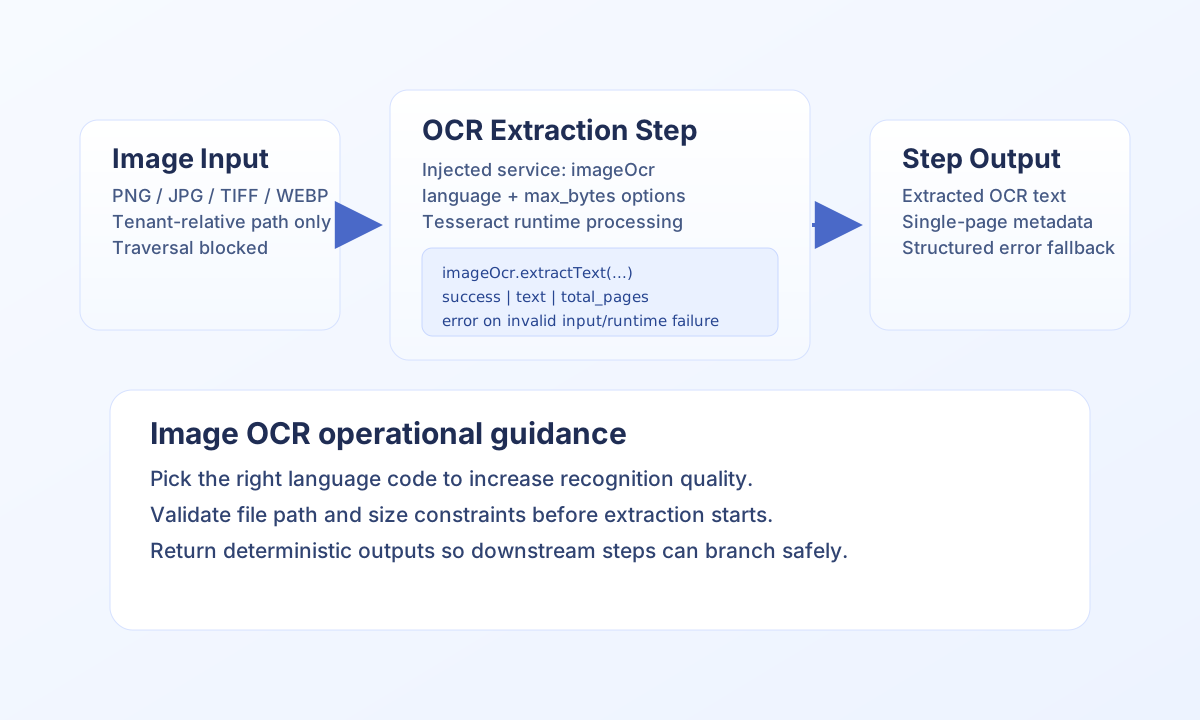
ProcessFlow can extract text from raster image files such as PNG, JPEG, TIFF, and screenshots using Tesseract OCR. This capability is designed for image-only inputs and is separate from PDF extraction workflows. Use imageOcr for images and use pdfOcr for PDF documents.
Use imageOcr inside process step code
Image OCR is available through the injected imageOcr service in ProcessFlow snippets. There is no standalone HTTP OCR endpoint for images in this release, so OCR is performed from step logic during normal process execution. File paths must be tenant-relative and remain inside tenant storage boundaries.
Use options like language and max_bytes to improve recognition quality and control output size. For multilingual documents, selecting the correct OCR language usually has the largest impact on text quality.
type OcrResponse = { success: boolean; text?: string; total_pages?: number; error?: string };

function extractImageText(
  imageOcr: { extractText(path: string, options?: Record<string, unknown>): OcrResponse },
  imagePath: string
) {
  const result = imageOcr.extractText(imagePath, { language: "eng", max_bytes: 2_000_000 });
  if (!result.success) {
    return { success: false, error: { code: "IMAGE_OCR_FAILED", message: result.error ?? "Image OCR failed" } };
  }
  return { success: true, data: { ocr_text: result.text ?? "", total_pages: result.total_pages ?? 1 } };
}
Trigger OCR-enabled steps through ProcessFlow API
Even though image OCR is service-based, you can still run OCR workflows through normal ProcessFlow execution endpoints by passing image_path in input_data. This is useful for testing, external orchestration, and repeatable batch pipelines.
curl -X POST "https://<YOUR_DOMAIN>/api/v1/processflow?action=execute-process" \
  -H "X-API-Key: <API_KEY>" \
  -H "X-Tenant-ID: <TENANT_ID>" \
  -H "Content-Type: application/json" \
  -d '{
    "process_id": "<PROCESS_ID>",
    "input_data": {
      "image_path": "platforms/25/screenshots/receipt.png"
    },
    "async": false
  }'
{
  "success": true,
  "data": {
    "execution_id": "<ENTITY_ID>",
    "status": "completed",
    "output": {
      "success": true,
      "data": {
        "ocr_text": "Receipt #14598 ...",
        "total_pages": 1
      }
    }
  }
}
Supported formats, limits, and failure patterns
Supported image extensions include png, jpg, jpeg, tiff, tif, bmp, gif, and webp. Files must exist in tenant storage, avoid traversal patterns, and stay within configured input limits. Output can be truncated by max_bytes, so set limits intentionally for downstream consumers.
If extraction quality is low, verify language code first, then source image clarity and orientation. If extraction fails entirely, check path validity, file size policy, and OCR runtime availability before retrying.
See also
Following these patterns helps you build OCR-driven image workflows that are secure, predictable, and production-safe.