ProcessFlow Keystore
Document information
- Canonical URL:
/docs/02_automations-and-processflow/40-Processflow_Keystore - Version:
2026-05-08 - Tags:
processflow,reference,processflow-keystore
The ProcessFlow keystore is the recommended way to store secrets used by process steps, including API keys, webhook secrets, and service credentials. Instead of hardcoding values in code, you save each secret once and retrieve it securely at runtime. This keeps sensitive data out of source snippets, logs, and shared exports while preserving a simple developer workflow.
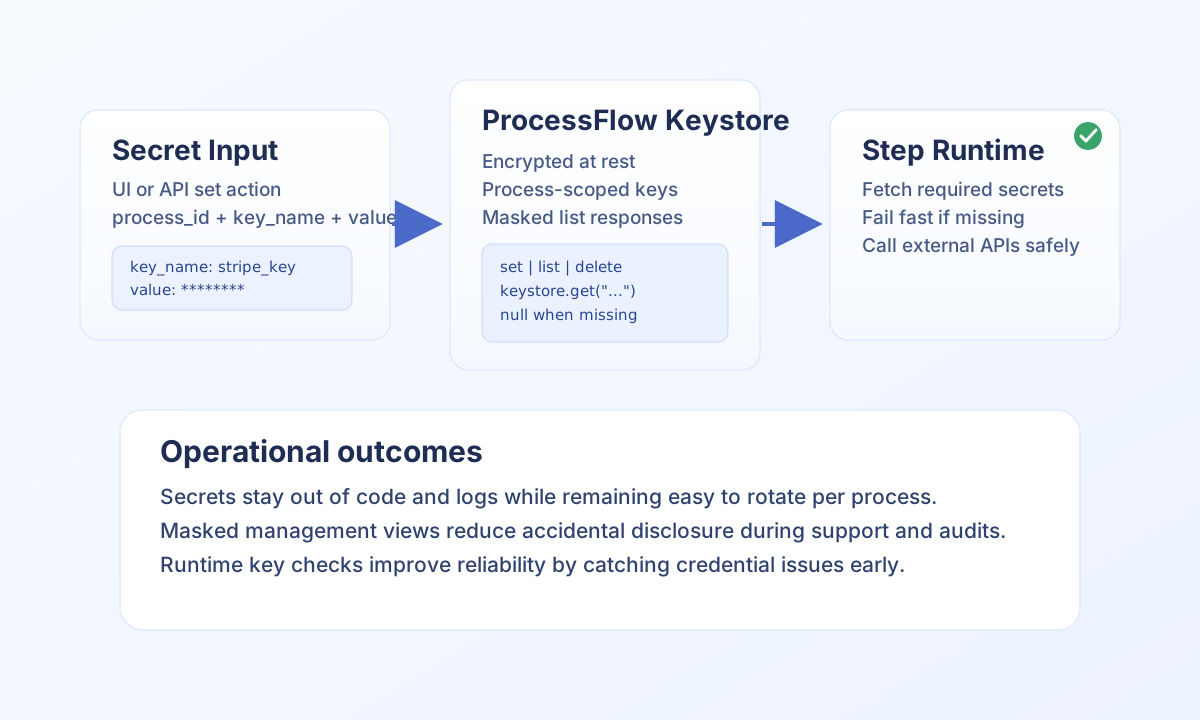
Use keystore for runtime secrets
Use keystore whenever a value is sensitive and should not appear in step code, logs, screenshots, or exported process definitions. Typical examples are payment gateway tokens, CRM API keys, and webhook signing secrets. Keeping one secret per key also makes rotation and troubleshooting easier.
Secrets are process-scoped, so two processes can reuse the same key name without sharing values. When you update an existing key, the new value replaces the old one for that process only. This scoped model lets teams evolve integrations independently with less risk of cross-process leakage.
Manage keys through API and runtime retrieval
For automation pipelines, you can set, list, and delete secrets through processflow-keystore endpoints. Use bearer credentials and tenant headers consistently so management requests match your runtime permissions model.
curl -X POST "https://<YOUR_DOMAIN>/api/v1/processflow-keystore?action=set" \
  -H "X-API-Key: <API_KEY>" \
  -H "X-Tenant-ID: <TENANT_ID>" \
  -H "Content-Type: application/json" \
  -d '{
    "process_id": "<PROCESS_ID>",
    "key_name": "stripe_key",
    "value": "<SECRET_VALUE>"
  }'
{
  "success": true,
  "data": {
    "process_id": "<PROCESS_ID>",
    "key_name": "stripe_key",
    "updated": true
  }
}
In step code, retrieve values with keystore.get("<key_name>") and fail fast if required secrets are missing. This gives users actionable errors and prevents partial process execution with invalid credentials.
function loadRequiredSecret(keystore: { get(name: string): string | null }, keyName: string) {
  const value = keystore.get(keyName);
  if (!value) {
    return {
      success: false,
      error: { code: "MISSING_SECRET", message: `Missing required secret: ${keyName}` },
    };
  }
  return { success: true, data: { value } };
}
Follow key naming and value rules
Key names are case-sensitive, must be printable ASCII, and must stay within the platform length limit. Prefer explicit lowercase names like stripe_key, crm_token, or webhook_secret so they remain readable in operational runbooks. Stable naming prevents rollout mistakes during key rotation.
The keystore stores text values. If you need binary material, encode to Base64 before storing and decode after retrieval in your step. Keep binary payloads small; large cryptographic assets are usually better managed in file storage or a dedicated secrets system.
Operate safely in production
Do not log secret values, even partially, and avoid passing secrets through process input unless the workflow intentionally supports runtime overrides. When an integration is decommissioned, delete its key immediately to reduce stale credential risk. Regularly rotating secrets and validating key presence at step start materially improves reliability.
At runtime, remember that UI and list operations return masked values for safety. If a step suddenly reports missing or invalid credentials, verify key name case, process scope, and recent rotations before debugging downstream API behavior.