ProcessFlow Step Types and Control Flow
Document information
- Canonical URL:
/docs/02_automations-and-processflow/08_processflow-step-types - Version:
2026-05-08 - Tags:
processflow,steps,reference
This guide explains how ProcessFlow control flow works in practice: action steps, conditional execution, parallel fan-out, and merged outcomes. Understanding these step behaviors helps you design workflows that are easier to reason about, test, and operate under real production load.
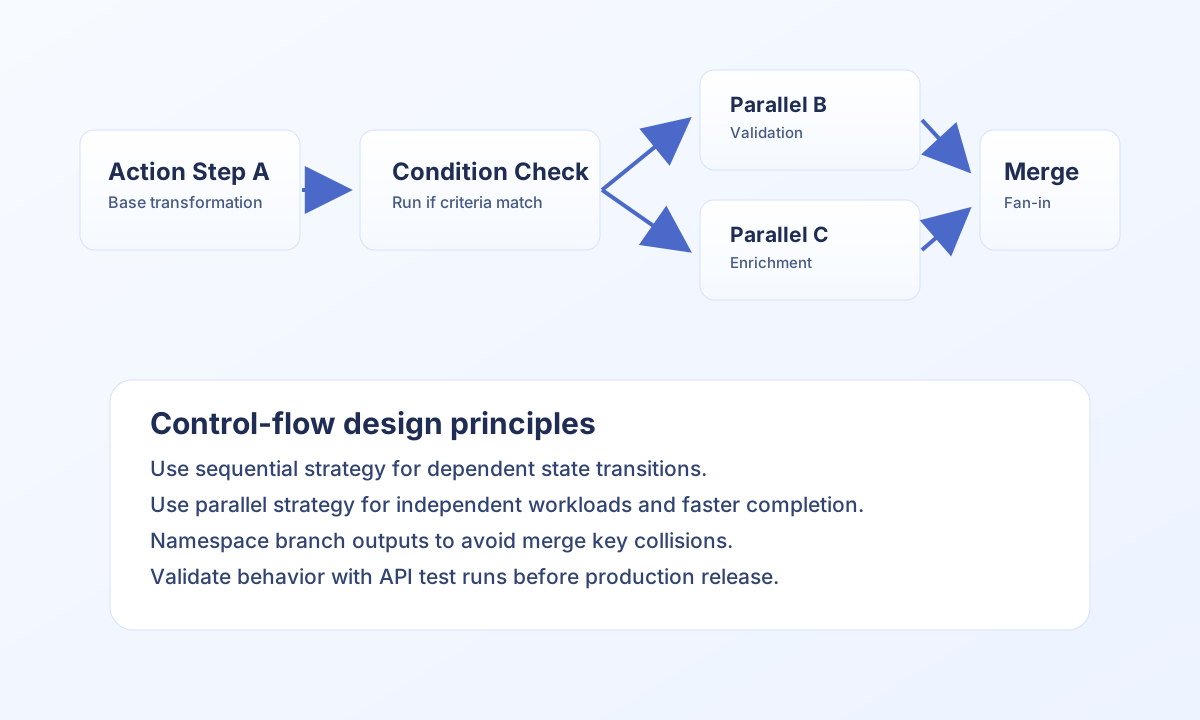
Core step types and execution behavior
Action steps are the default work units and run snippet logic that produces structured output data. Conditional behavior is configured at step level, so each step can run or skip based on current accumulated process state. Parallel execution is enabled at process strategy level and is useful when independent work can run concurrently without ordering dependencies.
The same step types apply to both synchronous and asynchronous process execution. The difference is whether the caller waits for final output (async: false) or receives a queue reference and checks completion later (async: true).
Use a Call process step (step_type: call_process) when one workflow should invoke another. Store the target process_id and wait mode (async) in step configuration, then call tf.process.execute (JavaScript/TypeScript) or $process->execute (PHP). The visual editor draws that step as a distinct violet node. Raw api.post(... execute-process ...) still works for legacy routers; prefer the helper so the canvas and Calls panel can read the target from configuration.
Choose sequential or parallel strategy deliberately
Use sequential strategy when each step depends on data from the previous step, or when state transitions must stay strictly ordered. Use parallel strategy when branches are independent and can safely run at the same time. Parallel fan-out improves latency for enrichment or validation workloads, but you should still design output keys carefully to avoid collision at merge time.
Conditions can be combined with both strategies, and are evaluated against the current shared state at runtime. Missing condition fields should be handled intentionally so branch behavior remains explicit and debuggable.
Model fan-in and conflict behavior clearly
After successful steps, ProcessFlow merges step output into shared state using shallow merge semantics. If multiple branches write the same key, the last write wins. There is no built-in deep merge reducer, so design branch outputs with distinct namespaces (for example fraud_check, inventory_check, pricing_check) when running in parallel.
When you need loop behavior, use batch processing inside action logic, or queue another run of the same process with tf.process.execute(process_id, input, { async: true }) (see Looping in ProcessFlow). There is no native loop node, so loop semantics should be explicit in code and output shape.
type SharedState = Record<string, unknown>;

function mergeStepOutput(currentData: SharedState, stepOutput: SharedState): SharedState {
  return { ...currentData, ...stepOutput }; // shallow merge, last write wins
}

function shouldRunStep(currentData: SharedState): boolean {
  return Boolean(currentData.user_status === "active");
}
Test strategy choices with API execution
Before publishing a process, validate branching and merge behavior through API runs so you can confirm expected output shape under both sync and async modes. This is especially important for parallel flows where independent branches produce overlapping keys.
curl -X POST "https://<YOUR_DOMAIN>/api/v1/processflow?action=execute-process" \
  -H "X-API-Key: <API_KEY>" \
  -H "X-Tenant-ID: <TENANT_ID>" \
  -H "Content-Type: application/json" \
  -d '{
    "process_id": "<PROCESS_ID>",
    "input_data": {
      "user_status": "active",
      "order_total": 249.90
    },
    "async": true,
    "options": {
      "priority": "normal"
    }
  }'
{
  "success": true,
  "queue_id": "<ENTITY_ID>",
  "status": "queued",
  "execution_mode": "async"
}
Related documentation
- ProcessFlow API documentation
- ProcessFlow triggers guide
- Process step code guide
- Asynchronous processing
Designing with explicit step semantics, branch rules, and merge boundaries helps you build ProcessFlow automations that stay understandable and reliable as they grow.