Asynchronous Processing in Tealfabric IO
Document information
- Canonical URL:
/docs/02_automations-and-processflow/34_asynchronous-processing__source-master - Version:
2026-06-09 - Tags:
processflow,reference,processflow-asynchronous-processing,async
Asynchronous processing lets ProcessFlow run long or heavy operations in the background while users, webhooks, and integrations continue working. Instead of waiting for completion in a single request, you queue work, receive a queue reference, and track progress until the job finishes. This model suits imports, external API dependencies, document processing, and other workloads where immediate blocking responses are not required.
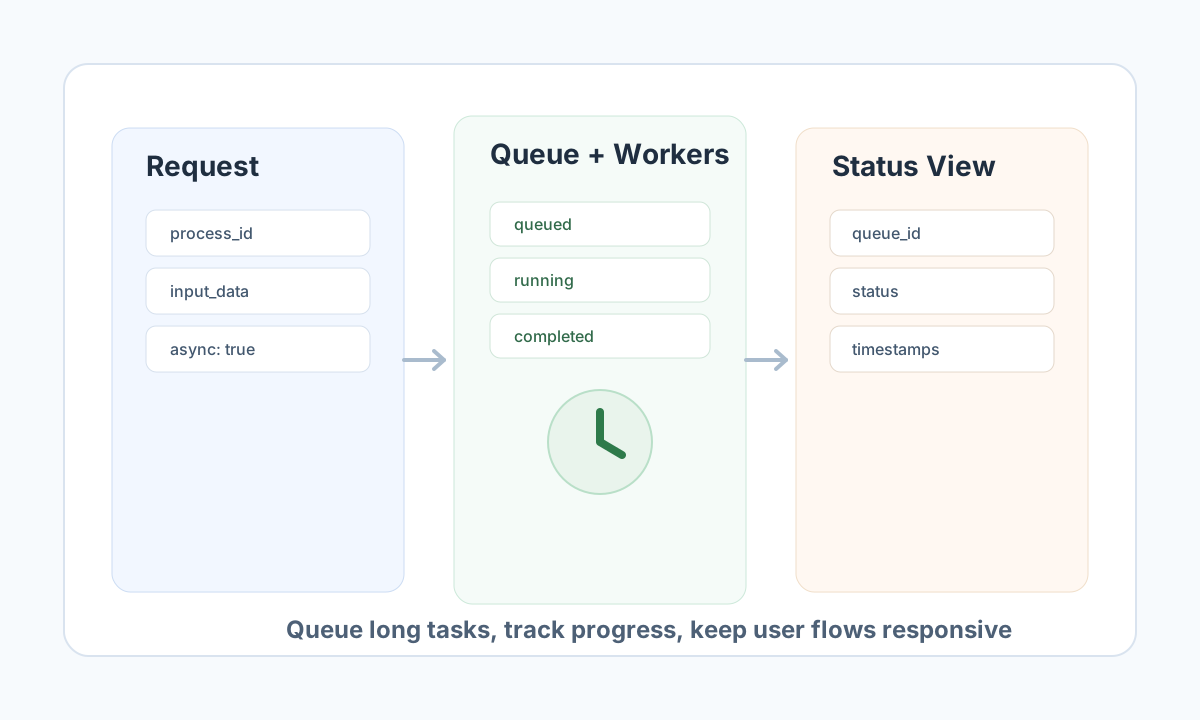
Choose sync or async intentionally
| Mode | Best for | What you get back |
|---|---|---|
| Synchronous | Form validation, quick record updates, any step that needs the answer now | Final process output in the same request |
| Asynchronous | Batch jobs, slow integration chains, heavy document work | A queue_id immediately; completion tracked in the background |
Choosing the right mode improves user experience and system stability. Fast, user-facing actions stay responsive in sync mode, while heavy operations avoid timeout risk in async mode.
Understand the async queue flow
When you execute a process with async mode enabled, the platform stores a queue job and returns immediately with a queue_id and queued status. Background workers claim the job, run the process in tenant scope, and update status through queued → running → completed or failed.
Tenant scoping ensures one tenant cannot inspect or affect another tenant's jobs. Queue status checks must always include the correct tenant and authorization headers.
Trigger async execution from ProcessFlow code
Inside a ProcessFlow step, use the injected api service to start background work without blocking the current step. Submit with async: true and capture the returned queue_id for status checks and user notifications.
type QueueResponse = { success: boolean; data?: { queue_id?: string; status?: string } };

async function queueProcess(
  api: { post(url: string, body: unknown): Promise<QueueResponse> },
  processId: string,
  inputData: Record<string, unknown>
) {
  const result = await api.post("/api/v1/processflow?action=execute-process", {
    process_id: processId,
    input_data: inputData,
    async: true,
    options: { priority: "normal" },
  });

  if (!result.success || !result.data?.queue_id) {
    return { success: false, error: { code: "QUEUE_FAILED", message: "Could not queue process execution" } };
  }

  return { success: true, data: { queue_id: result.data.queue_id, status: result.data.status ?? "queued" } };
}
Callers outside a running process (automation scripts, partner backends) use the same execute-process action with X-API-Key and X-Tenant-ID headers. See ProcessFlow API documentation.
Check queue status through the API
After queuing a job, query status with the returned queue_id. This pattern supports submit-and-poll WebApps, monitoring dashboards, and external orchestrators that need execution visibility.
curl -X GET "https://<YOUR_DOMAIN>/api/v1/processflow?action=queue-status&queue_id=<ENTITY_ID>" \
  -H "X-API-Key: <API_KEY>" \
  -H "X-Tenant-ID: <TENANT_ID>" \
  -H "Content-Type: application/json"
{
  "success": true,
  "data": {
    "queue_id": "<ENTITY_ID>",
    "process_id": "<PROCESS_ID>",
    "status": "running",
    "created_at": "2026-05-08T11:44:00Z",
    "updated_at": "2026-05-08T11:45:10Z",
    "retry_count": 0,
    "max_retries": 3,
    "execution_priority": "normal",
    "error_message": null
  }
}
Use a modest polling interval (for example every 5–15 seconds) instead of tight loops. For user-facing flows, acknowledge submission immediately, then show progress in a history page or status component.
Use retries and priorities deliberately
Queue jobs support priority levels such as urgent, high, normal, and low, plus retry counters on the queue record. These controls help protect critical workloads while keeping routine background tasks from competing with user-facing operations.
Reserve urgent lanes for genuinely time-sensitive work. Use retries for transient failures (temporary API timeouts, rate limits), not permanent validation errors—a clear error classification strategy prevents retry loops and improves queue throughput.
Operate async workloads reliably
Reliable async design separates submission from result viewing so users always understand what happens next. Monitor failure rates to catch integration or data issues early, and drive UI messaging from queue status fields (queued, running, completed, failed).
Asynchronous processing works best as an intentional product flow, not a fallback for slow code. With clear contracts and visible status handling, you can scale long-running operations without degrading interactive experiences.
For trigger design and webhook patterns, continue with ProcessFlow triggers guide and WebApp async process trigger.