WebApp Async Process Trigger Guide
Document information
- Canonical URL:
/docs/05_apps-webhooks-and-surfaces/20_webapp-async-process-trigger - Version:
2026-05-08 - Tags:
webapps,processflow,triggers
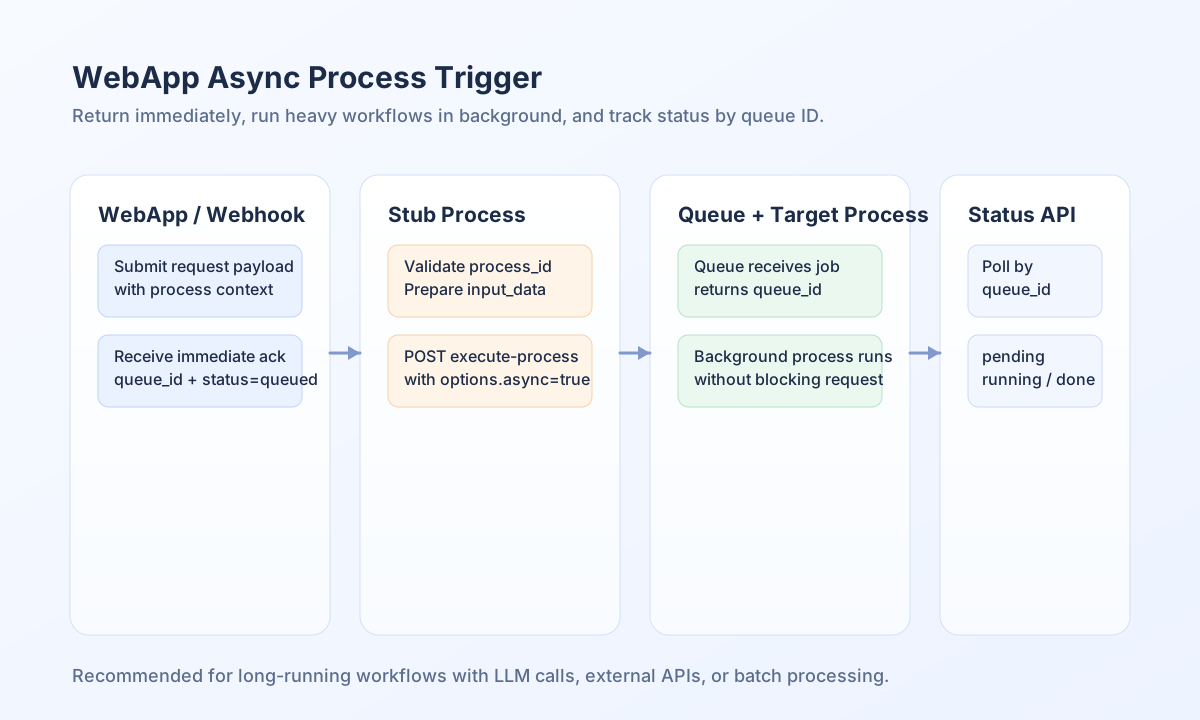
This guide shows how to trigger ProcessFlow jobs asynchronously from WebApps or webhooks so users get immediate responses instead of waiting for long-running execution. It is useful when your downstream process includes LLM calls, external APIs, or batch operations that can exceed normal request time limits. By introducing a lightweight trigger step, you can return quickly with a queue identifier and track completion separately.
Why async triggering matters
When a WebApp is attached directly to a long process, the HTTP request stays open until all steps finish. That behavior can cause timeouts, poor user feedback, and avoidable connection pressure under load. Async triggering separates request handling from heavy execution so the front end gets a fast acknowledgment and the workload runs safely in the background.
Use the stub-process pattern
The recommended design uses two processes: a small stub process and the real target process. The stub validates input, resolves the target process, and calls the execution API with async enabled. The target process then runs through the queue without blocking the original WebApp or webhook call.
In production, prefer process_id over process_name because IDs are stable and avoid lookup ambiguity. Process name lookup is still useful during early development or when teams are iterating quickly on flow naming.
Create the async trigger step
Set up a one-step ProcessFlow with a code snippet that forwards input and triggers async execution. Keep the snippet focused on validation, queue submission, and standardized response fields so callers always get predictable output.
const targetProcessId = String(process_input.process_id ?? "");
if (targetProcessId === "") {
    return {
        success: false,
        error: {
            code: "MISSING_PROCESS_IDENTIFIER",
            message: "process_id is required for async trigger"
        ],
        data: null
    };
}

const inputData = process_input;
unset(inputData.process_id, inputData.process_name);

const response = await api.post(`${app_url}/api/v1/processflow?action=execute-process`, {
    process_id: targetProcessId,
    input_data: inputData,
    options: {async: true]
});

if (!(response.success ?? false)) {
    return {
        success: false,
        error: {
            code: "ASYNC_TRIGGER_FAILED",
            message: "Failed to queue async execution"
        },
        data: null
    };
}

return {
    success: true,
    data: {
        queue_id: response.data?.queue_id ?? null,
        status: response.data?.status ?? "queued",
        process_id: targetProcessId,
        execution_mode: "async"
    ]
};
Poll queue status in client code
After queue submission, your app can poll status to update UX states such as “queued,” “running,” “completed,” or “failed.” Keep polling intervals moderate to avoid unnecessary load, and stop once a terminal state is reached.
type QueueStatus = "pending" | "running" | "completed" | "failed" | "retrying" | "cancelled";

async function pollQueueStatus(queueId: string): Promise<QueueStatus> {
  const response = await fetch(
    `/api/v1/processflow?action=queue-status&queue_id=${encodeURIComponent(queueId)}`,
  );
  if (!response.ok) throw new Error(`Status request failed: ${response.status}`);
  const payload = (await response.json()) as { data?: { status?: QueueStatus } };
  return payload.data?.status ?? "pending";
}
Trigger async execution over API
Use explicit headers and request payloads when invoking async execution from service integrations or external clients. The response should expose queue_id so status tracking can continue outside the initial request context.
curl -X POST "https://api.example.com/api/v1/processflow?action=execute-process" \
  -H "X-API-Key: <API_KEY>" \
  -H "X-Tenant-ID: <TENANT_ID>" \
  -H "Content-Type: application/json" \
  -d '{
    "process_id": "<ENTITY_ID>",
    "input_data": {
      "source": "webapp_form",
      "request_id": "req-2026-05-08-001"
    },
    "options": {
      "async": true
    }
  }'
{
  "success": true,
  "data": {
    "queue_id": "queue_abc123def456",
    "status": "queued",
    "process_id": "<ENTITY_ID>"
  }
}
Prevent common rollout issues
Most failures come from missing process_id, attaching the WebApp to the wrong process, or not storing queue_id for follow-up status checks. You can reduce incidents by validating identifiers early, keeping the stub process minimal, and logging queue submission outcomes. These checks make asynchronous triggering predictable for both users and operators.
See also
Async triggering is the default-safe pattern whenever request latency and process runtime differ significantly. With a stub process, clear queue tracking, and stable response contracts, you can scale long-running automations without degrading frontend responsiveness.