Process Environment Variables
Document information
- Canonical URL:
/docs/02_automations-and-processflow/13_process-environment-variables - Version:
2026-09-30 - Tags:
processflow,reference,process-environment-variables
ProcessFlow injects runtime variables into every step so your code can access input data, tenant context, and platform services without manual bootstrapping. Variable names are case-sensitive. Some services are null or disabled unless the step’s sandbox profile grants the matching capability (for example file access or connector execution).
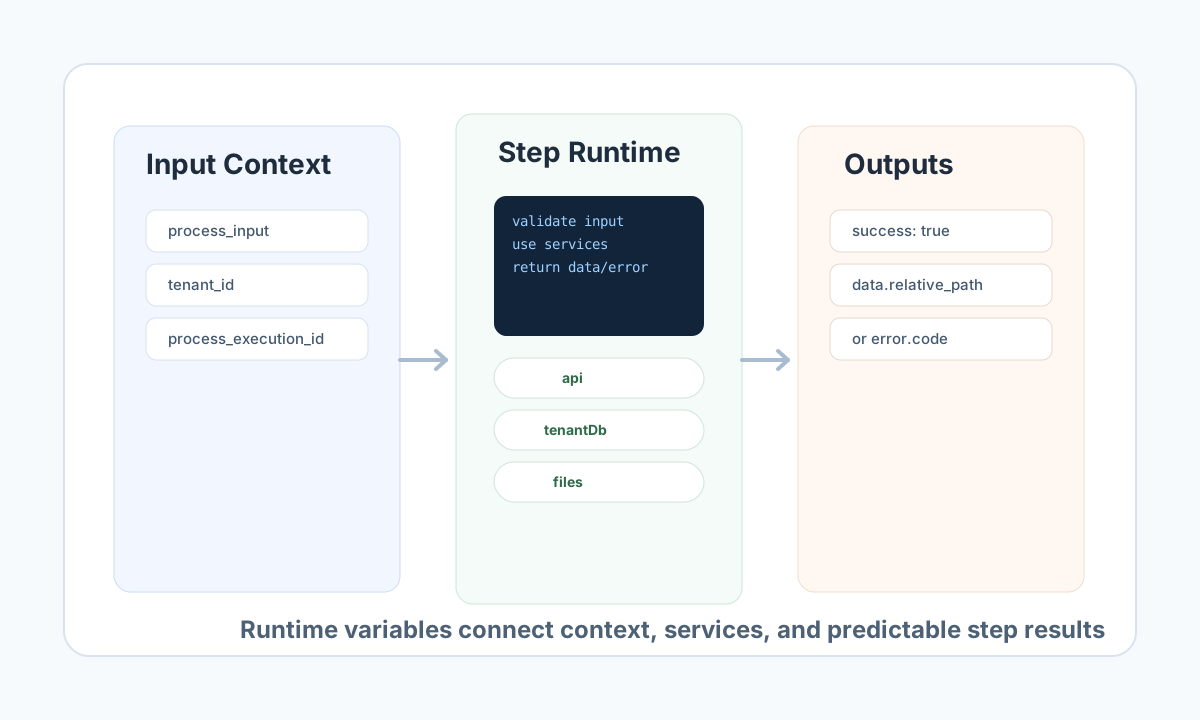
Input and output context
| Variable | Type | Practical usage |
|---|---|---|
process_input | object | Normalized trigger payload or data passed from a previous step. |
process_output | object | Mutable output bag for the current step; downstream steps can read values you set here. |
raw_input | string | Raw request body (often JSON text) for signature verification and webhook parsing. |
Identity and process metadata
| Variable | Type | Practical usage |
|---|---|---|
tenant_id | string | Active tenant for the execution; use in all tenant-scoped logic. |
user_id | string | null | User who triggered the run, when available. |
webapp_tenant_id | string | WebApp tenant context (usually the same as tenant_id). |
process_id | string | ID of the process definition being executed. |
process_execution_id | string | Workflow execution ID for correlation, logging, and unique file paths. |
execution_auth_source_id | string | Source execution ID used for internal HTTP auth headers (often matches _execution_id in process_input). |
run_correlation_id | string | Support and log correlation reference for this run. |
correlation_id | string | Alias of run_correlation_id. |
app_url | string | Base URL of the Tealfabric app for building internal API calls. |
WebApp and HTTP request context
These fields are populated when the process is triggered from a WebApp (form POST, webhook-style submission). They are typically empty or absent for API-only or scheduled triggers.
| Variable | Type | Practical usage |
|---|---|---|
http_headers | object | Request headers (Host, Content-Type, X-Forwarded-Proto, and others). |
request_method | string | HTTP method, for example POST or GET. |
request_uri | string | Request path, for example /webapp/contact-form. |
remote_addr | string | Client IP as seen by the platform. |
Do not use server globals such as $_SERVER — they are blocked in the sandbox. Use the injected fields above instead.
Platform services
Prefer tenantDb and integration over low-level or deprecated APIs.
| Variable | Type | Practical usage |
|---|---|---|
tenantDb | object | Recommended tenant-scoped database access (query, getOne, insert, update, delete, …). Also available as tf.tenantDb. |
db | object | Raw MySQL handle for tenant /root only (getRawConnection()). Other tenants: use tenantDb / tf.tenantDb. |
process_db | object | null | /root tenant only — PDO-shaped handle for platform tables and step logs. null for normal tenant steps. |
integration | object | Execute configured integrations (executeSync, executeAsync, getStatus, getResult, getPendingCount, …). Mirrored on tf.integration. |
connectors | object | Deprecated alias of integration — use integration in new code. |
api | object | Authenticated internal HTTP client (get, post) with execution context headers. |
llm | object | Call the platform LLM (callLLM / complete). |
email | object | Queue transactional email (send). |
notification | object | Create and manage in-app notifications (send, dispatch, update, remove). |
jwt | object | Decode or verify JWT payloads (decodePayload, verify). |
datapool | object | Tenant DataPool access (query, insert, update, schema helpers). |
keystore | object | null | Process-scoped secrets (get, set, list); null when keystore capability is off. |
Files, documents, and OCR
| Variable | Type | Practical usage |
|---|---|---|
files | object | null | Execution-scoped file I/O (read, write, list) when file capability is enabled; null otherwise. |
documentReview | object | Start document review workflows (createReviewFromProcessFlow). |
pdfOcr | object | Extract text from PDFs in tenant storage (extractText). |
imageOcr | object | Extract text from images in tenant storage (extractText). |
Tenant-relative paths only (for example platforms/25/receipts/invoice.pdf). See PDF OCR and Image OCR.
Logging and the tf namespace
JavaScript and TypeScript steps receive a capability-aware tf object. Prefer tf.* in new snippets; legacy root globals remain for migrated PHP-style code and are aliased on tf where applicable.
| Variable | Type | Practical usage |
|---|---|---|
log_message | callable | Legacy logging alias — log_message("info", "message"). Prefer tf.log. |
tf | object | Namespaced sandbox API (see table below). |
tf core members
| Member | Capability | Purpose |
|---|---|---|
tf.capabilities | — | Array of enabled capability names for this run |
tf.log | logging | Structured step log lines |
tf.context.get/set/snapshot | context | Read/write execution context |
tf.utils.nowIso/sha256/hmacSha256/deterministicId | — | Deterministic helpers (hashing, IDs, timestamps) |
tf.sleep(ms) / tf.wait(ms) | — | Pause the step for ms milliseconds. The delay counts against the step timeout |
tf.dataAccess.getRecord/findRecords | data-access | Read-only record access |
tf.connector.execute | connector | Synchronous connector execution (preferred for new code) |
tf service aliases
The same objects as the root globals are also on tf: tf.tenantDb, tf.integration, tf.api, tf.datapool, tf.llm, tf.email, tf.notification, tf.jwt, tf.files, tf.keystore, tf.pdfOcr, tf.imageOcr, tf.documentReview, tf.db ( /root only).
Full method lists, capability matrix, async integration patterns, and examples: Process sandbox tf API reference.
Tenant file helpers
When the file capability is enabled, these functions are also injected (not objects on a service):
file_get_contents, file_put_contents, file_exists, mkdir, read, write, unlink, copy, rename, glob, and related fopen / fread / fwrite helpers.
Paths must stay inside tenant storage boundaries. Include process_execution_id in generated paths to avoid collisions between concurrent runs.
Internal authentication (advanced)
| Variable | Type | Practical usage |
|---|---|---|
execution_auth_key | string | null | Shared secret for signed internal HTTP calls from step code. Do not log, return to clients, or hardcode in snippets. |
The api service applies execution auth automatically when app_url and auth context are configured.
Handle optional context safely
Some helpers are context-dependent:
filesandkeystoremay benullwhen the step profile does not grant file or secret access.- WebApp HTTP fields (
raw_input,http_headers, …) appear only for WebApp-triggered runs. - Service methods throw a clear error when the step’s sandbox capability disables that feature.
Guard early and return structured errors so downstream steps are not left with ambiguous failures.
type StepInput = { filename?: string };

function buildOutputPath(input: StepInput, executionId: string, filesService: unknown) {
  if (!input.filename) {
    return { success: false, error: { code: "MISSING_FILENAME", message: "filename is required" } };
  }
  if (!filesService) {
    return { success: false, error: { code: "NO_FILES_SERVICE", message: "file context is not available" } };
  }

  return {
    success: true,
    data: { relative_path: `public_docs/${executionId}/${input.filename}` },
  };
}
Verify runtime context through API execution
When testing variable usage, execute a process through the API with explicit input_data and inspect the execution result.
curl -X POST "https://<YOUR_DOMAIN>/api/v1/processflow?action=execute-process" \
  -H "X-API-Key: <API_KEY>" \
  -H "X-Tenant-ID: <TENANT_ID>" \
  -H "Content-Type: application/json" \
  -d '{
    "process_id": "<ENTITY_ID>",
    "input_data": {
      "filename": "report.pdf"
    },
    "async": false
  }'
{
  "success": true,
  "data": {
    "execution_id": "exec_0f8e21a7",
    "status": "completed"
  }
}
Keep variable usage predictable
Prefer injected services over blocked low-level patterns. Store secrets in keystore or tf.keystore, not in source code. For WebApp-heavy workflows, see WebApp functions guide. For sandbox limits, see Sandbox guardrails. For the full tf API, see Process sandbox tf API reference.
Treat these names as a stable contract between your process design and the execution engine. Clear input validation, tenant-scoped service usage, and structured return payloads make step behavior easier to maintain as workflows grow.