DataPool User Guide
Document information
- Canonical URL:
/docs/06_data-and-documents/05_datapool-user-guide - Version:
2026-09-03 - Tags:
datapool,data,guides
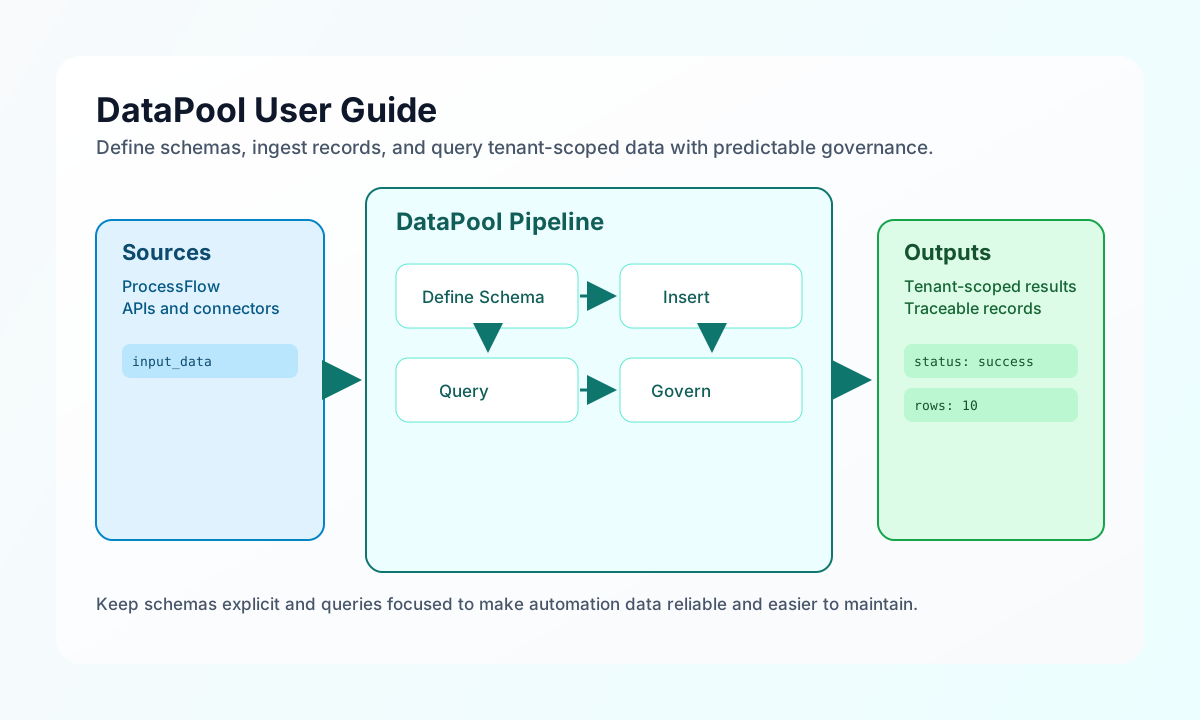
DataPool is the tenant-scoped data layer used by Tealfabric workflows to store, query, and manage structured records. This guide explains how to work with schemas, insert and query data, and keep operations safe and predictable in production. If you are building ProcessFlow automations that depend on shared operational data, this page gives you the baseline patterns to follow.
Which query surface to use
| Surface | When to use | Path / API |
|---|---|---|
| HTTP SQL query | External services, scripts, API-key clients | POST /api/v1/datapool/query with JSON { "query", "params" } — response includes data (and also results / count) |
| ProcessFlow sandbox | Step code inside a process | tf.datapool.query(...), tf.datapool.table(...) — not the HTTP path above (ProcessFlow TF API) |
| Console / CRUD list | Browse or mutate rows by schema | GET / POST / PUT / DELETE /api/v1/datapool/data |
| Trace AI / MCP | Agent tools | query_datapool (and related datapool tools) — not REST |
Do not call GET /api/v1/datapool/query (method not allowed). SQL-style HTTP clients should use POST /api/v1/datapool/query only.
GET /api/v1/datapool/data?query=… still accepts a SQL-like query string for ProcessFlow and older callers; new external integrations should prefer POST /datapool/query so the request body can carry parameterized params safely.
Understand the DataPool model
DataPool organizes data into schemas that behave like named collections with defined fields and types. Each operation runs in tenant scope by default, which means your queries and writes only access your tenant data. This isolation model is foundational for multi-tenant safety and should be assumed in every integration design.
In practice, most teams use DataPool for customer and transaction records, process outputs, document metadata, and reporting snapshots. The same service can be used from ProcessFlow step code and API-driven integration paths, which makes it easier to keep storage and retrieval behavior consistent across automations. Keeping schema names and field contracts stable is the fastest way to reduce downstream breakage.
Create and use a schema in ProcessFlow
A clean onboarding path is to create one schema for a business domain, insert a record, and query it back with a filter. This confirms naming, typing, and permissions before your workflow scales to bulk operations. The example below demonstrates that first lifecycle.
await tf.datapool.createSchema({
  schema_name: "customers",
  schema_definition: [
    { name: "id", type: "string" },
    { name: "name", type: "string" },
    { name: "email", type: "string" },
    { name: "status", type: "string" },
    { name: "created_at", type: "timestamp" },
  ],
  schema_type: "structured",
  storage_backend: "database",
  description: "Customer master records",
});

const dataId = await tf.datapool.insert("customers", {
  id: "cust_123",
  name: "Alex Taylor",
  email: "alex@example.com",
  status: "active",
  created_at: new Date().toISOString().slice(0, 10),
});

const activeCustomers = await tf.datapool
  .table("customers")
  .where("status", "active")
  .limit(10)
  .get();

return {
  success: true,
  data: {
    inserted_id: dataId,
    active_customers: activeCustomers,
  },
};
Choose query style based on your use case
DataPool supports both SQL-style querying and fluent query builder patterns, and both can work well when used consistently. SQL is useful for analysts and teams already comfortable with parameterized query strings, while the fluent API is often easier to refactor in code-driven workflows. The key is to always use filters and limits so runs stay predictable under real data volume.
For HTTP SQL, use POST /api/v1/datapool/query (examples below). For ProcessFlow, prefer tf.datapool.table(...).where(...).get() or tf.datapool.query(...).
const baseUrl = "https://api.example.com/api/v1";
const tenantId = "<TENANT_ID>";
const apiKey = "<API_KEY>";

type Customer = {
  id: string;
  name: string;
  email: string;
  status: string;
};

async function fetchActiveCustomers(): Promise<Customer[]> {
  const response = await fetch(`${baseUrl}/datapool/query`, {
    method: "POST",
    headers: {
      "X-API-Key": apiKey,
      "X-Tenant-ID": tenantId,
      "Content-Type": "application/json",
    },
    body: JSON.stringify({
      query: "SELECT id, name, email, status FROM customers WHERE status = ? LIMIT 10",
      params: ["active"],
    }),
  });
  if (!response.ok) throw new Error(`Request failed: ${response.status}`);
  const payload = (await response.json()) as { data?: Customer[] };
  return payload.data ?? [];
}
Execute DataPool queries through API
If you integrate DataPool from external services, include tenant and authorization headers on every request and keep payloads parameterized. Parameterized query patterns reduce risk and make behavior reproducible in debugging sessions. The example below shows a complete request and response pair for POST /api/v1/datapool/query.
Required API key scope: datapool.read.
curl -X POST "https://api.example.com/api/v1/datapool/query" \
  -H "X-API-Key: <API_KEY>" \
  -H "X-Tenant-ID: <TENANT_ID>" \
  -H "Content-Type: application/json" \
  -d '{
    "query": "SELECT id, name, email, status FROM customers WHERE status = ? LIMIT 5",
    "params": ["active"]
  }'
{
  "success": true,
  "data": [
    {
      "id": "cust_123",
      "name": "Alex Taylor",
      "email": "alex@example.com",
      "status": "active"
    }
  ],
  "results": [
    {
      "id": "cust_123",
      "name": "Alex Taylor",
      "email": "alex@example.com",
      "status": "active"
    }
  ],
  "count": 1
}
data and results contain the same row array. Prefer reading data in new clients; results / count match older DataPool list callers.
Keep data quality and governance practical
DataPool works best when schema definitions are intentional, inserts are validated before write, and query paths stay narrow with targeted filters. For long-running programs, log source identifiers and process references on inserts so lineage and troubleshooting remain straightforward. These small habits provide most of the governance value without adding heavy operational overhead.
See also
- Data and Documents Introduction
- Writing Step Code Introduction
- Data Validation & Sanitization
- ProcessFlow TF API (
tf.datapool)
DataPool is most effective when you treat schemas as contracts and keep every query intentional. With stable data shapes and clear provenance, your automation and reporting layers stay easier to evolve over time.