DataPool Storage Comparison Guide
Document information
- Canonical URL:
/docs/06_data-and-documents/10_datapool-storage-comparison - Version:
2026-05-08 - Tags:
datapool,storage,reference
Choosing a storage strategy affects security, operating effort, and how quickly your team can ship data-driven workflows. This guide compares DataPool with common alternatives so you can decide based on workload, governance needs, and operational constraints. For most Tealfabric-first applications, DataPool is the default because it is tenant-aware and workflow-ready from day one.
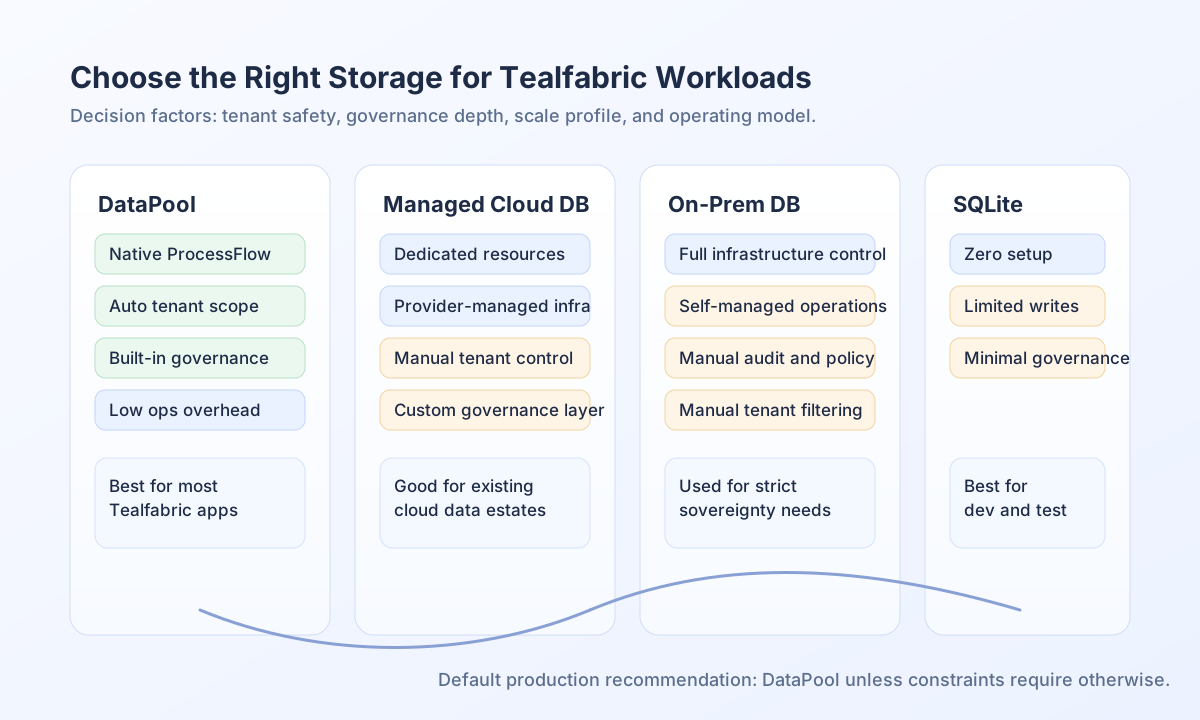
Compare storage choices by outcome
DataPool is best when you want integrated ProcessFlow access, automatic tenant isolation, and built-in governance controls without managing database infrastructure. Managed cloud databases such as AWS RDS or Azure Database fit teams that need dedicated database tuning and already operate cloud data stacks. On-premise databases are usually chosen for strict sovereignty or existing infrastructure commitments, while SQLite remains useful for local development and lightweight single-user use cases.
The key practical difference is where complexity lives. DataPool pushes tenant scoping, lifecycle policies, and auditability into the platform. External databases move those responsibilities to your implementation and operations teams.
Quick decision guidance
Use DataPool when your primary goals are fast delivery, tenant-safe defaults, and direct ProcessFlow integration. Consider managed cloud databases when you need very large-scale specialized tuning or must consolidate with an existing cloud-native data platform. Use on-premise databases when policy requires full infrastructure control. Keep SQLite for development, testing, or small local tools rather than shared production workloads.
Functional comparison
| Decision area | DataPool | Managed cloud DB (RDS/Azure) | On-prem DB (MySQL/PostgreSQL) | SQLite |
|---|---|---|---|---|
| ProcessFlow integration | Native | Manual integration | Manual integration | Manual integration |
| Tenant isolation | Automatic | Application-managed | Application-managed | Application-managed |
| Governance (audit/lineage/quality) | Built in | Custom implementation | Custom implementation | Minimal/custom |
| Infrastructure management | None | Managed by provider | Fully self-managed | None |
| Scaling pattern | Platform-managed | Service tier scaling | Hardware/cluster scaling | Limited concurrency |
| Best fit | Tealfabric-first apps | Cloud data platforms | Sovereignty-heavy environments | Dev/test, local apps |
Validate storage fit in code
When teams compare options, they often start with one practical check: whether a workload depends on automatic tenant-safe behavior or can tolerate manual query governance. The example below keeps one intent across languages: return a recommended storage option from workload flags, with DataPool as the default when governance and tenant safety are required.
type WorkloadProfile = {
  processflowCentric: boolean;
  multiTenant: boolean;
  needsStrongGovernance: boolean;
  requiresOnPrem: boolean;
  dataVolumeGb: number;
};

function chooseStorage(profile: WorkloadProfile): "datapool" | "cloud_db" | "on_prem_db" | "sqlite" {
  if (profile.requiresOnPrem) return "on_prem_db";
  if (profile.processflowCentric || profile.multiTenant || profile.needsStrongGovernance) return "datapool";
  if (profile.dataVolumeGb >= 500) return "cloud_db";
  return "datapool";
}
Compare options through API
If you want to automate architecture checks in internal tooling, expose a comparison endpoint that accepts workload traits and returns a recommendation with rationale. Always send tenant context headers so recommendations can be logged and reviewed in the correct workspace context.
curl -X POST "https://api.example.com/api/v1/datapool/storage-comparison/evaluate" \
  -H "X-API-Key: <API_KEY>" \
  -H "X-Tenant-ID: <TENANT_ID>" \
  -H "Content-Type: application/json" \
  -d '{
    "workload_name": "customer-operations",
    "processflow_centric": true,
    "multi_tenant": true,
    "needs_governance": true,
    "requires_on_prem": false,
    "estimated_volume_gb": 120
  }'
{
  "success": true,
  "data": {
    "recommended_storage": "datapool",
    "reasons": [
      "Native ProcessFlow integration",
      "Automatic tenant isolation",
      "Built-in governance controls"
    ]
  }
}
Plan migration with lower risk
When moving from an external database to DataPool, migrate by domain rather than all tables at once so you can validate parity and keep rollback options simple. Start with a bounded dataset, confirm record counts and key business queries, then route read paths to DataPool before retiring old write paths. If you need long-term hybrid architecture, keep authoritative metadata and governance controls in DataPool while integrating high-volume external stores through approved connectors.
See also
A strong storage decision balances performance needs with governance and operational effort. For most Tealfabric workflows, DataPool provides the clearest path to secure, maintainable, and scalable delivery.