Document Review and Annotation User Guide
Document information
- Canonical URL:
/docs/06_data-and-documents/15_document-review-and-annotation - Version:
2026-05-08 - Tags:
documents,collaboration,guides
This guide explains how to review documents, annotate feedback, and manage document review status in your tenant workspace. It is intended for both reviewers who provide feedback and administrators who coordinate review workflows. By following these patterns, teams can keep review cycles traceable and easier to complete on time.
Understand the review experience
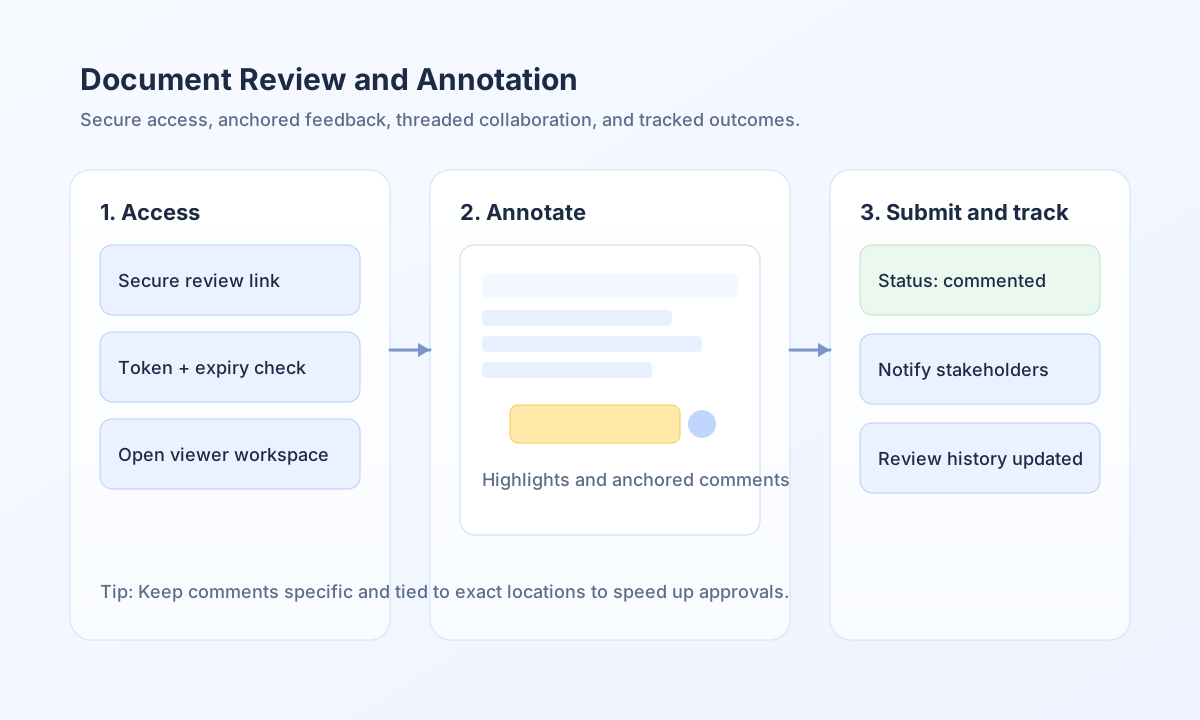
Document review is built around secure review links, in-app document viewing, and anchored annotations tied to specific file locations. Reviewers can add highlights, inline comments, and discussion-thread replies before submitting a final review response. Once submitted, the review status updates in the workspace so administrators can track progress without manual follow-up.
The document management side complements this by giving authorized users a file browser with status indicators, upload controls, and review lifecycle actions. This means your team can manage both content and feedback from one area instead of switching across separate tools. Keeping files organized and review assignments clear is the fastest way to reduce review delays.
Access documents and start a review
Most reviewers begin from a secure link delivered through email or notification, while administrators typically open reviews from Workspace → Documents. Access links are time-limited for security, so expired links should be re-issued instead of shared between users. If your role allows direct workspace access, you can still use the same review tools and submission flow.
const reviewId = String(process_input.result?.review_id ?? "");
const reviewToken = String(process_input.result?.review_token ?? "");

if (reviewId === "" || reviewToken === "") {
    return {success: false, error: "Missing review access parameters"};
}

const reviewUrl = `${app_url}/review/${encodeURIComponent(reviewId)}?token=${encodeURIComponent(reviewToken)}`;

return {
    success: true,
    data: {
        review_url: reviewUrl,
        expires_in_hours: 72,
    },
};
Add annotations and comments effectively
High-quality review feedback is specific, anchored, and actionable. Use highlights to mark the exact region, then add comments that explain what should change and why it matters. Threaded replies are best for clarifications, while final submission should summarize whether the document is ready or needs revision.
const annotation = [
    type: "comment",
    page: 3,
    bounds: {x: 124, y: 236, width: 300, height: 72],
    message: "Clarify this acceptance criterion and add an example.",
};

const reviewComment = [
    comment: "Please update this section before approval.",
    severity: "medium",
    category: "content-clarity",
};

return {
    success: true,
    data: {
        annotation: annotation,
        comment: reviewComment,
    },
};
Keep document operations and status tracking consistent
Administrators should treat review status as part of file operations, not a separate afterthought. Before moving, deleting, or replacing files, confirm there are no active reviews that depend on the current location or file version. This avoids broken links and keeps the audit trail aligned with the latest document state.
type ReviewStatus = "pending" | "in_review" | "commented" | "resolved" | "cancelled";

function canDeleteFile(statuses: ReviewStatus[]): { allowed: boolean; reason: string } {
  const hasActiveReview = statuses.some((status) => ["pending", "in_review", "commented"].includes(status));
  if (hasActiveReview) return { allowed: false, reason: "File has active reviews" };
  return { allowed: true, reason: "No active reviews" };
}
Submit and monitor review outcomes through API
If your workflow automation needs to trigger or finalize review updates, include explicit review identifiers and status transitions in each API request. Required headers should always include tenant context so review events stay correctly scoped. The response payload should expose the updated status and timestamps to support notifications and reporting.
curl -X POST "https://api.example.com/api/v1/document-reviews/submit" \
  -H "X-API-Key: <API_KEY>" \
  -H "X-Tenant-ID: <TENANT_ID>" \
  -H "Content-Type: application/json" \
  -d '{
    "review_id": "<ENTITY_ID>",
    "decision": "changes_requested",
    "summary": "Clarify section 2.3 and update figures.",
    "annotations_count": 4,
    "comments_count": 6
  }'
{
  "success": true,
  "data": {
    "review_id": "<ENTITY_ID>",
    "status": "commented",
    "submitted_at": "2026-05-08T10:45:00Z"
  }
}
Reduce review-cycle friction
Review bottlenecks usually come from unclear assignments, vague comments, or file changes made while a review is still active. You can avoid these problems by assigning reviewers explicitly, using annotation-first feedback, and requiring a final summary at submission time. These practices make collaboration faster while preserving a clear audit trail.
See also
Document reviews are most effective when feedback is anchored, status changes are explicit, and file operations respect active review state. With this approach, your team can scale collaboration without losing context or control.