WebApps File Uploads
Document information
- Canonical URL:
/docs/05_apps-webhooks-and-surfaces/webapps/47-Webapps_File_Uploads - Version:
2026-05-28 - Tags:
webapps,reference,webapps-file-uploads
This guide explains how to accept file uploads in a WebApp and process those files in ProcessFlow. It covers simple browser uploads, optional chunked uploads with Plupload, and how uploaded files appear in step code through the injected files service.
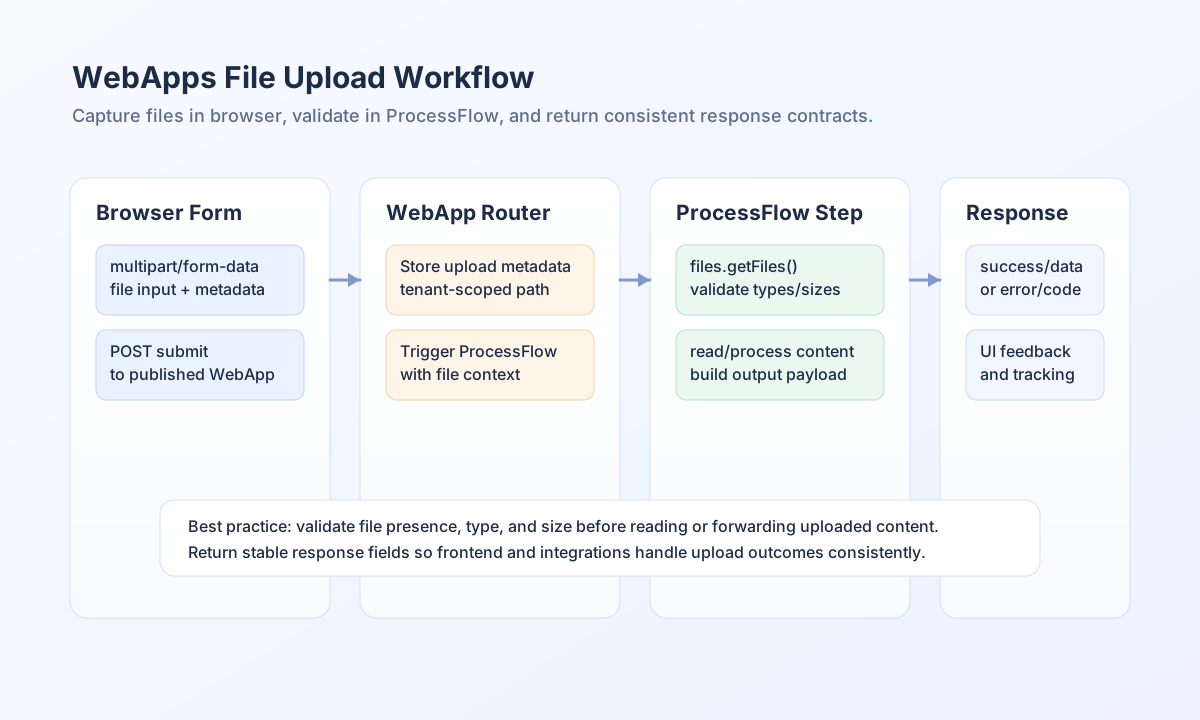
Understand the upload lifecycle
There are two ways to get files into a WebApp run:
- Single request (recommended for most forms) — The browser sends one
multipart/form-dataPOST with form fields and file parts. The WebApp stores the files, attaches metadata to the process input, and starts your ProcessFlow. - Chunked upload (large files or slow networks) — The browser sends many POST requests (one per chunk) to the same published WebApp URL, then sends a final POST with form fields only. All requests for one submission must share the same
_execution_idso chunks assemble into one folder before the process runs.
In both cases, ProcessFlow step code works the same way: use the files service to list and read uploads. Your steps should validate type, size, and business rules; the browser only delivers bytes.
Limits to plan for
| Limit | Typical value | Notes |
|---|---|---|
| Max size per file | Up to 1 GiB | Single multipart upload or assembled chunked file |
| Max chunk payload | 8 MiB | Each chunked POST must stay within this size |
| Max files per submission | 50 | Across one _execution_id |
Exact limits can vary by environment. If a request is rejected, the JSON response includes a message you can show to the user.
Configure the WebApp form (simple upload)
A working upload form must use method="post" and enctype="multipart/form-data" with one or more file inputs.
<form id="uploadForm" method="post" enctype="multipart/form-data">
  <label for="full_name">Full name</label>
  <input id="full_name" name="full_name" type="text" required />

  <label for="attachments">Attachments</label>
  <input id="attachments" name="attachments[]" type="file" multiple />

  <button type="submit">Upload</button>
</form>
<p id="result" aria-live="polite"></p>
Submit with fetch and FormData to your published WebApp URL (the same URL users open in the browser):
const form = document.getElementById("uploadForm");
const resultEl = document.getElementById("result");

form.addEventListener("submit", async (event) => {
  event.preventDefault();
  const formData = new FormData(form);

  try {
    const response = await fetch(window.location.href, {
      method: "POST",
      body: formData,
    });
    const payload = await response.json();

    if (payload.success) {
      resultEl.textContent = "Upload successful.";
    } else {
      resultEl.textContent =
        payload?.error?.message ?? payload?.message ?? "Upload failed.";
    }
  } catch (error) {
    resultEl.textContent = `Network error: ${error.message}`;
  }
});
Use this pattern when the total upload fits comfortably in one request and your users have reliable connectivity.
Chunked uploads with Plupload
Chunked uploads split each file into smaller parts. Use them when files are large, mobile networks are unstable, or you want per-file progress bars before the user submits the rest of the form.
Contract (all chunk requests)
POST to your published WebApp URL with multipart/form-data. Each chunk request must include:
| Field | Description |
|---|---|
chunk | Zero-based index of this chunk (0 … chunks - 1) |
chunks | Total number of chunks for this file |
unique_id | Stable id for this file upload (same value for every chunk of the same file) |
name | Original file name |
file | Binary chunk body (standard file field) |
_execution_id | Same value on every chunk and on the final form submit for this user session |
Optional: you may send additional form fields on chunk requests; they are ignored until the final process submission.
Chunk responses
While chunks are still arriving:
{
  "success": true,
  "completed": false,
  "chunk": 2,
  "chunks": 10,
  "uploaded_chunks": 3
}
When the last chunk is stored and the file is assembled:
{
  "success": true,
  "completed": true,
  "file": {
    "field_name": "file",
    "original_name": "report.pdf",
    "stored_name": "file_1716890123456_report.pdf",
    "relative_path": "processdata/<execution_id>",
    "size": 52428800,
    "type": "application/octet-stream",
    "uploaded_at": "2026-05-28T12:00:00.000Z"
  },
  "file_size": 52428800
}
Chunk requests return immediately and do not run your ProcessFlow. Only the final form submission starts the process.
Recommended flow
- When the user opens the page, generate one
_execution_id(for examplecrypto.randomUUID()). - For each file, let Plupload upload chunks. Set
unique_idto Plupload’s per-file id (file.id) so chunks for different files do not collide. - Wait until every file returns
"completed": true. - POST the remaining form fields (name, email, and so on) to the same WebApp URL with the same
_execution_id. Do not attach file inputs again—the files are already stored.
Plupload example
Include Plupload from your preferred CDN, then configure chunk size at or below 8 MiB (for example 8 * 1024 * 1024 bytes).
<form id="uploadForm">
  <input type="text" name="full_name" required />
  <input type="email" name="email" required />
  <button type="button" id="pickfiles">Choose files</button>
  <button type="submit" id="submitForm">Send</button>
  <div id="progress"></div>
</form>

<script src="https://cdn.jsdelivr.net/npm/plupload@3.1.5/js/plupload.min.js"></script>
<script>
  const uploadUrl = window.location.href;
  const executionId = crypto.randomUUID();
  const completedFiles = [];

  const uploader = new plupload.Uploader({
    runtimes: "html5",
    browse_button: "pickfiles",
    url: uploadUrl,
    chunk_size: 8 * 1024 * 1024,
    max_file_size: "1024mb",
    multipart_params: {
      _execution_id: executionId,
    },
    init: {
      BeforeUpload(up, file) {
        up.setOption("multipart_params", {
          _execution_id: executionId,
          unique_id: file.id,
        });
      },
      UploadProgress(up, file) {
        document.getElementById("progress").textContent =
          `${file.name}: ${file.percent}%`;
      },
      FileUploaded(up, file, response) {
        const result = JSON.parse(response.response);
        if (!result.success) {
          throw new Error(result.message ?? "Chunk upload failed");
        }
        if (result.completed && result.file) {
          completedFiles.push(result.file);
        }
      },
      Error(up, err) {
        console.error(err.message);
      },
    },
  });

  uploader.init();

  document.getElementById("uploadForm").addEventListener("submit", async (e) => {
    e.preventDefault();

    uploader.start();

    uploader.bind("UploadComplete", async () => {
      const formData = new FormData();
      formData.append("full_name", document.querySelector('[name="full_name"]').value);
      formData.append("email", document.querySelector('[name="email"]').value);
      formData.append("_execution_id", executionId);

      const response = await fetch(uploadUrl, { method: "POST", body: formData });
      const payload = await response.json();
      if (!payload.success) {
        throw new Error(payload?.error?.message ?? payload?.message ?? "Submit failed");
      }
    });
  });
</script>
Plupload notes:
- Plupload sends
chunk,chunks, andnameautomatically whenchunk_sizeis set. You must addunique_idand_execution_idyourself (seeBeforeUploadabove). - The default file field name is
file, which matches the WebApp upload handler. - Set
chunk_sizeno larger than 8 MiB per request. - Use
FileUploadedandcompleted: trueto know when a file is ready before you submit the form.
When to prefer simple upload instead
Single-request FormData is simpler to build and test. Prefer it unless you need chunking for size, progress, or retries.
ProcessFlow: using uploaded files
After the WebApp runs your process, uploaded files are available through the files service in step code. The service reads metadata for the _execution_id that was attached to the process input.
Always check that the service exists and that at least one file was uploaded before you process content.
if (files == null) {
  return {
    success: false,
    error: {
      code: "NO_FILES_SERVICE",
      message: "No file context is available for this run.",
    },
  };
}

const uploadedFiles = files.getFiles();
if (!uploadedFiles || uploadedFiles.length === 0) {
  return {
    success: false,
    error: {
      code: "NO_FILES",
      message: "Please attach at least one file.",
    },
  };
}
What getFiles() returns
Each entry describes one uploaded file:
| Field | Meaning |
|---|---|
field_name | Form field name (often file for chunked uploads) |
index | Position when multiple files were uploaded |
original_name | Name from the user’s device |
stored_name | Name on disk under the execution folder |
relative_path | Tenant-relative directory for this execution (for example processdata/<execution_id>) |
size | Size in bytes |
type | MIME type when known |
uploaded_at | ISO timestamp |
Use original_name when calling readFile().
Common operations
List all files
const uploadedFiles = files.getFiles();
Get metadata for one file
const invoice = files.getFile("invoice.pdf");
Read file content
try {
  const content = files.readFile("invoice.pdf");
  // Parse, scan, or forward content
} catch (e) {
  return {
    success: false,
    error: { code: "READ_FAILED", message: String(e.message ?? e) },
  };
}
Upload to an external system (TypeScript)
const result = await files.uploadToExternal(
    "invoice.pdf",
    "https://api.example.com/upload",
    [
        headers: [
            "Authorization: Bearer your-token",
        ],
    ]
);
End-to-end validation example
This step rejects unsupported MIME types and returns a summary for the rest of the process:
const allowedTypes = new Set(["application/pdf", "image/png", "image/jpeg"]);

if (files == null) {
  return {
    success: false,
    error: { code: "NO_FILES_SERVICE", message: "No file context available." },
  };
}

const uploadedFiles = files.getFiles();
if (!uploadedFiles?.length) {
  return {
    success: false,
    error: { code: "NO_FILES", message: "Please attach at least one file." },
  };
}

const processed = [];
for (const fileMeta of uploadedFiles) {
  if (!allowedTypes.has(fileMeta.type)) {
    return {
      success: false,
      error: {
        code: "INVALID_FILE_TYPE",
        message: `Unsupported file type: ${fileMeta.original_name}`,
      },
    };
  }

  const content = files.readFile(fileMeta.original_name);
  processed.push({
    name: fileMeta.original_name,
    mime_type: fileMeta.type,
    size: fileMeta.size,
    preview: String(content).slice(0, 200),
  });
}

return {
  success: true,
  data: {
    submitted_by: process_input.full_name ?? null,
    file_count: processed.length,
    files: processed,
  },
  message: "Files uploaded and processed successfully.",
};
Process input may also include _attachments (metadata array) and _execution_id. Step code should still use files.getFiles() so behavior stays the same for simple and chunked uploads.
Validate with API tests
Use multipart curl against your published WebApp URL or API execute endpoint to confirm behavior before debugging UI code.
Simple upload
curl -X POST "https://your-webapp.example.com/my-form" \
  -F "full_name=Jamie Example" \
  -F "attachments[]=@/path/to/invoice.pdf"
Single chunk (illustrative)
EXEC_ID="$(uuidgen)"
curl -X POST "https://your-webapp.example.com/my-form" \
  -F "_execution_id=${EXEC_ID}" \
  -F "chunk=0" \
  -F "chunks=1" \
  -F "unique_id=upload-1" \
  -F "name=invoice.pdf" \
  -F "file=@/path/to/invoice.pdf"
Troubleshooting
| Symptom | What to check |
|---|---|
files is null | Form used POST; process has file capability; upload completed before the process ran |
getFiles() is empty | Files were sent; for chunked uploads, same _execution_id on every chunk and on final submit; wait for completed: true |
Chunk always completed: false | Missing or changing unique_id between chunks; wrong chunk / chunks values |
| Chunk rejected | Chunk larger than 8 MiB; reduce Plupload chunk_size |
readFile() fails | Name matches original_name from getFiles(); wrap in try/catch |
Related guides
Reliable uploads come from a clear browser contract (_execution_id for chunking), validation in ProcessFlow, and consistent error codes in your step responses.