IBM Sterling B2B Integrator Connector Guide
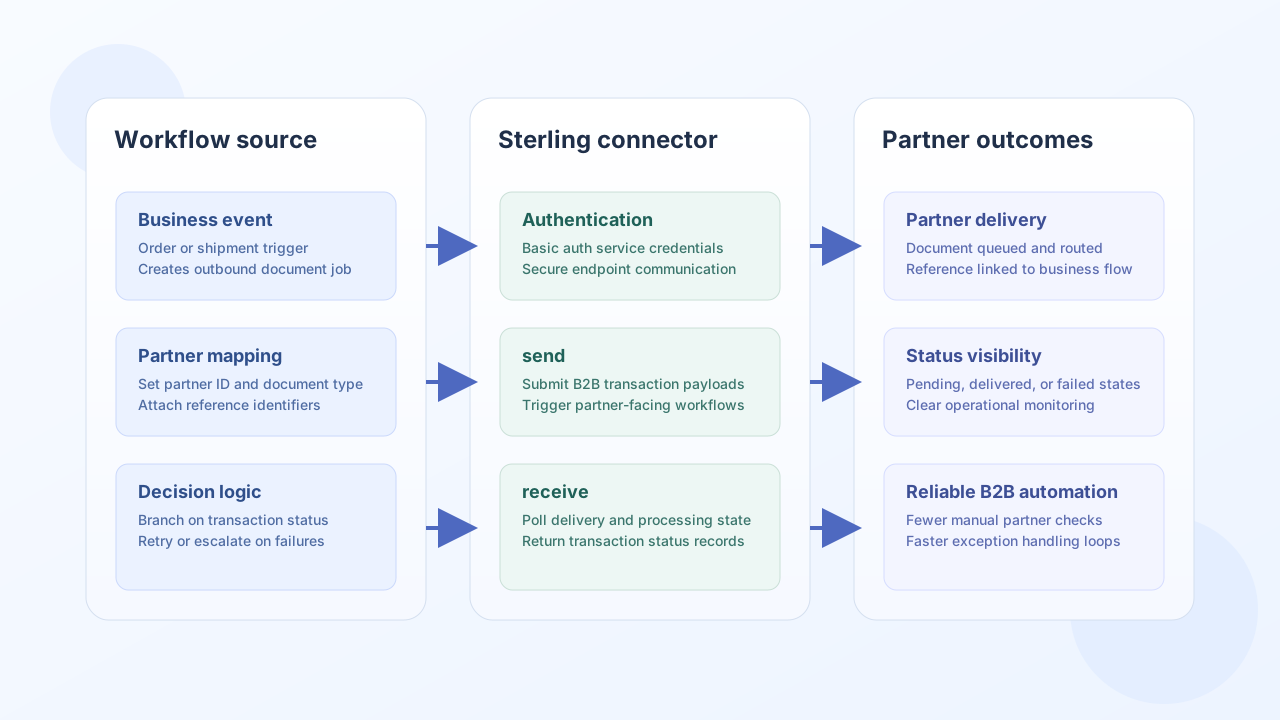
The IBM Sterling B2B Integrator connector helps Tealfabric workflows exchange and monitor partner-facing B2B documents through Sterling APIs. It is useful for automated inbound and outbound EDI-style flows where message state, partner routing, and delivery visibility are critical.
Document information
| Field | Value |
|---|---|
| Canonical URL | /docs/04_connecting-systems/connectors/i/ibm-sterling-b2b |
| Version (published date) | 2026-05-08 |
| Tags | connectors, reference, ibm-sterling-b2b |
| Connector ID | ibm-sterling-b2b-1.0.0 |
Configuration and authentication
Configure your Sterling instance endpoint and integration credentials so document operations run against the intended environment. In production, use a dedicated service account and scope permissions to the business processes your workflow needs.
base_url(required): Sterling B2B base URL (trailing slashes are trimmed).username(required): Sterling integration username.password(required): password for the integration user.timeout_seconds(optional): request timeout threshold (default60).
The connector uses Basic Authentication for API requests. Run test after configuration to verify network access and credential validity before enabling live partner traffic. Only test validates required configuration fields; send, receive, and execute follow legacy behavior and do not pre-validate configuration.
Send transactions with send
Use send to submit document payloads or trigger outbound partner transactions from workflow events. The default HTTP method is POST. Provide data for the JSON body, or omit data to send the full call payload as the body, matching legacy behavior. Empty bodies are omitted on POST/PUT/PATCH, matching PHP !empty($body) semantics.
Paths are relative to base_url (no leading slash).
const baseUrl = "https://api.example.com/api/v1";
const tenantId = "<TENANT_ID>";
const apiKey = "<API_KEY>";

async function submitOutboundOrder(integrationId: string) {
  const response = await fetch(`${baseUrl}/integrations/${encodeURIComponent(integrationId)}/execute`, {
    method: "POST",
    headers: {
      "X-API-Key": apiKey,
      "X-Tenant-ID": tenantId,
      "Content-Type": "application/json",
    },
    body: JSON.stringify({
      operation: "send",
      endpoint: "api/v1/transactions",
      method: "POST",
      data: {
        partner_id: "PARTNER_1001",
        document_type: "850",
        reference_id: "PO-7781",
        payload: "<EDI_PAYLOAD>",
      },
    }),
  });
  if (!response.ok) throw new Error(`Request failed: ${response.status}`);
  return response.json();
}
curl -X POST "https://api.example.com/api/v1/integrations/<ENTITY_ID>/execute" \
-H "X-API-Key: <API_KEY>" \
-H "X-Tenant-ID: <TENANT_ID>" \
-H "Content-Type: application/json" \
-d '{
"operation": "send",
"endpoint": "api/v1/transactions",
"method": "POST",
"data": {
"partner_id": "PARTNER_1001",
"document_type": "850",
"reference_id": "PO-7781",
"payload": "<EDI_PAYLOAD>"
}
}'
{
  "success": true,
  "data": {
    "message": "IBM Sterling B2B operation completed successfully",
    "result": {
      "transaction_id": "<ENTITY_ID>",
      "status": "queued",
      "reference_id": "PO-7781"
    }
  }
}
Track transactions with receive
Use receive to query transaction state and pull partner-processing outcomes into your workflow. When the API returns an items array, the connector exposes record_count and items; otherwise it wraps the single resource as a one-element items array.
const baseUrl = "https://api.example.com/api/v1";
const tenantId = "<TENANT_ID>";
const apiKey = "<API_KEY>";

async function listPendingTransactions(integrationId: string) {
  const response = await fetch(`${baseUrl}/integrations/${encodeURIComponent(integrationId)}/execute`, {
    method: "POST",
    headers: {
      "X-API-Key": apiKey,
      "X-Tenant-ID": tenantId,
      "Content-Type": "application/json",
    },
    body: JSON.stringify({
      operation: "receive",
      endpoint: "api/v1/transactions",
      query: {
        status: "pending",
        limit: 20,
      },
    }),
  });
  if (!response.ok) throw new Error(`Request failed: ${response.status}`);
  return response.json();
}
curl -X POST "https://api.example.com/api/v1/integrations/<ENTITY_ID>/execute" \
-H "X-API-Key: <API_KEY>" \
-H "X-Tenant-ID: <TENANT_ID>" \
-H "Content-Type: application/json" \
-d '{
"operation": "receive",
"endpoint": "api/v1/transactions",
"query": {
"status": "pending",
"limit": 20
}
}'
{
  "success": true,
  "data": {
    "message": "IBM Sterling B2B data retrieved successfully",
    "record_count": 2,
    "items": [
      {"transaction_id": "<ENTITY_ID>", "status": "pending", "partner_id": "PARTNER_1001"},
      {"transaction_id": "<ENTITY_ID>", "status": "pending", "partner_id": "PARTNER_2042"}
    ]
  }
}
Arbitrary API calls with execute
Use execute for arbitrary HTTP methods against Sterling endpoints. The default HTTP method is GET. Prefer body for mutable payloads; data is accepted as an alias when body is omitted. Empty bodies are omitted on POST/PUT/PATCH.
{
  "operation": "execute",
  "endpoint": "api/v1/partners",
  "method": "GET"
}
{
  "success": true,
  "data": {
    "message": "IBM Sterling B2B method executed successfully",
    "result": {
      "items": []
    }
  }
}
Connection test with test
test validates required configuration (base_url, username, password) and probes GET api/v1/health with Basic authentication.
{
  "success": true,
  "data": {
    "message": "IBM Sterling B2B connection test successful",
    "details": {
      "base_url": "https://sterling.example.com"
    }
  }
}
Reliability guidance
Most failures in B2B traffic are caused by credential drift, invalid endpoint configuration, or partner-specific payload issues. Use test checks in deployment workflows, enforce schema validation before send, and apply retry with backoff for transient timeouts or rate-limited responses.
These practices improve delivery reliability and reduce manual triage for partner integrations.