Insightly Connector Guide
The Insightly connector lets Tealfabric workflows create, update, and retrieve CRM records in Insightly. It is useful for lead intake, contact lifecycle automation, and opportunity-driven workflows that need reliable CRM synchronization.
Document information
| Field | Value |
|---|---|
| Canonical URL | /docs/04_connecting-systems/connectors/i/insightly |
| Version (published date) | 2026-05-08 |
| Tags | connectors, reference, insightly |
| Connector ID | insightly-1.0.0 |
Configure API access
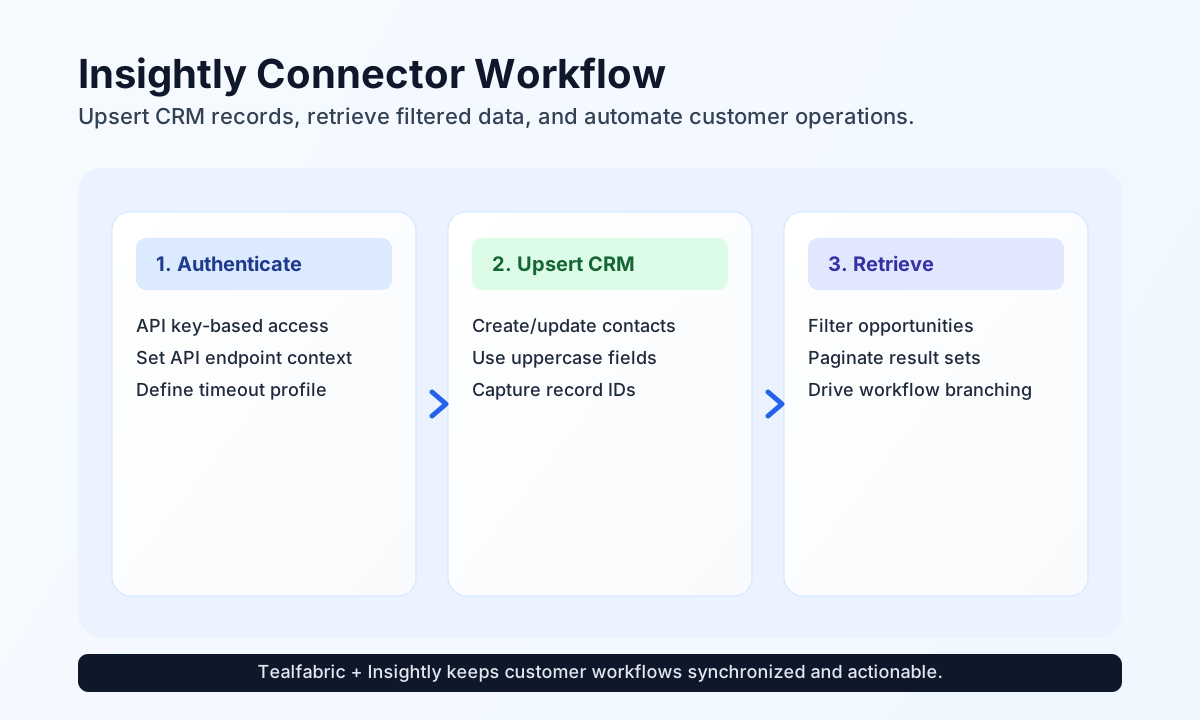
Configure the connector with your Insightly api_key so requests can authenticate through Insightly's API key model. In most environments, the default base_url is correct, while timeout_seconds can be raised for larger response payloads.
Because Insightly field names are uppercase in many API payloads, validate field naming in your workflow data mapping before sending create or update requests.
Create or update records with send
Use send to push contacts, opportunities, or related CRM records into Insightly. This operation supports create and update flows depending on endpoint and identifier usage.
const baseUrl = "https://api.example.com/api/v1";
const tenantId = "<TENANT_ID>";
const apiKey = "<API_KEY>";

async function createContact(integrationId: string) {
  const response = await fetch(`${baseUrl}/integrations/${encodeURIComponent(integrationId)}/execute`, {
    method: "POST",
    headers: {
      "X-API-Key": apiKey,
      "X-Tenant-ID": tenantId,
      "Content-Type": "application/json",
    },
    body: JSON.stringify({
      operation: "send",
      endpoint: "Contacts",
      method: "POST",
      data: {
        FIRST_NAME: "Avery",
        LAST_NAME: "Nguyen",
        EMAIL_ADDRESS: "avery.nguyen@example.com",
        TITLE: "Operations Manager"
      }
    }),
  });
  if (!response.ok) throw new Error(`Request failed: ${response.status}`);
  return response.json();
}
curl -X POST "https://api.example.com/api/v1/integrations/<ENTITY_ID>/execute" \
-H "X-API-Key: <API_KEY>" \
-H "X-Tenant-ID: <TENANT_ID>" \
-H "Content-Type: application/json" \
-d '{
"operation": "send",
"endpoint": "Contacts",
"method": "POST",
"data": {
"FIRST_NAME": "Avery",
"LAST_NAME": "Nguyen",
"EMAIL_ADDRESS": "avery.nguyen@example.com",
"TITLE": "Operations Manager"
}
}'
{
  "success": true,
  "data": {
    "message_count": 1,
    "data": {
      "CONTACT_ID": 73219811,
      "FIRST_NAME": "Avery",
      "LAST_NAME": "Nguyen"
    },
    "response": {
      "CONTACT_ID": 73219811,
      "FIRST_NAME": "Avery",
      "LAST_NAME": "Nguyen"
    }
  }
}
Retrieve records with receive
Use receive to list or fetch specific records for follow-up automation, enrichment, or reporting logic. Filtering and pagination parameters help control data volume in high-traffic CRM environments.
const baseUrl = "https://api.example.com/api/v1";
const tenantId = "<TENANT_ID>";
const apiKey = "<API_KEY>";

async function listOpenOpportunities(integrationId: string) {
  const response = await fetch(`${baseUrl}/integrations/${encodeURIComponent(integrationId)}/execute`, {
    method: "POST",
    headers: {
      "X-API-Key": apiKey,
      "X-Tenant-ID": tenantId,
      "Content-Type": "application/json",
    },
    body: JSON.stringify({
      operation: "receive",
      endpoint: "Opportunities",
      query: {
        top: 10,
        filter: "OPPORTUNITY_STATE eq 'OPEN'",
        orderby: "DATE_UPDATED_UTC desc"
      }
    }),
  });
  if (!response.ok) throw new Error(`Request failed: ${response.status}`);
  return response.json();
}
curl -X POST "https://api.example.com/api/v1/integrations/<ENTITY_ID>/execute" \
-H "X-API-Key: <API_KEY>" \
-H "X-Tenant-ID: <TENANT_ID>" \
-H "Content-Type: application/json" \
-d '{
"operation": "receive",
"endpoint": "Opportunities",
"query": {
"top": 10,
"filter": "OPPORTUNITY_STATE eq '\''OPEN'\''",
"orderby": "DATE_UPDATED_UTC desc"
}
}'
{
  "success": true,
  "data": {
    "message_count": 1,
    "data": [
      {
        "OPPORTUNITY_ID": 481192,
        "OPPORTUNITY_NAME": "Q3 Renewal Expansion",
        "OPPORTUNITY_STATE": "OPEN"
      }
    ],
    "total_size": 1
  }
}
Test credentials with test
Use test to validate api_key and confirm connectivity via GET Users. Only test enforces required-parameter validation up front; other operations rely on Insightly API responses when credentials are missing or invalid.
curl -X POST "https://api.example.com/api/v1/integrations/<ENTITY_ID>/execute" \
  -H "X-API-Key: <API_KEY>" \
  -H "X-Tenant-ID: <TENANT_ID>" \
  -H "Content-Type: application/json" \
  -d '{
    "operation": "test"
  }'
{
  "success": true,
  "data": {
    "message": "Insightly connection test successful",
    "details": {
      "api_base_url": "https://api.insightly.com/v3.1",
      "users_count": 3
    }
  }
}
Bidirectional sync with sync
Use sync to run optional outbound (send) and/or inbound (receive) legs in one call. Empty outbound/inbound objects are skipped, matching legacy PHP empty() leg handling.
curl -X POST "https://api.example.com/api/v1/integrations/<ENTITY_ID>/execute" \
  -H "X-API-Key: <API_KEY>" \
  -H "X-Tenant-ID: <TENANT_ID>" \
  -H "Content-Type: application/json" \
  -d '{
    "operation": "sync",
    "outbound": {
      "endpoint": "Contacts",
      "method": "POST",
      "data": { "FIRST_NAME": "Avery", "LAST_NAME": "Nguyen" }
    },
    "inbound": {
      "endpoint": "Contacts",
      "query": { "top": 5 }
    }
  }'
Batch operations with batch
Use batch to run multiple send or receive sub-operations sequentially. Each item may use operation/type plus nested data, or inline callData fields. Per-item failures are recorded without aborting the batch.
curl -X POST "https://api.example.com/api/v1/integrations/<ENTITY_ID>/execute" \
  -H "X-API-Key: <API_KEY>" \
  -H "X-Tenant-ID: <TENANT_ID>" \
  -H "Content-Type: application/json" \
  -d '{
    "operation": "batch",
    "operations": [
      { "operation": "receive", "data": { "endpoint": "Contacts", "query": { "top": 1 } } },
      { "operation": "receive", "data": { "endpoint": "Opportunities", "query": { "top": 1 } } }
    ]
  }'
Reliability guidance
Most connector failures come from invalid API keys, incorrect endpoint names, or payload field mismatches. If operations fail, validate credentials first, then confirm endpoint spelling and uppercase field naming for the target object type.
For production stability, paginate list operations, apply targeted filters, and handle rate-limit responses with controlled backoff. This keeps CRM automation responsive and predictable as record volume grows.