IFTTT Webhooks Connector Guide
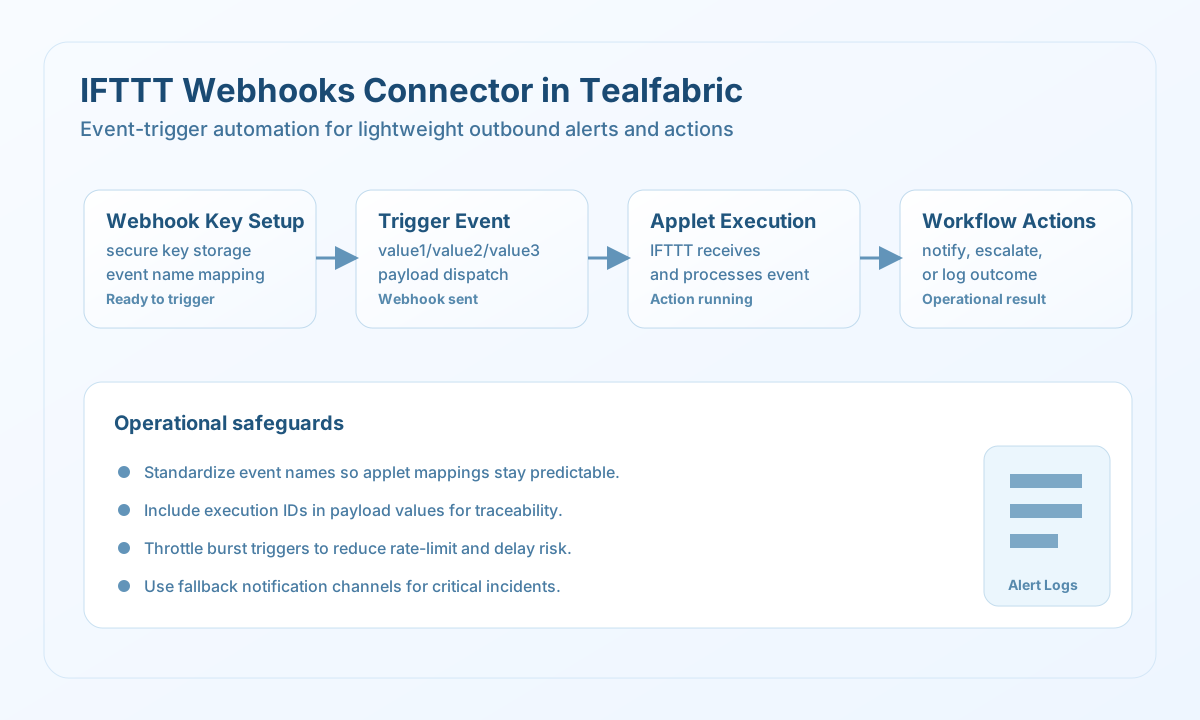
The IFTTT Webhooks connector allows Tealfabric workflows to trigger IFTTT applets by sending event payloads through the Webhooks service. It is useful for lightweight outbound automation such as notifications, home-office actions, and user-facing alert flows.
Document information
| Field | Value |
|---|---|
| Canonical URL | /docs/04_connecting-systems/connectors/i/ifttt-webhooks |
| Version (published date) | 2026-05-08 |
| Tags | connectors, reference, ifttt-webhooks |
| Connector ID | ifttt-webhooks-1.0.0 |
When to use this connector
Use this connector when your workflow needs to fire an external automation quickly through an IFTTT applet trigger. Typical use cases include incident notifications, status broadcasts, and simple integration handoffs where a full custom API integration is unnecessary. The connector works best when event names and payload conventions are defined consistently across teams.
Prerequisites
Before configuring the connector, create and test an IFTTT applet that uses the Webhooks trigger service. Capture the webhook key from your IFTTT Webhooks settings page and confirm event names exactly match the applet trigger definitions. Decide which value1, value2, and value3 fields each workflow should populate.
Configuration
Store these settings in the integration profile:
webhook_key(required): IFTTT Webhooks key.timeout_seconds(optional): Request timeout in seconds.
Trigger events with trigger
Use trigger to send an event to IFTTT and activate linked actions. Keep payload values concise and structured so applets can parse them reliably. Optional value1–value3 fields are omitted when empty per legacy PHP empty() semantics (including the string "0").
const baseUrl = "https://api.example.com/api/v1";
const tenantId = "<TENANT_ID>";
const apiKey = "<API_KEY>";

type TriggerResult = {
  message: string;
  event_name: string;
  result: unknown;
};

async function triggerIncidentAlert(integrationId: string): Promise<TriggerResult> {
  const response = await fetch(
    `${baseUrl}/integrations/${encodeURIComponent(integrationId)}/execute`,
    {
      method: "POST",
      headers: {
        "X-API-Key": apiKey,
        "X-Tenant-ID": tenantId,
        "Content-Type": "application/json",
      },
      body: JSON.stringify({
        operation: "trigger",
        event: "incident_alert",
        value1: "Production queue delay detected",
        value2: "priority:high",
        value3: "execution_id=exec_20260508_1319",
      }),
    }
  );
  if (!response.ok) throw new Error(`Request failed: ${response.status}`);
  const payload = (await response.json()) as { success?: boolean; data?: TriggerResult };
  if (!payload.success || !payload.data) throw new Error("IFTTT trigger failed");
  return payload.data;
}
curl -X POST "https://api.example.com/api/v1/integrations/<ENTITY_ID>/execute" \
-H "X-API-Key: <API_KEY>" \
-H "X-Tenant-ID: <TENANT_ID>" \
-H "Content-Type: application/json" \
-d '{
"operation": "trigger",
"event": "incident_alert",
"value1": "Production queue delay detected",
"value2": "priority:high",
"value3": "execution_id=exec_20260508_1319"
}'
{
  "success": true,
  "data": {
    "message": "IFTTT webhook triggered successfully",
    "event_name": "incident_alert",
    "result": {}
  }
}
Validate setup with test
Use test before production rollout to verify webhook key validity and endpoint reachability. A successful test does not validate every applet path, so also run at least one real event in your staging setup.
curl -X POST "https://api.example.com/api/v1/integrations/<ENTITY_ID>/execute" \
  -H "X-API-Key: <API_KEY>" \
  -H "X-Tenant-ID: <TENANT_ID>" \
  -H "Content-Type: application/json" \
  -d '{
    "operation": "test"
  }'
{
  "success": true,
  "data": {
    "message": "IFTTT Webhooks connection test successful",
    "details": {
      "webhook_key_configured": true
    }
  }
}
Reliability guidance
IFTTT applet execution can be delayed or rate-limited based on account tier, so avoid bursty trigger patterns for critical workflows. Include execution identifiers in payload values so support teams can correlate events with workflow runs. For high-priority alerts, pair IFTTT triggers with a secondary notification path for redundancy.