Amazon SES API Connector Guide
The Amazon SES connector lets Tealfabric workflows send transactional and notification emails through Amazon Simple Email Service. It is well suited for order confirmations, security alerts, onboarding messages, and high-volume service email workflows.
Document information
| Field | Value |
|---|---|
| Canonical URL | /docs/04_connecting-systems/connectors/a/amazon-ses |
| Version (published date) | 2026-05-08 |
| Tags | connectors, reference, amazon-ses |
| Connector ID | amazon-ses-1.0.0 |
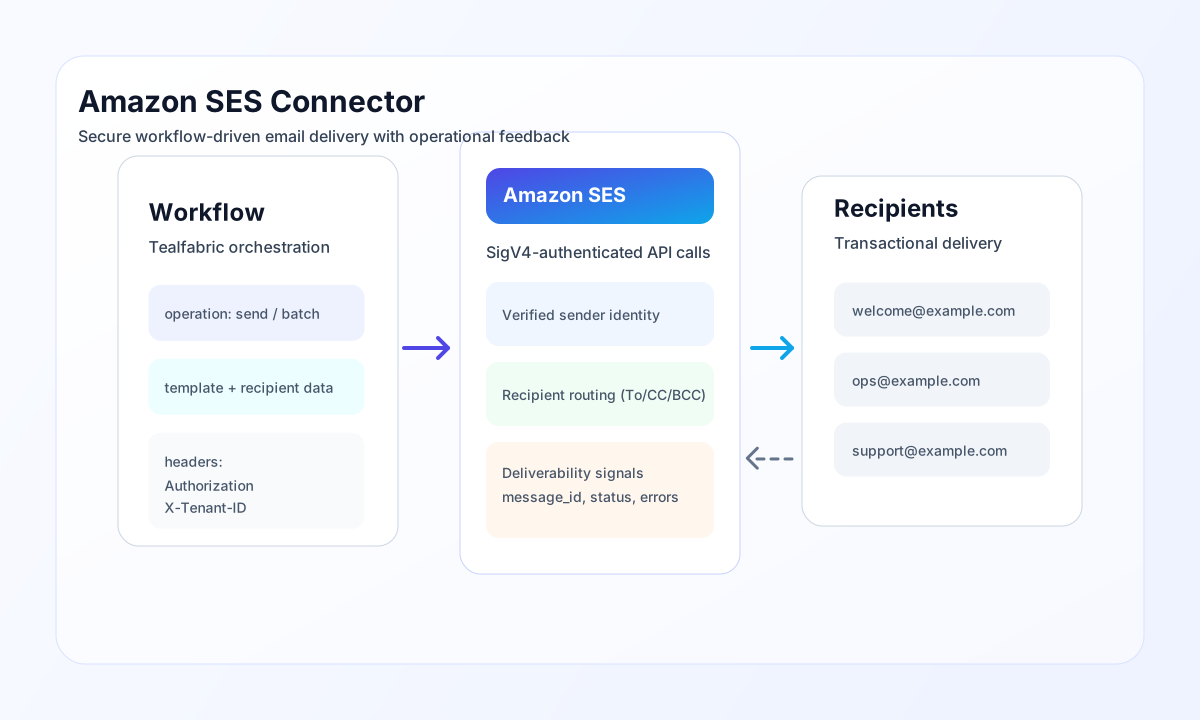
Configure SES credentials and sender identity
Set api_key and api_secret to IAM credentials with SES send permissions, then configure from_email to a verified identity in your SES account. Use region to target the SES region where your identities and sending quotas are configured.
Set from_name for branded sender display and increase timeout_seconds for larger messages or slower network paths. Run test after setup to validate authentication and endpoint reachability.
Send transactional email with send
Use send to deliver single emails with plain text, HTML, or both. For better inbox compatibility, include both html and text versions and define reply_to where responses should be routed.
const baseUrl = "https://api.example.com/api/v1";
const tenantId = "<TENANT_ID>";
const apiKey = "<API_KEY>";

async function sendWelcomeEmail(integrationId: string) {
  const response = await fetch(`${baseUrl}/integrations/${encodeURIComponent(integrationId)}/execute`, {
    method: "POST",
    headers: {
      "X-API-Key": apiKey,
      "X-Tenant-ID": tenantId,
      "Content-Type": "application/json",
    },
    body: JSON.stringify({
      operation: "send",
      to: "recipient@example.com",
      cc: ["ops@example.com"],
      subject: "Welcome to the platform",
      html: "<h1>Welcome</h1><p>Your account is ready.</p>",
      text: "Welcome. Your account is ready.",
      reply_to: "support@example.com"
    }),
  });
  if (!response.ok) throw new Error(`Request failed: ${response.status}`);
  return response.json();
}
curl -X POST "https://api.example.com/api/v1/integrations/<ENTITY_ID>/execute" \
-H "X-API-Key: <API_KEY>" \
-H "X-Tenant-ID: <TENANT_ID>" \
-H "Content-Type: application/json" \
-d '{
"operation": "send",
"to": "recipient@example.com",
"cc": ["ops@example.com"],
"subject": "Welcome to the platform",
"html": "<h1>Welcome</h1><p>Your account is ready.</p>",
"text": "Welcome. Your account is ready.",
"reply_to": "support@example.com"
}'
{
  "success": true,
  "data": {
    "message_id": "<ENTITY_ID>",
    "to": "recipient@example.com",
    "subject": "Welcome to the platform"
  }
}
Send multi-recipient jobs with batch
Use batch for queue-driven notification jobs where multiple emails should be sent in one workflow step. Pace large batches to stay within your SES send-rate quota and avoid throttling responses.
Deliverability and reliability guidance
Common failures include invalid IAM credentials, unverified sender identities, sandbox restrictions, and rate limits. Confirm identity verification and account production status before onboarding customer-facing sends.
For healthy deliverability, monitor bounce and complaint metrics, include unsubscribe and branding practices where required, and retry transient failures with backoff. This keeps transactional email flows stable and compliant.