AssemblyAI Connector Guide
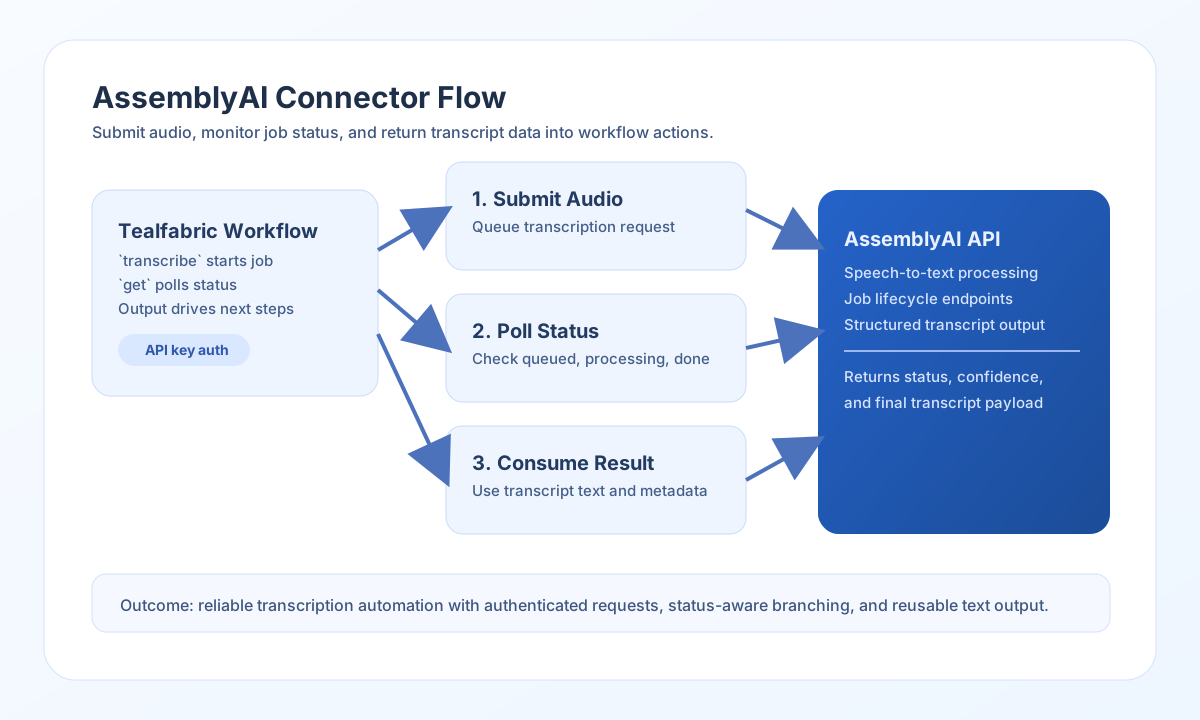
The AssemblyAI connector helps you automate speech-to-text workflows from Tealfabric. You can submit audio for transcription, monitor transcription status, and retrieve structured results for downstream processing in your workflows.
Document information
| Field | Value |
|---|---|
| Canonical URL | /docs/04_connecting-systems/connectors/a/assemblyai |
| Version (published date) | 2026-05-08 |
| Tags | connectors, reference, assemblyai |
| Connector ID | assemblyai-1.0.0 |
Configure the connector
Set api_key to your AssemblyAI API key so requests are authenticated using the Authorization header. You can also set timeout_seconds to handle longer files or slower network conditions without premature workflow failures.
Before production use, run the test operation once to confirm authentication and connectivity. This gives you confidence that your workflow can reach AssemblyAI endpoints reliably.
Submit audio for transcription with transcribe
Use transcribe to start a transcription job from an uploaded audio URL and optional transcription settings. This operation is typically the first step in an audio-processing workflow.
const baseUrl = "https://api.example.com/api/v1";
const tenantId = "<TENANT_ID>";
const apiKey = "<API_KEY>";

async function startTranscription(integrationId: string, audioUrl: string) {
  const response = await fetch(`${baseUrl}/integrations/${encodeURIComponent(integrationId)}/execute`, {
    method: "POST",
    headers: {
      "X-API-Key": apiKey,
      "X-Tenant-ID": tenantId,
      "Content-Type": "application/json",
    },
    body: JSON.stringify({
      operation: "transcribe",
      audio_url: audioUrl,
      speaker_labels: true,
      language_code: "en_us"
    }),
  });
  if (!response.ok) throw new Error(`Request failed: ${response.status}`);
  return response.json();
}
curl -X POST "https://api.example.com/api/v1/integrations/<ENTITY_ID>/execute" \
-H "X-API-Key: <API_KEY>" \
-H "X-Tenant-ID: <TENANT_ID>" \
-H "Content-Type: application/json" \
-d '{
"operation": "transcribe",
"audio_url": "https://cdn.example.com/audio/customer-call-042.mp3",
"speaker_labels": true,
"language_code": "en_us"
}'
{
  "success": true,
  "data": {
    "id": "<ENTITY_ID>",
    "status": "queued"
  }
}
Check transcription status with get
Use get to poll a transcription job until it is complete. This pattern helps your workflow branch safely between in-progress, completed, and error states.
const baseUrl = "https://api.example.com/api/v1";
const tenantId = "<TENANT_ID>";
const apiKey = "<API_KEY>";

async function getTranscriptionStatus(integrationId: string, transcriptId: string) {
  const response = await fetch(`${baseUrl}/integrations/${encodeURIComponent(integrationId)}/execute`, {
    method: "POST",
    headers: {
      "X-API-Key": apiKey,
      "X-Tenant-ID": tenantId,
      "Content-Type": "application/json",
    },
    body: JSON.stringify({
      operation: "get",
      transcript_id: transcriptId
    }),
  });
  if (!response.ok) throw new Error(`Request failed: ${response.status}`);
  return response.json();
}
curl -X POST "https://api.example.com/api/v1/integrations/<ENTITY_ID>/execute" \
-H "X-API-Key: <API_KEY>" \
-H "X-Tenant-ID: <TENANT_ID>" \
-H "Content-Type: application/json" \
-d '{
"operation": "get",
"transcript_id": "<ENTITY_ID>"
}'
{
  "success": true,
  "data": {
    "id": "<ENTITY_ID>",
    "status": "completed",
    "text": "Thank you for calling support today..."
  }
}
Reliability and error handling
Authentication failures usually indicate an invalid or expired API key, while 429 responses indicate account-level rate limiting. If you process high volumes, add retry logic with backoff and keep timeout_seconds aligned with your typical media duration.
Schema validation failures are usually caused by missing required fields such as audio_url or transcript_id. Validate these values before execution so workflow failures are easier to diagnose and recover.