Azure Machine Learning Connector Guide
The Azure Machine Learning connector lets Tealfabric workflows call deployed Azure ML endpoints and monitor job execution in Azure ML workspaces. It is useful for automating model inference, batch processing, and post-inference business actions.
Document information
| Field | Value |
|---|---|
| Canonical URL | /docs/04_connecting-systems/connectors/a/azure-machine-learning |
| Version (published date) | 2026-05-08 |
| Tags | connectors, reference, azure-machine-learning |
| Connector ID | azure-machine-learning-1.0.0 |
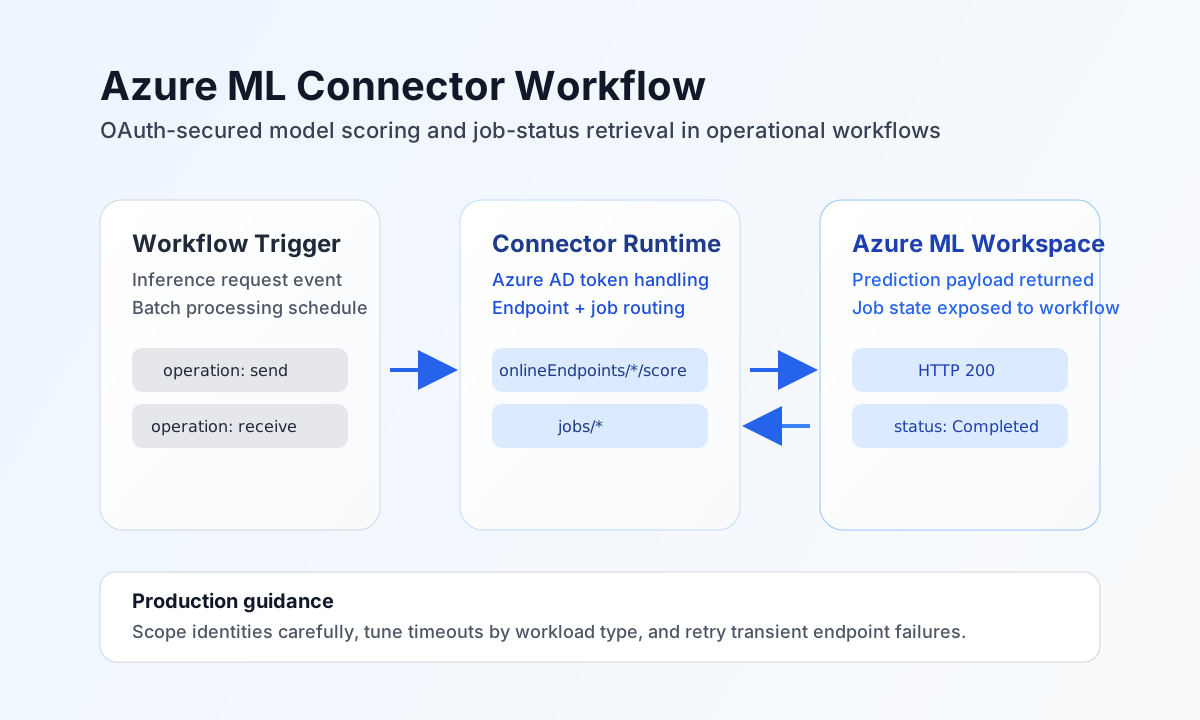
Configure Azure workspace authentication
Set subscription_id, resource_group, and workspace_name for the Azure ML workspace you want to automate. Then configure tenant_id, client_id, and client_secret for a service principal with permission to invoke endpoints and read job status in that workspace.
Set timeout_seconds based on model scoring and job polling expectations. Run test after setup to verify token acquisition and workspace API connectivity before scheduling production workflows.
Invoke online endpoints with send
Use send when your workflow needs to submit scoring payloads to a deployed Azure ML endpoint. Keep payload schemas aligned with the model deployment contract so responses are predictable and easier to validate downstream.
const baseUrl = "https://api.example.com/api/v1";
const tenantId = "<TENANT_ID>";
const apiKey = "<API_KEY>";

async function scoreCustomerRisk(integrationId: string) {
  const response = await fetch(`${baseUrl}/integrations/${encodeURIComponent(integrationId)}/execute`, {
    method: "POST",
    headers: {
      "X-API-Key": apiKey,
      "X-Tenant-ID": tenantId,
      "Content-Type": "application/json",
    },
    body: JSON.stringify({
      operation: "send",
      endpoint: "onlineEndpoints/customer-risk-endpoint/score",
      method: "POST",
      data: {
        input_data: {
          columns: ["customer_id", "age", "country", "annual_spend"],
          data: [["<ENTITY_ID>", 42, "US", 12500]]
        }
      }
    }),
  });
  if (!response.ok) throw new Error(`Request failed: ${response.status}`);
  return response.json();
}
curl -X POST "https://api.example.com/api/v1/integrations/<ENTITY_ID>/execute" \
-H "X-API-Key: <API_KEY>" \
-H "X-Tenant-ID: <TENANT_ID>" \
-H "Content-Type: application/json" \
-d '{
"operation": "send",
"endpoint": "onlineEndpoints/customer-risk-endpoint/score",
"method": "POST",
"data": {
"input_data": {
"columns": ["customer_id", "age", "country", "annual_spend"],
"data": [["<ENTITY_ID>", 42, "US", 12500]]
}
}
}'
{
  "success": true,
  "data": {
    "predictions": [
      {
        "customer_id": "<ENTITY_ID>",
        "risk_score": 0.82,
        "risk_band": "high"
      }
    ]
  }
}
Retrieve job status with receive
Use receive to check asynchronous job runs, such as batch endpoints or training/inference jobs. Polling status in workflows lets you control downstream logic based on completion, failure, or cancellation state.
const baseUrl = "https://api.example.com/api/v1";
const tenantId = "<TENANT_ID>";
const apiKey = "<API_KEY>";

async function getBatchJobStatus(integrationId: string) {
  const response = await fetch(`${baseUrl}/integrations/${encodeURIComponent(integrationId)}/execute`, {
    method: "POST",
    headers: {
      "X-API-Key": apiKey,
      "X-Tenant-ID": tenantId,
      "Content-Type": "application/json",
    },
    body: JSON.stringify({
      operation: "receive",
      endpoint: "jobs/<ENTITY_ID>",
      query: {
        api_version: "2024-04-01"
      }
    }),
  });
  if (!response.ok) throw new Error(`Request failed: ${response.status}`);
  return response.json();
}
curl -X POST "https://api.example.com/api/v1/integrations/<ENTITY_ID>/execute" \
-H "X-API-Key: <API_KEY>" \
-H "X-Tenant-ID: <TENANT_ID>" \
-H "Content-Type: application/json" \
-d '{
"operation": "receive",
"endpoint": "jobs/<ENTITY_ID>",
"query": {
"api_version": "2024-04-01"
}
}'
{
  "success": true,
  "data": {
    "name": "<ENTITY_ID>",
    "status": "Completed",
    "properties": {
      "creation_context": {
        "created_by": "ml-automation"
      }
    }
  }
}
Operate safely in production
Model endpoints and jobs can have variable latency depending on model size, concurrency, and region capacity. Use reasonable timeout values, add retry with backoff for transient errors, and isolate high-volume workloads with dedicated deployments where needed.
Authentication failures are usually caused by expired secrets, incorrect tenant settings, or missing workspace permissions. Rotate credentials regularly, store secrets securely, and re-run connectivity tests after identity or role changes.
Related resources
For endpoint invocation and job APIs, see the Azure Machine Learning documentation and Azure ML REST API reference.