Azure OpenAI Connector Guide
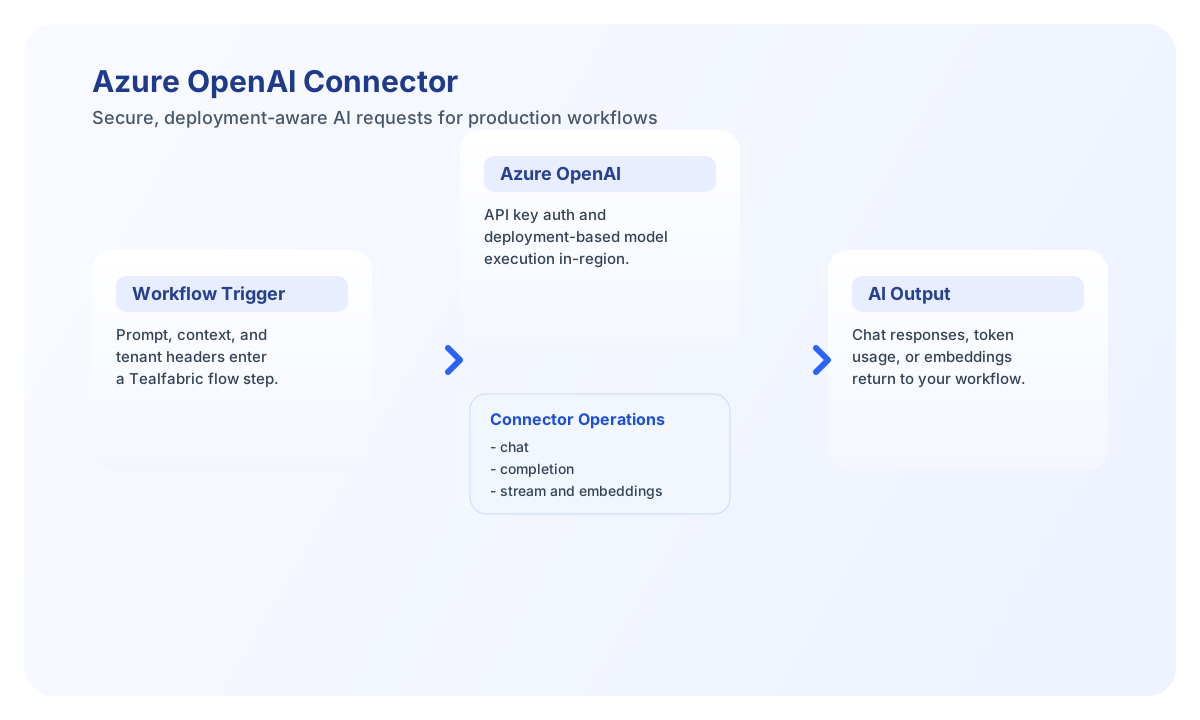
The Azure OpenAI connector allows Tealfabric workflows to run chat, completion, and embedding operations through Azure-managed OpenAI deployments. It is designed for enterprise environments that need regional hosting, deployment control, and governed AI integration.
Document information
| Field | Value |
|---|---|
| Canonical URL | /docs/04_connecting-systems/connectors/a/azure-openai |
| Version (published date) | 2026-05-08 |
| Tags | connectors, reference, azure-openai |
| Connector ID | azure-openai-1.0.0 |
Configure endpoint and deployment
Set endpoint_url to your Azure OpenAI resource endpoint, provide api_key, and set deployment_name to the deployment configured in Azure. In Azure OpenAI, workflows target deployments rather than raw model IDs, so deployment naming must match your portal configuration exactly.
Use api_version compatible with your resource features and set timeout_seconds for longer inference requests. Optional connector-level defaults (temperature, max_tokens, top_p, frequency_penalty, presence_penalty, system_prompt, stop_sequences) apply when call data omits those fields. Run test before production rollout to verify network and credential access.
Operation input rules match the legacy connector:
chatrequiresmessages.completionrequiresprompt(routed through chat-completions with a single user message).streamacceptsmessages,prompt, ormessage.
Generate chat responses with chat
Use chat for conversational prompts, summarization, and instruction-following workflows. Keep prompts concise and use structured message roles so outputs stay predictable.
const baseUrl = "https://api.example.com/api/v1";
const tenantId = "<TENANT_ID>";
const apiKey = "<API_KEY>";

async function generateChatResponse(integrationId: string) {
  const response = await fetch(`${baseUrl}/integrations/${encodeURIComponent(integrationId)}/execute`, {
    method: "POST",
    headers: {
      "X-API-Key": apiKey,
      "X-Tenant-ID": tenantId,
      "Content-Type": "application/json",
    },
    body: JSON.stringify({
      operation: "chat",
      messages: [
        { role: "system", content: "You are a helpful operations assistant." },
        { role: "user", content: "Summarize the latest incident notes in 3 bullets." }
      },
      temperature: 0.2,
      max_tokens: 300
    }),
  });
  if (!response.ok) throw new Error(`Request failed: ${response.status}`);
  return response.json();
}
curl -X POST "https://api.example.com/api/v1/integrations/<ENTITY_ID>/execute" \
-H "X-API-Key: <API_KEY>" \
-H "X-Tenant-ID: <TENANT_ID>" \
-H "Content-Type: application/json" \
-d '{
"operation": "chat",
"messages": [
{"role": "system", "content": "You are a helpful operations assistant."},
{"role": "user", "content": "Summarize the latest incident notes in 3 bullets."}
],
"temperature": 0.2,
"max_tokens": 300
}'
{
  "success": true,
  "message_count": 1,
  "response": {
    "choices": [
      {
        "message": {
          "role": "assistant",
          "content": "- Incident impact limited to EU region...\n- Root cause traced to queue timeout...\n- Mitigation deployed with monitoring in place."
        }
      }
    ],
    "usage": {
      "prompt_tokens": 58,
      "completion_tokens": 74,
      "total_tokens": 132
    }
  },
  "tokens": {
    "prompt_tokens": 58,
    "completion_tokens": 74,
    "total_tokens": 132
  }
}
Create vectors with embeddings
Use embeddings when your workflow needs semantic search, classification, or similarity scoring. This operation is useful for building retrieval pipelines over internal documentation and ticket histories.
const baseUrl = "https://api.example.com/api/v1";
const tenantId = "<TENANT_ID>";
const apiKey = "<API_KEY>";

async function createEmbedding(integrationId: string) {
  const response = await fetch(`${baseUrl}/integrations/${encodeURIComponent(integrationId)}/execute`, {
    method: "POST",
    headers: {
      "X-API-Key": apiKey,
      "X-Tenant-ID": tenantId,
      "Content-Type": "application/json",
    },
    body: JSON.stringify({
      operation: "embeddings",
      input: "Quarterly revenue update for enterprise accounts."
    }),
  });
  if (!response.ok) throw new Error(`Request failed: ${response.status}`);
  return response.json();
}
curl -X POST "https://api.example.com/api/v1/integrations/<ENTITY_ID>/execute" \
-H "X-API-Key: <API_KEY>" \
-H "X-Tenant-ID: <TENANT_ID>" \
-H "Content-Type: application/json" \
-d '{
"operation": "embeddings",
"input": "Quarterly revenue update for enterprise accounts."
}'
{
  "success": true,
  "message_count": 1,
  "embeddings": [
    {
      "index": 0,
      "embedding": [0.012, -0.008, 0.144, -0.032]
    }
  ],
  "model": "text-embedding-ada-002",
  "usage": {
    "prompt_tokens": 8,
    "total_tokens": 8
  }
}
Reliability guidance
Most failures come from invalid deployment names, unsupported API versions, or throttling (429) on busy resources. Confirm deployment configuration and API version compatibility in Azure before troubleshooting prompt behavior.
For stable production operation, implement backoff retries, set token limits to control cost, and monitor deployment usage by region. This keeps AI workflows responsive and predictable.